This document outlines the features, setup, and troubleshooting for the WOHOME S99 Soundbar and Subwoofer system. It serves as a comprehensive guide for users to get started with their new audio device, ensuring proper installation, connection, and optimal performance.
The WOHOME S99 system is designed to enhance your audio experience, whether for TV, music, or gaming. It comprises a soundbar and a dedicated subwoofer, working together to deliver rich and immersive sound. The soundbar features a sleek design with integrated controls on its top panel and various input ports on the bottom, allowing for versatile connectivity options. The subwoofer, a separate unit, connects to the soundbar to provide deep bass, adding depth and impact to your audio.
Function Description
The primary function of the WOHOME S99 is to act as an external audio system, significantly improving sound quality compared to built-in TV speakers. It supports multiple input modes, including optical, coaxial, AUX, USB, and Bluetooth, making it compatible with a wide range of devices such as TVs, BD/DVD players, set-top boxes, game consoles, smartphones, and other external audio sources.
The soundbar's top panel features intuitive controls:
- A power on/off button for easy system activation.
- A mode button to cycle through different input sources (LED screen displays the current mode).
- Volume adjustment buttons (long press for continuous adjustment, LED screen shows the number).
- Track navigation buttons (short press for previous/next song in BT and USB modes).
- A play/pause button (for BT and USB modes) which also functions as a mute/unmute button for AUX, optical, and coaxial modes.
The remote control provides additional functionalities, offering a convenient way to manage the soundbar from a distance. It includes buttons for:
- Power on/off.
- Mute/unmute.
- Bass and Treble volume adjustment (in DEFAULT mode).
- Volume up/down.
- Play/pause (for USB/BT modes) and mute (for RCA, Optical, Coaxial modes).
- Next/previous song (for USB/BT modes).
- Input mode selection (BT, OPT, AUX, COAX, USB, 3D).
- EQ mode selection (MUSIC, TV, MOVIE) to optimize sound for different content types.
- A 3D surround sound button for an enhanced audio experience.
Usage Features
The WOHOME S99 offers flexible connectivity and usage scenarios:
Initial Setup and Power Connection:
- Connect the power adapter to the soundbar's DC IN port and then to an electrical outlet.
- Press the power button to turn on the soundbar; the LED screen will illuminate.
- It's crucial to ensure the AC/DC adapter lies flat to prevent water or foreign substances from entering and causing malfunction.
Subwoofer Connection:
- The subwoofer connects to the soundbar via a dedicated connection cable, plugging into the "Sub.Output" port on the soundbar.
Connecting to a TV:
The manual outlines three methods for connecting the soundbar to a TV:
- Optical Cable (Method 1): Connect the soundbar's DIGITAL AUDIO IN (OPTICAL) jack to the TV's OPTICAL OUT jack using the supplied digital optical cable. Select "OPT" on the soundbar via the remote. Important notes include using the soundbar's remote for volume control, setting TV audio output to "PCM" if no sound or cracking noise occurs, removing caps from the optical jack, and disabling the TV's internal speakers.
- Coaxial Cable (Method 2): Connect the soundbar's Coaxial Audio In to the TV's COAXIAL OUT jack (coaxial digital cable not supplied). Select "COA" on the soundbar via the remote. Similar to optical, ensure TV audio output is set to "PCM" and internal speakers are disabled.
- AUX Connection (Method 3): Use a 3.5mm to RCA audio cable (not supplied) to connect the TV's stereo RCA(L/R) Audio output to the soundbar's AUX jack, or a 3.5mm to 3.5mm audio cable (supplied) to connect the TV's AUX output to the soundbar's AUX jack. Select "AUX" on the soundbar via the remote. For some TVs, the TV's remote can adjust the soundbar's volume in this mode, provided the TV's analog output is set to "Variable." If no sound or echo, set the TV's audio output to external speaker.
Connecting an External Device (BD/DVD, Set-top box, Game console):
- Optical Cable: Connect the soundbar's DIGITAL AUDIO (OPTICAL) to the source device's OPTICAL OUT. Select "OPT" and ensure the device's audio output is PCM and its internal speaker is disabled.
- Coaxial Cable: Connect the soundbar's Coaxial Audio In to the source device's Coaxial OUT. Select "COA" and ensure the device's audio output is PCM and its internal speaker is disabled.
- 3.5mm AUX Cable or 3.5mm to RCA Cable: Connect the soundbar's AUX jack to the external device using the appropriate cable. Select "AUX" on the soundbar.
Connecting a USB Device:
- Plug a USB device into the USB jack on the soundbar.
- Select "USB" on the soundbar via the remote to play music files.
Connecting a Bluetooth (BT) Device:
- Select "BT" on the soundbar via the remote.
- Enable Bluetooth on your device (e.g., smartphone).
- Search for "WOHOME S99" in your device's Bluetooth list and connect. The soundbar's LED screen will display "BT" when connected.
- Play music files from your connected device through the soundbar.
- Only one BT device can be connected at a time.
- BT signal range is up to 30 feet without solid obstructions. Other wireless devices (video monitors, cordless phones, cameras) may interfere with BT range.
Wall Installation:
- The manual provides a detailed diagram and instructions for wall-mounting the soundbar.
- Tools required include a drill, screwdriver, pencil, ruler, and spirit level.
- Mark fixing points on the wall, ensuring they are level and correctly spaced (510mm apart, 100mm from each end of the soundbar's mounting points).
- For solid masonry walls, drill holes, insert wall plugs, and drive screws until heads stand proud by about 1mm.
- For hollow plasterboard walls, use appropriate wall anchors and locate fixing points into wall studs or cross braces if possible.
- Carefully position the soundbar onto the screw heads, ensuring full engagement into the keyhole mounts.
Maintenance Features
The manual includes a troubleshooting section to address common issues:
No Sound:
- Verify the soundbar's input mode matches the sound source.
- Increase volume on both the remote/soundbar and the source device.
- Check if the sound source's output is working.
- For optical connections, ensure transparent anti-dust caps are removed from both ends of the optical cable, and the cable is securely connected. The optical port should show white lightning when connected.
Remote Not Working:
- Check battery polarity (positive and negative).
- Ensure no obstructions block the receiving location near the soundbar's LED.
- The remote's working distance is 6-8m (empty place).
Low or Bad Sound:
- Ensure the output device's volume is high.
- Test with other devices to rule out issues with the working device.
- The product is designed for home use; performance may vary in larger spaces.
Inconsistent Sound with TV:
- Set up and shut off the TV's sound. Refer to the TV's manual for specific instructions.
BT Connection Issues:
- Ensure "BT" mode is selected on the soundbar.
- Reboot the cellphone or Bluetooth device and search again.
- Confirm the soundbar is not connected to other BT devices.
- Check for strong interfering signals (e.g., WIFI, 2.4G) and try using it in a different space.
- Test with other BT devices to determine if the issue is with the BT device itself.
- Ensure no obstacles block the signal between the soundbar and the BT device.
- Power off and reboot the soundbar.
No Sound or Crack Sound from Streaming Video Apps:
- The WOHOME S99 does not support Dolby or DTS audio from streaming apps like Netflix, YouTube, Amazon Prime Video, Hulu, and HBO.
- Users must disable Dolby and DTS audio settings within these apps. Instructions for Netflix are provided as an example: launch the app, select content, press the Down arrow on the remote during playback, select Audio&Subtitles, disable Dolby and DTS, save settings, and then test the sound.
Warranty and Support:
- The product comes with a one-year warranty and a 45-day money-back guarantee.
- Lifetime technical support and 100% satisfaction service are offered.
- Users are encouraged to contact support (support@wohomeshop.com) for any problems, providing TV brand, model number, and order ID for assistance.
This comprehensive guide ensures users can effectively set up, operate, and troubleshoot their WOHOME S99 Soundbar and Subwoofer system, maximizing their audio enjoyment.

 Need help?
 General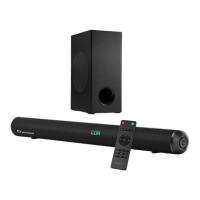

 To Next Page