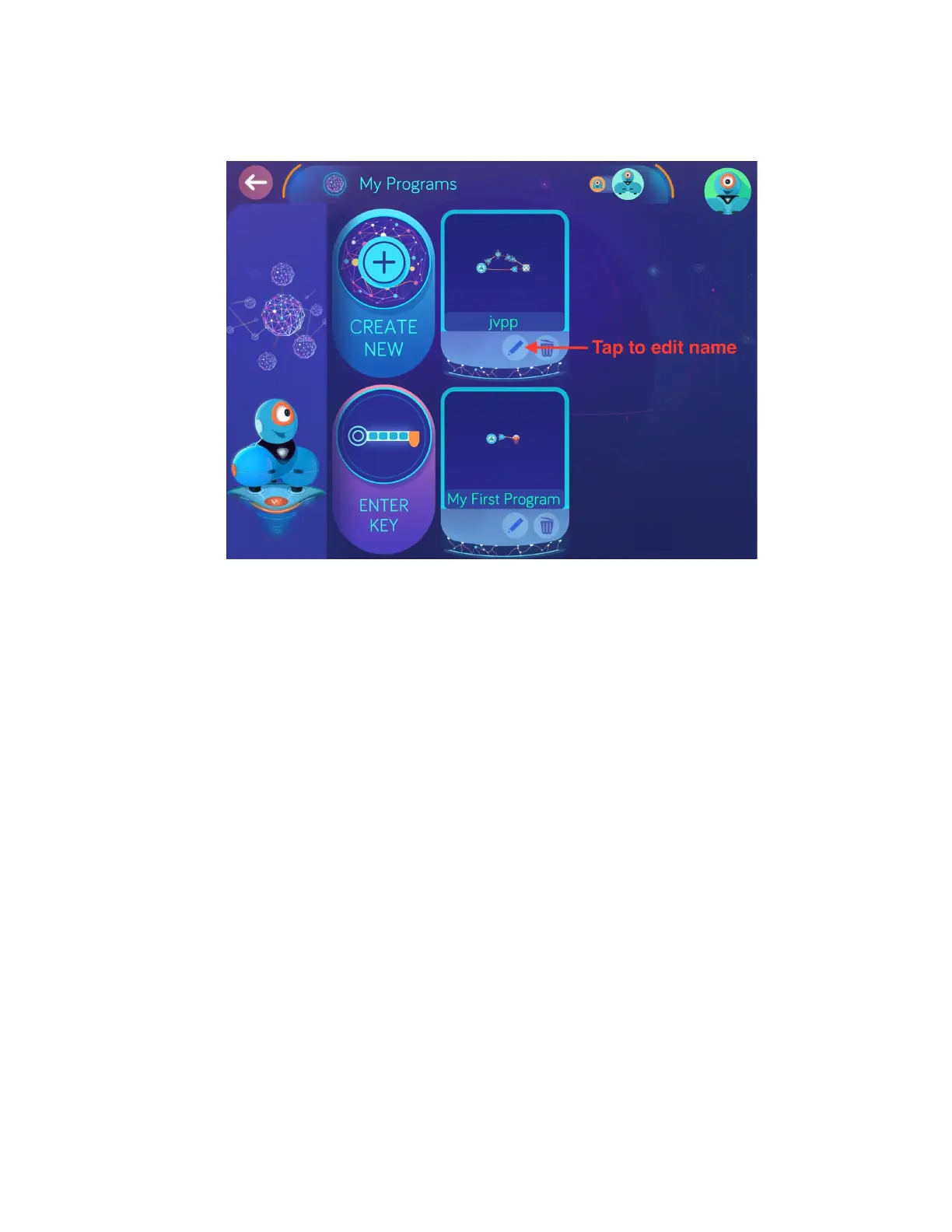
g. Aftersaving,theprogramwillappearintheFreeplaybrowserscreen.Tapthe
pencilicontorenametheprogramto“FollowtheLeader”.
h. Taptheimageoftheprogramicontoloadtheprogram.
i. TaptheRunButtonandplaceyourhandinfrontofDash.Slowlymoveyourhand
forwardtogetDashtofollowit.ThegoalistoguideDashforwardbykeeping
yourhandaconstantdistanceinfront.Ifyourhandistoofarahead,Dashwill
stop.Ifyourhandistooclose,Dashwillstop.
j. Foranotherdemoexample,thefollowingkeywillmakeDashdanceandspeaka
specialmessagewhenyouclap:qm7e
k. DownloadthecodeandthentaptheRunButton.ClaploudlynearDashand
watchtheshow!
5. GoingFurther
a. TolearnmoreabouttheWonderapp,continuetocompletemorechallengesin
theScrollQuest.Eachchallengewillintroduceyoutonewcuetypesandnew
programmingexamples.
b. Experimentbycreatingyourownprogramswithdifferentstatesandcues.
c. UsingtheOptionsDialogue
i. Ifyoudon’thavetimetocompletealotofScrollQuestchallenges,you
canusetheOptionsPaneltounlockfeaturesquickly.


 To Next Page
 Loading...