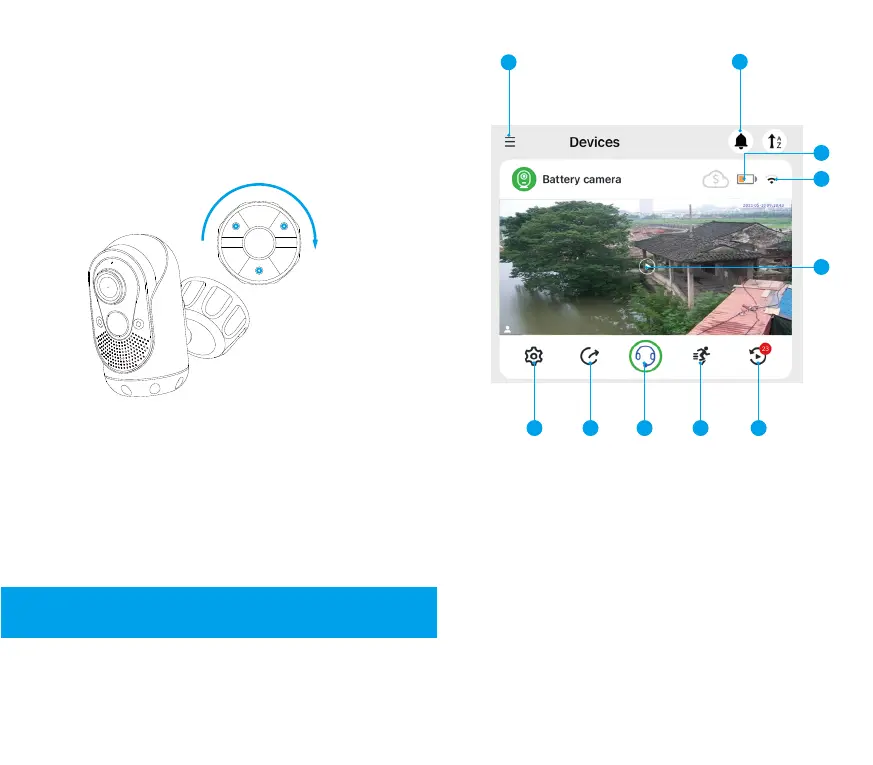
1. Introduction to the functions of the homepage
Introduction to the Functional Interface
4. Aim the camera bracket at the base of the
bracket, rotate the threaded rubber cap on the
bracket clockwise to fix the device on the base,
adjust the lens angle of WongKuo Battery
Camera, and tighten the threaded rubber cap.
5. If the lens control surface of WongKuo Battery
Camera is found to be skewed after installation,
loosen the rubber cap and readjust the angle until
the angle is satisfied, then tighten the rubber cap
again to fix it.
1
3
2
5
6 7
10
8
9
(1) Menu bar
Open it to view your login account, clear cache, reset
account password, enter the help center, feedback and
exit the current account, etc.
(2) “Do Not Disturb” setting button
Click to enter the “Do Not Disturb” setting page. You can
set Timed Do Not Disturb pop-up reminder and turn off
Timed Do Not Disturb. At present we offer three time
options of 30 minutes, 2 hours and 12 hours.
4
11 10


 To Next Page