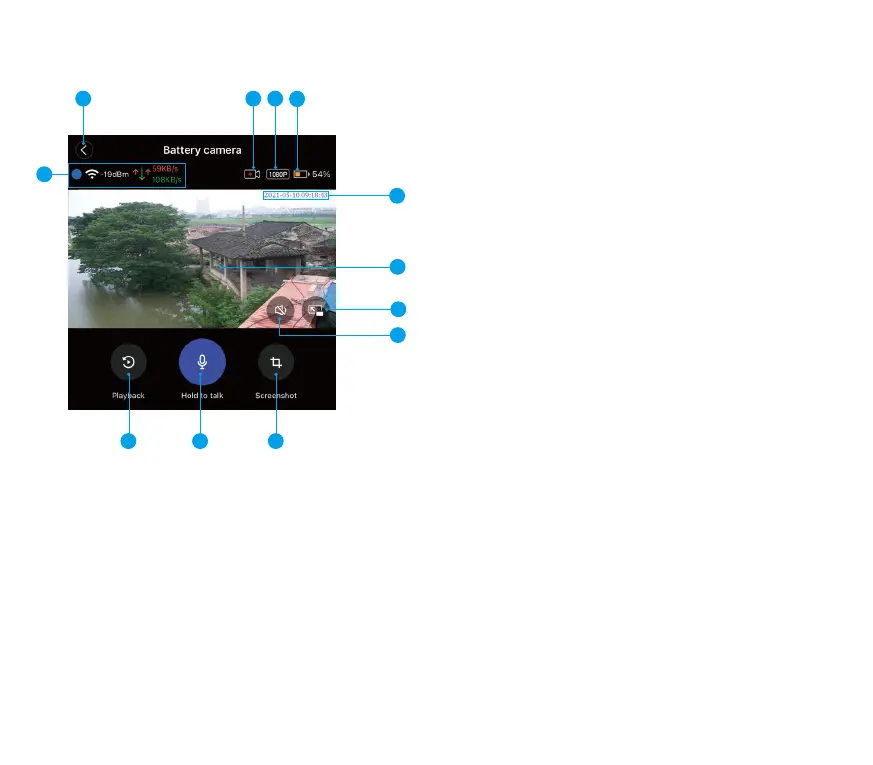
(1) Return button
Click it to return to the homepage.
(2) Video reminder
This icon flashes at the top of the live screen, indicating that
the camera is recording; with good network signal,
WONGKUO Battery Camera will automatically start video
recording when the real-time monitoring live screen is turned
on, and the recording time is 3 minutes. After 3 minutes, the
real-time monitoring will no longer record the live screen.
(3) Resolution
It is the resolution of the video. The default resolution of
Wongkuo Battery Camera is 1080P.
(4) Battery pack battery indicator
It turns green when charging with an icon; after unplugging
the power cord, it will be displayed in white; and it will turn
red when the power is short. Next to it, the number of
remaining power will be displayed in percentage, and there
will be an email reminder of power shortage.
10
2 3
4
6
5
7
8
9
11
12
2. Introduction of live video interface
(5) WiFi network signal
The network signal strength at the current location of your
WONGKUO Battery Camera is shown here, along with the
real-time network upload/download speed. If the WIFI bars
are missing and the screen is stuck, it is recommended to
reinstall it near the WiFi router.
(6) Time and date
Here is the actual year, month and time of the place where
your camera is located. There is no need to set it. When
WONGKUO Battery Camera is connected to the Internet,
it will automatically check the accuracy of the display time.
(7) Real-time monitoring screen
Here is live video from the lens of WONGKUO Battery Camera.
(8) Full Screen mode
Click here to switch the phone to full screen mode, and click
again to return to normal mode.
1
15 14


 To Next Page
 Loading...