SMART MENU AND CATEGORY CARDS
To access the Smart Menu, press the MENU button on the remote. Use the left and right
arrows on the remote to browse the category cards.
CHANNELS VIEW
View all available channels.
HDTV
Find all of the HD content
available to watch, including
live TV, recorded TV and PPV.
RECORDED TV
View all of the programs
you’ve recorded.
WOW! ONDEMAND
Search the vast library
of VOD titles.
FAVORITE CHANNELS
Create a list of your favorite
channels for easy access
MOVIES
View all available movies,
including live TV, recorded TV
and PPV.
NETFLIX
Instantly access your Netflix
account without switching
inputs on your TV.
SEARCH
Search for programs by
title, keyword, or category
across all available content,
including live or recorded TV,
PPV, and VOD.
SPORTS
View all available sports
programming, including live
TV, recorded TV and PPV.
KIDS
View all children’s
programming, including live
TV and recorded TV.
NEWS
Find all of the news
channels and current news
programming, including live
TV and recorded TV.
MUSIC
Listen to music from your
computer or view all TV music
channels.
MESSAGES
Read messages about WOW!
services and updates.
SETTINGS
Customize your
ULTRA experience.
PHOTOS
View photos from your
computer on your TV.
HOMECONNECT
Access movies, music or
photos from your computer
on your TV.
STREAMLAND
Access online video content,
stream TV shows, movies and
get popular apps.
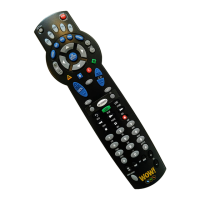
0
clear
TV
Input
7 8 9
pqrs tuv wxyz
4
ghi
5
jkl
6
mno
1
2
abc
3
def
vol ch
last
mute
rec
pause
play
rew fwd
stop
skipreplay
menu
back next
OK
info
ticker
live
TV
A
B
C
D
dvr liveTV
vod grid
Controls TV and/or Audio Device Power Display Grid Guide
Displays on Demand
(VOD) Library
Return to Live TV
Lists Recorded Shows
Toggles between the
Menu and Full Screen
Displays Program
Information
Selects Menu Options and
Programs from the Guide
Goes to Next Page
Skips Ahead 30Min.
When in the Guide
Displays Menu Options
Skips Ahead in Buered or
Recorded Content
Controls Live and
Recorded TV, Other Content
Changes Channels and
Pages in the Grid and Menu
Directly Tune to Channels
Changes Input on TV
(EG. Hdmi 1, Video 1,
& Component 1)
Navigates Menu and
Guide Options
Go to Previous Page
Rewinds Last 7 Seconds
Mute Audio On and O
Changes TV or
Receiver Volume
Takes You to Channel
Last Viewed
Deletes Character during
Text Entry or Removes Flip Bar
0517
Ultra_Quick_Reference Guide_051017.indd 1 5/10/17 10:34 AM


 To Next Page
 Need help?
 General