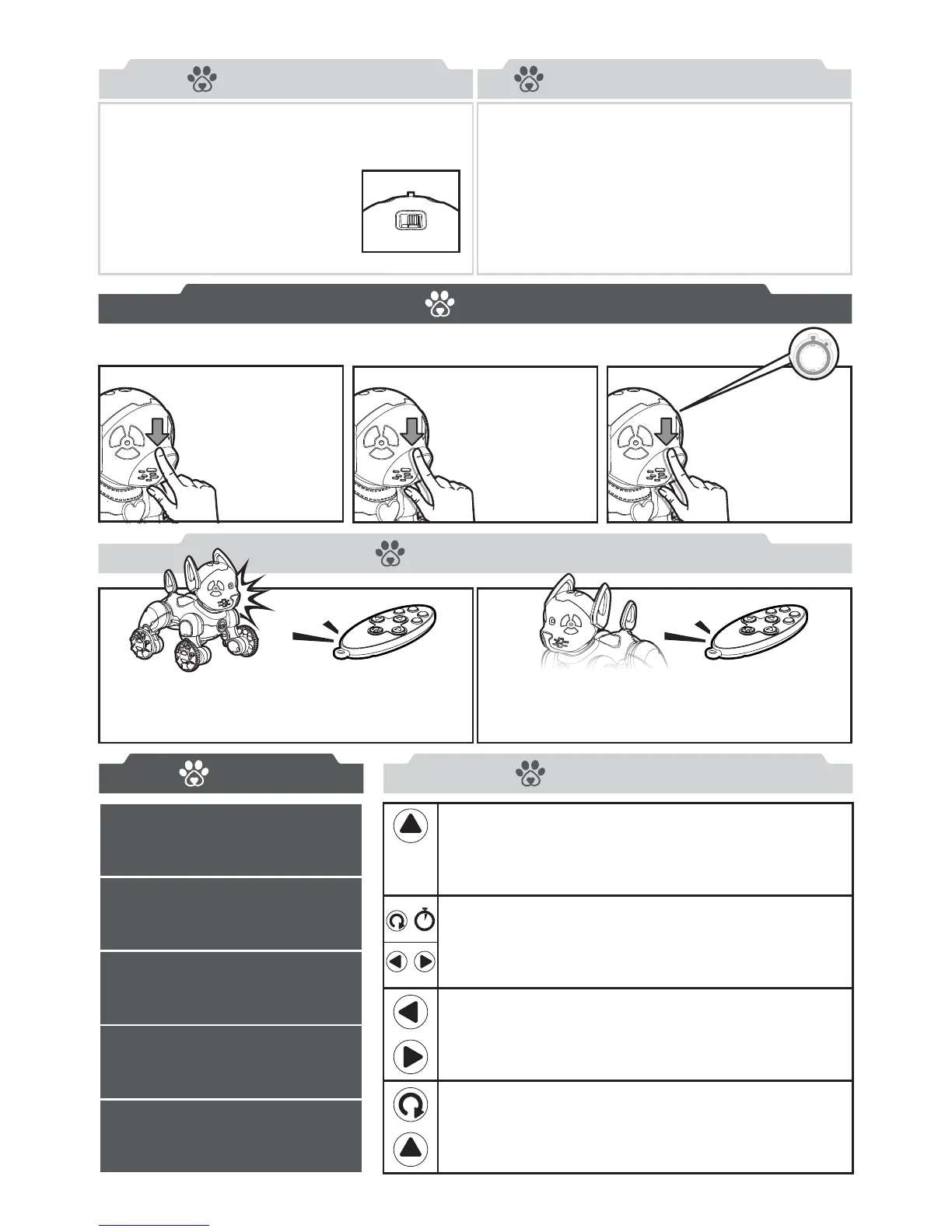
To make WowWee Chippies
™
move forward,
press the “Up Arrow” Button on the
Remote Control.
To make WowWee Chippies
™
move left, press
the “Left Arrow” Button on the Remote Control.
To make WowWee Chippies
™
move right, press
the “Right Arrow” Button on the Remote Control.
To spin on the spot, press and hold the left or
right arrow buttons.
To make WowWee Chippies
™
move backward,
press the “Down Arrow” Button on the
Remote Control.
Tap twice on WowWee
Chippies
™
nose:
Make your pup kiss
or sneeze!
Cover WowWee
Chippies
™
nose for
2 seconds:
Your pup will act
a little scared &
might whimper if
they can’t see!
Tap once on WowWee
Chippies
™
nose:
Make your pup sniff,
lick and bark!
WowWee Chippies
™
has two sets of wheels and can turn on the spot.
To control yours, point the Remote Control at the IR Sensor located on top
of your WowWee Chippies
™
head.
The Remote Control allows you to drive WowWee Chippies
™
around or
activate fun game modes like guard, dance, sing, and free roam.
Once you’ve turned on your WowWee Chippies
™
pup, it’s playtime! WowWee Chippies
™
will move
in excitement while sniffing around its new home.
There are two ways to interact with WowWee Chippies
™
:
through touch, and using the remote control.
2s
+
4. Hold the forward/backward arrows down at the same time to make
WowWee Chippies
™
take a tinkle!
2. Hold the backward arrow to make WowWee Chippies
™
whimper!
Hold the left/right arrows to make WowWee Chippies
™
spin.
1. Hold the forward arrow to make WowWee Chippies
™
howl!
3. Hold the left/right arrows down at the same time to make
WowWee Chippies
™
fart!
+
+
Geing Started
Playing with WowWee Chippies
™
After you’ve inserted batteries into your WowWee
Chippies
™
and Remote Control, your brand new
pup is ready to play!
Before turning your WowWee
Chippies
™
on, place it on a large,
even surface. Next, shift the Power
Switch located on the back to ON.
Touch
Remote Control
Inputs Secret Controls
There are 3 different ways to interact with the touch sensor on WowWee Chippies
™
nose.
/
ON OFF











 To Next Page