3
Mic Studio 100 Pro
PROFESSIONAL MICROPHONE FOR STREAMING
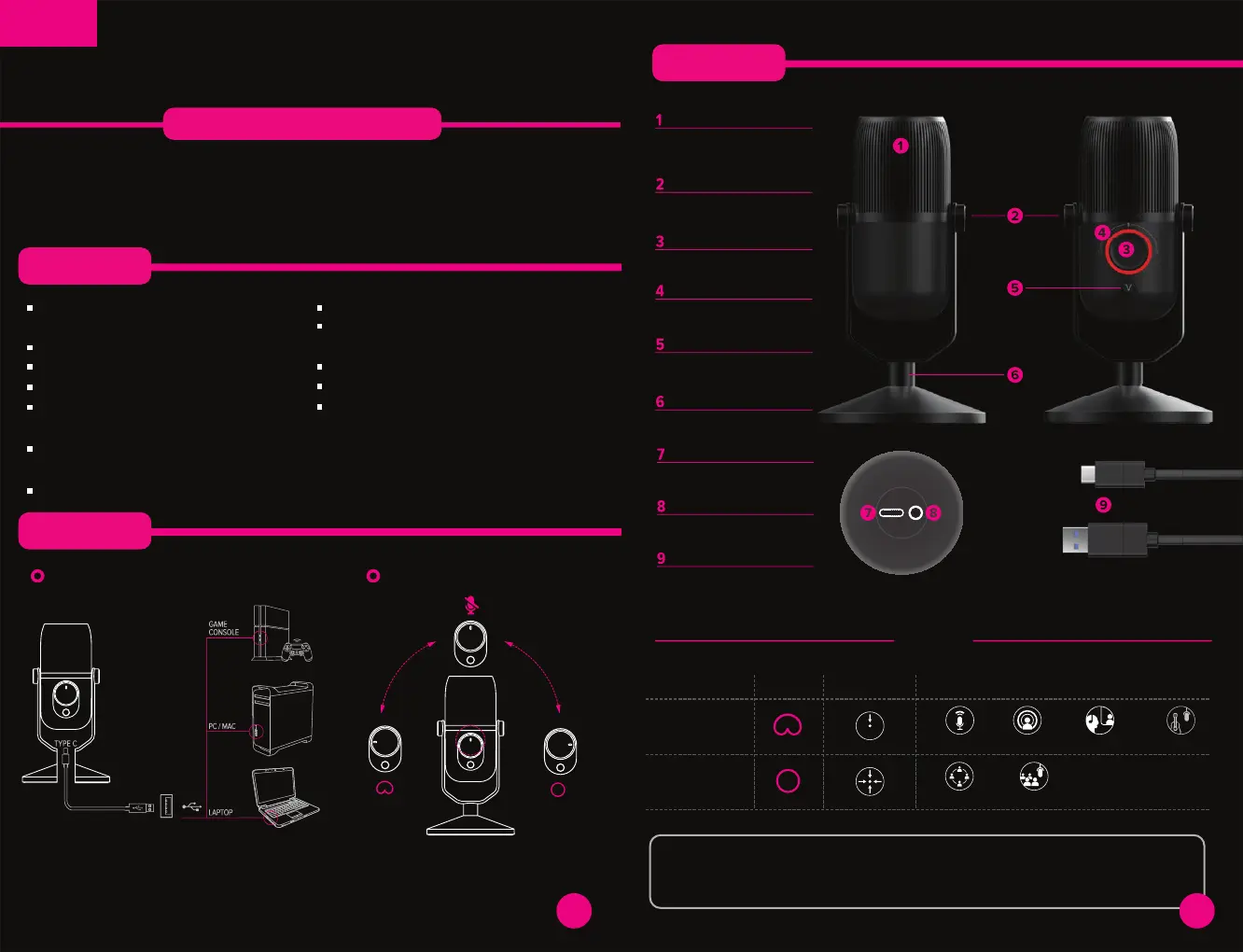
Connections
Especifications
How to connect it Mode selection
English
Thank you for purchasing the new Woxter Mic Studio 100 microphone.
We hope you enjoy it to the fullest, for this, we advise you to read this brief
guide of use:
Impedance: 32Ω.
1. Connect the Type C cable to the
microphone.
2. Connect the other end of the cable
to the external device via USB.
3. Turn the button to choose
between 3 operating
modes.
Cardioid
MUTE
Omnidirectional
MODES
EVENTS
STREAMING
PODCAST
Functions
and specs
Acoustic grille design
VERTIGAIN®
Resistant structure
Switch Mode
Led light
Volume control
Support base
Type C connection
Connection 3.5 mm
2 meters cable length
USB 2.0
VERTIGAIN® TECHNOLOGY
Less dispersed sound waves getting an improvement of sound by
10%, sound clearer and more accurate than other USB microphones.
Recording
modes
Cardioid
Omni-directional
Specially designed for:
INSTRUMENTSVIDEO CALLS
CONFERENCES
4
woxter.es


 To Next Page