P. 2 / 25
Burner Control CBR
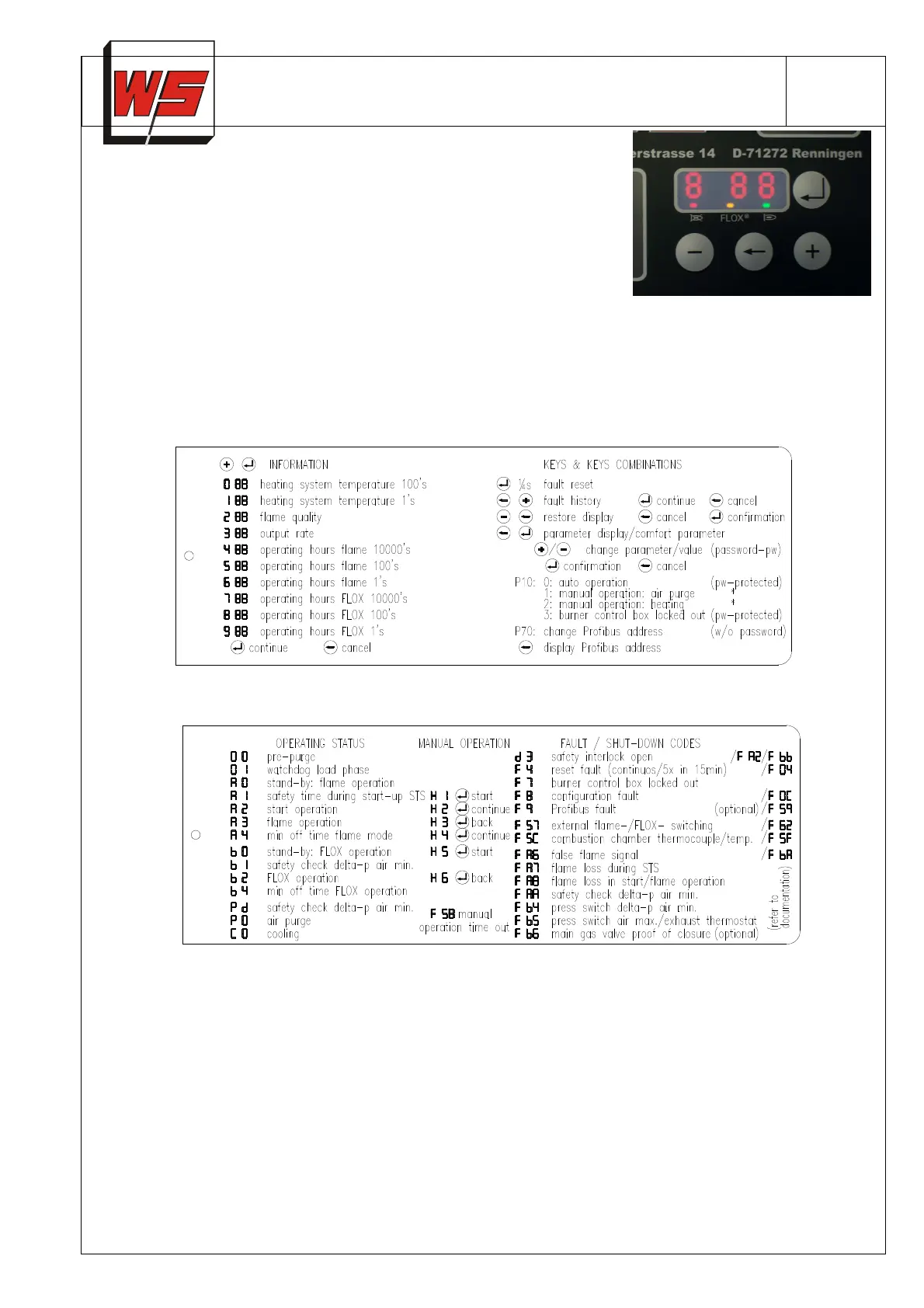
The burner control box has many diagnosis features for ease of
commissioning or trouble shooting:
Program sequence, device parameters, fault code history, operating hours
counter, combustion chamber temperature (measured by dual thermocouple)
or the flame signal strength can be indicated on the 7-segment display.
Three LED's visualize the most important operating states:
• green
Flame signal strength (flashing when quality bad)
• yellow
FLOX
- Status
• red
Fault (flashing)
The functions of the buttons, button combinations, information, operating and fault codes are described on two
labels. Labels are available in different languages and are changeable.
Code label 1
Code label 2
Each CBR is configured for its specific application and tested prior to delivery.
The most important parameters can be visualized on the display (Comfort Configuration) by applying the
appropriate key combinations (refer to label 1). A Password is required to change parameters (except Profibus
address) and to activate manual operation.
You will receive your password from our sales, service or electronics department after completing registration.


 To Next Page
 Loading...