The Wunda Smart Hub is a central control unit for the Wunda Smart home heating system, designed to facilitate communication between various smart heating devices and the internet. It acts as the brain of the system, allowing users to manage their heating remotely via a dedicated app.
Function Description:
The Smart Hub connects to your home router via an Ethernet cable, establishing an internet connection. This connection enables it to communicate with other Wunda Smart devices such as Smart Radiator Heads, Smart Thermostats, Smart Connection Boxes, and Smart Boilers. Users interact with the system through the WundaSmart app, available on both iOS and Android platforms, or via a web portal. The hub's primary function is to receive commands from the user (via the app/web portal) and relay them to the connected heating devices, and vice versa, ensuring efficient and intelligent heating control. It features LED indicators to show its power status (blue) and internet connectivity (green).
Important Technical Specifications:
- Nominal Supply Voltage: 12 VDC (power adapter included in the set).
- Maximum Current Consumption: 100 mA.
- Maximum Transmit Power: <5 dBm e.r.p.
- Radio Communications: 869.85 MHz, two-way.
- Radio Coverage: Up to 500 m in an open area.
- External Aerial: Yes (included in the set).
- Interface: Ethernet Port 10/100 MBit.
- Signaling: LED (RGB).
- Operating Temperature Range: 5 - 45 °C (excluding condensation).
- Degree of Protection: IP20.
- Dimensions: 98 x 98 x 28 mm (without aerial).
- Default DHCP: On.
- Default IP Address: 192.168.0.129.
- Default Username: root.
- Default Password: root.
Usage Features:
- Centralized Control: The Smart Hub serves as the central point for managing all Wunda Smart heating devices in a home.
- Remote Access: Users can control their heating system remotely via the WundaSmart app on their smartphone or a web portal, provided they have internet access.
- Easy Registration: Devices can be registered using a QR code on the Smart Hub Card Activation or by manually entering the serial number and pairing code on the web portal.
- Optimal Placement: For the best connection with other Wunda Smart devices, the hub should be situated centrally within the premises. It should also be placed far from metal obstacles, transformers, engines, fluorescent lamps, microwave devices, refrigerators, and other industrial equipment to avoid interference.
- Wall Mounting (Optional): The hub comes with a detachable wall bracket, allowing for secure wall mounting using two screws.
- Connectivity Indicators: The LED lights provide immediate visual feedback on the hub's operational status: blue for power on, and green for internet connection. If the LED does not flash green after connecting, users should ensure the power is on and all cables are securely connected.
Maintenance Features:
- Reset Options: The Smart Hub offers multiple reset functionalities:
- Short Press: A short press of the button on the underside of the hub resets the device.
- Login/Password Reset: Holding the button for 5 seconds until the red LED comes on resets the login and password to the default settings (root/root).
- Factory Reset: Turning on the power while holding the button until the red LED comes on resets the device to its factory settings.
- Troubleshooting: The LED indicators assist in basic troubleshooting. A blue light confirms power, while a green light confirms internet connectivity. Absence of a green light indicates a connection issue that needs to be addressed by checking cables and router connection.
- Software Updates: While not explicitly detailed in the provided manual, smart hubs typically receive firmware updates to improve performance, add features, and address security vulnerabilities, managed through the internet connection.
- Return Policy: In case of product return, users are advised to return the product in its original box to the manufacturer's address. Returns are subject to the refund policy, and users should check the terms and conditions on www.wundasmart.com.

 Need help?
 General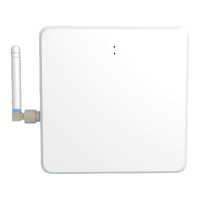

 To Next Page