DIN-XP
Input module
with 16 operation or fault inputs
DIN-XP_V2.7.0_PI_2019-04_EN Subject to technical changes Page 1 of 4
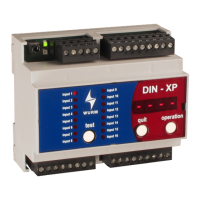
Front view
Features
Inputs for 230V~
Individual selection of operating input or fault input
Load current / zero signal current principle for each input
Setting of priority for all fault inputs
Alarm delay time for all fault inputs
Clear display of signal statuses and voltage statuses
Lamp test and fault message acknowledgement
Simple parameter settings
Alarm relays for priority 1 and 2 available
Selectable relay operating mode
Plug-in screw terminals
Large data memory for signal history
Clear text designations in FRIGODATA XP per input
Evaluation of Prio 1 and Prio 2 subsection faults from a gateway
Direct connection of a CAN-USB to the service socket
Connection to the Wurm system through a Wurm CAN communication bus (C-BUS) and
FRIGODATA XP


 To Next Page

 General