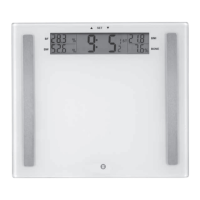
5. DELTA LAST and a weight will appear in the display window for 3 seconds. This
shows the difference between your current weight and previous weight.
6. DELTA START and a weight will appear in the display window for 3 seconds. This
shows the difference between your current weight and start weight.
7. DELTA GOAL and a weight will appear in the display window for 3 seconds. This
shows the difference you need to lose (or gain) to reach your goal weight.
8. Next, the scale will enter the body analysis mode. The display will show “o” until
the data has been gathered.
9. Then, the display will show your weight along with your body fat percentage (BF)
body water percentage (BW) and your body mass index (BMI) .
10. The display then scrolls to show your weight, your bone mass (BM), your
muscle mass (MM) and your BMI twice.
11. The scale will then turn off automatically.
Weight tacking mode only
• Tap on the scale, when 0.0 appear, then you can press USER button
to choose user number. (P-1 to P-4)
• Press UP button to enter WEIGHT TRACKING mode,
when the scale display user number, then 0.00 will appear.
• User step on the scale, display will blink, then your current weight will be
displayed for a few seconds.
• Then display different weight as follows
Delta Last = Current weight – Last weight
Delta Start = Current Weight – Start Weight
Delta Goal = Current Weight – Goal Weight
Customizing Your Body Analysis Monitor
This scale can be customized for up to 4 users. While the customization process is
not difficult, it may be easiest to read all the instructions first to familiarize yourself
with them. Then keep the instruction manual handy as you go through the process
step by step.
Buttons: USER, SET, Up and Down arrows
To set your user data
Tap the scale to turn it on and wait until “0.00” appears.
Setting the user number
Press the “SET” button. The number “P-1” will appear and blink. Use the Up/Down
button to select a user number (P-1 to P-4). Press SET to confirm.
Setting the height
Next, the inch or cm symbol lights up (if switch is set to lb, default is height in inches;
if switch is set to kg, default is height in cm). Press the up or down arrows to adjust
the height. Pressing and holding either the up or the down arrow will advance
numbers quickly. Press SET to accept the height. Scale enters the age setting mode.
Setting the age
AGE appears and the default age “25” flashes. Press the up or down arrows to
adjust the age and press SET to confirm. The scale enters the gender setting mode.
Setting the gender
1. Default gender icon will flash. Press the Up/Down button to choose between
female and male modes.
2. Press SET button to confirm selection.
Your personal data has now been entered and stored into the bathroom scale.
then ,the scale will display the user data for a few seconds.
If you make a mistake and need to change the data entered, simply follow these
steps again to reset the data.
If you would like to reset the data entered (i.e your age changes), simply follow
these steps again to reset the data.
If at any time during the personal data entry process, a button is not pressed within
15 seconds, the scale will automatically switch off.
Setting Data for Weight Tracking
1. Setting Start Weight
• “0.00” will now appear in the display window after you
finish person data setting.
• Step onto the scale.
• Wait 3 seconds and your current weight will appear.
• The scale will then automatically save your current
weight as your start weight – “START”.
2. Setting Goal Weight
• Following established health guidelines, the scale will
then automatically calculate your goal weight as
10% off your start weight – “GOAL”.
• You can press the UP or DOWN arrow buttons if you
wish to adjust your goal weight.
• Press SET button to save your goal weight.
The scale will then automatically switch off.
If no operation, the goal weight will not be stored.
Setting Start and Goal weight only
• When the scale is standby, press USER button, then show the user number P-1.
Press USER button to choose user number P-1 to P-4.
• The display will show 0.00 after 3 second if no other operation.
• Stand on the scale, when weight is stable, the display show the start weight. Then
goal weight is flashing (The goal weight is 90% of the start weight).
• Press UP and DOWN button to adjust the goal weight, Pressing and holding either
the up or the down arrow will advance numbers quickly. Press SET to confirm.
The goal weight will not be stored, if not press SET to confirm.
Body Analysis and Weight Tracking
1. Operate the scale on a secure flat floor. Tap the scale to turn it on, and wait until
“0.00” appears. Press the USER button repeatedly until your user number shows
on the display.
2. Stored data for your user number appears (User number, Height, and Age) then
the scale displays “0.00”.
3. Step on the scale barefoot, with your feet aligned on the electrodes (metal strips)
on both sides of the platform. Note: You must be barefoot in order for the scale
to read your body analysis measurements.
4. The scale display will blink and then your current weight will be displayed for a
few seconds.
Body Analysis mode only:
Tap on the scale, when 0.0 appear, then you can use USER button to choose user
number (P-1 to P-4)
Press DOWN button to enter the analysis mode when the scale display user
number, then 0.00 will appear.
• User stand on the scale, 000 will flash slowly. Scale will show the weight after 2
to 3 second then the weight will become stable.
• When weight is stable, enter into body fat analysis mode
Display“o”is going on until get the body fat data
• If user stands on scale with shoes, will show “----”, then after show weight ,ERR
and BMI will appear.
NOTES:If you step on the scale before “0.00” appears, the scale will not
function properly.
Scale will first show “–––,” then your weight only and “Err” if there is improper
foot contact in the body analysis mode, (for instance, when you stand on the
scale with socks or shoes on). Hard or dry skin can prevent you from making
proper contact with electrodes on the surface of the scale. Try applying a
small amount of moisturizer to your feet before using the scale, but be careful
not to slip on the stepping surface.
If user do not set start weight and goal weight, the delta weight will show "Err" for
first time use.
Battery Notes:
• Always purchase the correct size and grade of battery most suitable for the
intended use.
• Replace all batteries of a set at the same time.
• Do not mix old and new batteries. Do not mix alkaline and standard (carbon-zinc)
batteries. Do not use rechargeable (Ni-Cad, Ni-MH, etc.) batteries.
• Clean the battery contacts and also those of the device prior to battery installation.
• Ensure the batteries are installed correctly with regard to polarity (+ and -).
• Remove screw to open battery cover and remove old batteries. Remove batteries
from scale that is not to be used for an extended period of time.
• “Lo” will appear on the display if battery is low and needs to be replaced. Remove
and replace batteries.
When replacing the batteries, make sure you dispose of the old batteries in accor-
dance with applicable regulations. They should be disposed of in a location specifi-
cally designated for that purpose so they can be recycled safely and without posing
any risk for the environment. Do not burn or bury them.
When using electrical appliances, especially when children are present, basic safety
instructions should always be followed, including the following:
• Polythene bags over product or package may be dangerous. To avoid danger of
suffocation, keep this wrapper away from babies and children. This bag is not a toy.
• This appliance is not intended for use by persons (including children) with reduced
physical, sensory or mental capabilities, or lack of experience and knowledge,
unless they have been given supervision or instruction concerning use of the
appliance by a person responsible for their safety. Children should be supervised
to ensure that they do not play with the appliance.
LIMITED TEN YEAR WARRANTY
Our goods come with guarantees that cannot be excluded under the Australian
Consumer Law. You are entitled to a replacement or refund for a major failure
and for compensation for any other reasonably foreseeable loss or damage. You
are also entitled to have the goods repaired or replaced if the goods fail to be of
acceptable quality and the failure does not amount to a major failure.
In New Zealand our goods come with a guarantee that cannot be excluded under
the Consumer Guarantee Act 1993.
Conair Australia Pty Ltd. will repair or replace (at our option, and excludes batter-
ies) your bathroom scale free of charge for one hundred and twenty months from
the date of purchase if the appliance is defective in workmanship or materials
under normal home use.
This warranty covers working parts that affect the function of the appliance. It does
not cover cosmetic deterioration caused by fair wear and tear, damage caused by
accident, misuse, shipment or other ordinary household use. Conair shall not be
responsible for any incidental, consequential or special damages.
This warranty is available to consumers only. You are a consumer if you are the
owner of a WW Scale by Conair that was purchased at a retail outlet for personal,
family or household use. This warranty is not available to retailers or other commer-
cial purchasers or owners.
This warranty is an additional benefit and does not affect your legal rights. To
obtain service under this warranty, please read the Warranty Leaflet included or
contact Conair Customer Service at aus_info@conair.com.
While a scale can be a useful tool on your wellness journey, it’s not a complete
program. Come to a WW Workshop www.ww.com/au/workshop or join online to
learn how to build healthy eating habits, shift your mindset, become more active
and understand how to better manage your weight.
In Australia: 13 19 97 or www.ww.com/au
In New Zealand: 0800 009 009 or www.ww.com/nz
WW is the registered trademark of WW International,
Inc. and is used under license by Conair Australia Pty Ltd.
©2019 WW International, Inc. All rights reserved.
WW ASSURANCE:
Questions? Comments? Call Conair Customer Service.
Conair Australia Pty. Ltd.
Suite 101, 18 Rodborough Rd
Frenchs Forest NSW 2086 Australia
Australia: 1800 650 263
Conair New Zealand Limited
PO BOX 251159
Pakuranga, Auckland 1706 New Zealand
New Zealand: 0800 266 247
For advice & tips on your new WW scale email us on:
aus_info@conair.com
IB-16/361A
WW710A
WW BODY ANALYSIS SMART SCALE
Congratulations! By purchasing this WW Scale, you’ve made a positive step in your
wellness journey. To get the greatest benefit from your purchase, please read this
entire brochure before using your scale.


 To Next Page
 Need help?

 General