MVM
MVM
Basic information
Getting started
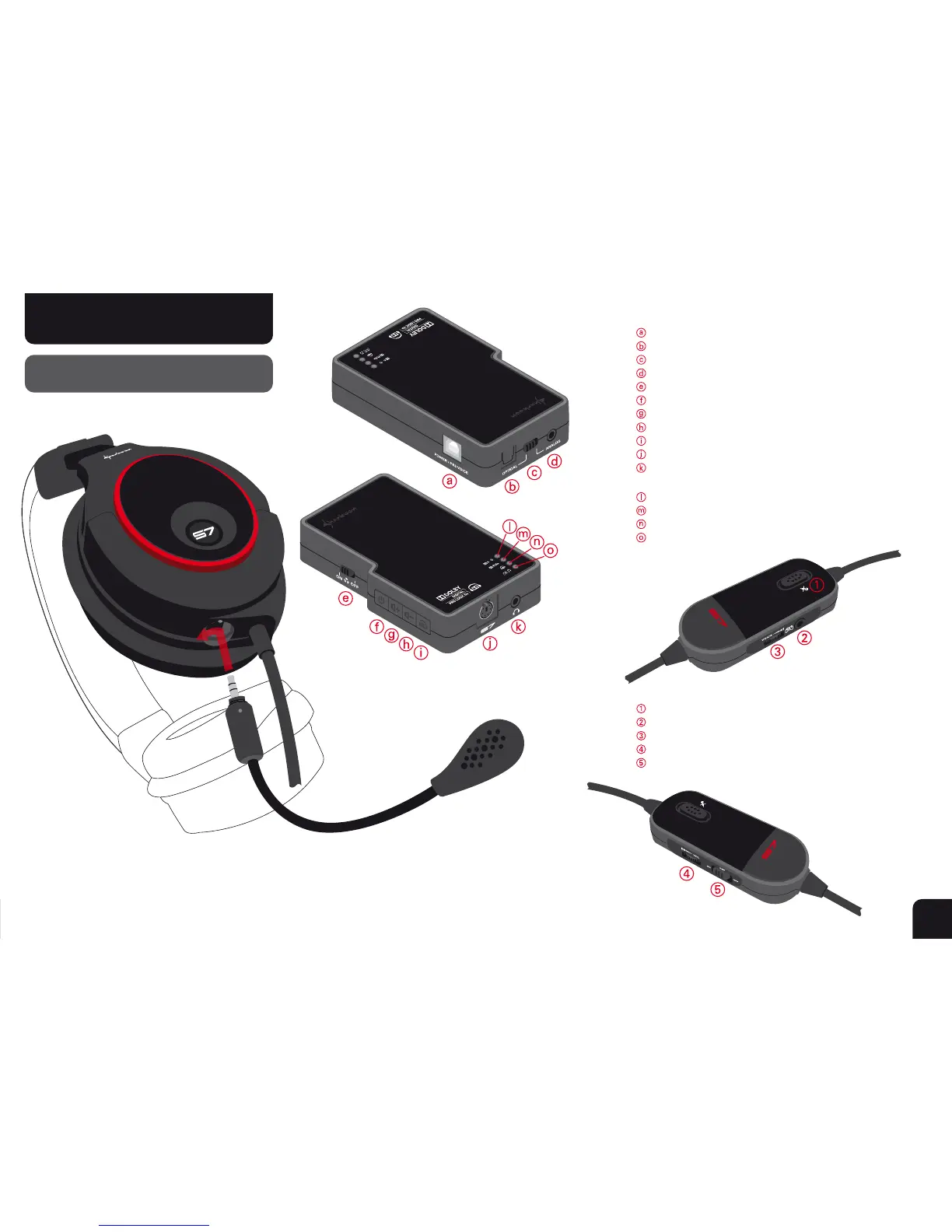
USB connector (for power and PS3
™
/PC microphone)
Optical audio input (S/PDIF)
Switch between optical and analog input
Analog audio input
ON/OFF switch for 3D stereo function
SCU power on/off button
Volume +
Volume -
Dolby
®
Headphone button
X-Tatic S7 headphone connector (G6)
Analog output for speakers or non S7 headset
(3.5 mm jack)
Power/Source LED
Dolby
®
ProLogic IIx
®
on/off LED
Dolby
®
Headphone on/off LED
Gaming/Music mode LED
Microphone on / off and Microphone Voice Monitoring
Connection for Xbox
®
360 microphone
Microphone volume controller
Volume adjustment controller
Amplifier on/off switch
Locate and align the markings on both the headset and the microphone.
Plug the microphone into the microphone connector.
Turn the microphone to the front to lock it.
2



 To Next Page