20 Freedom Xi Installation Guide
Basic Installation Procedures
Step 6: Connecting the DC Cables
The following instructions only apply to the standard models.
Follow the procedure given below to connect the ba
ttery leads to the
terminals on the DC end. The cables should be as short as possible
and large enough to handle the required current, in accordance with
the electrical codes or regulations applicable to your installation.
Table 2 on page 10 specifies the minimum DC cable size and
maximum fuse size for the Freedom Xi.
Do not route your DC cables through an electrical distribution
pan
el, battery isolator, or other device that will cause additional
voltage drops.
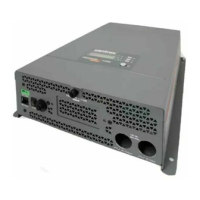
Figure 5 shows the DC end for your reference.
Figure 5 DC End for Standard Models
To make the DC connections
Refer to Figure 6.
1. Make sure the inverter is off and no AC or DC is connected to
th
e unit.
2. Remove the nuts and washers from the Freedom Xi positive
and negative DC
terminals.
NOTICE
REVERSE POLARITY DAMAGE
Check cable polarity at both the battery and the Freedom Xi before
making the final DC connection. Positive must be connected to positive;
negative must be connected to negative.
Reversing the positive and negative battery cables will damage the
Freedom Xi and void your warranty.
Failure to follow these instructions can damage the unit and/or equipment.
WARNING
FIRE HAZARD
Use only copper wire rated 75 °C minimum. Make sure all DC
connections are tight to a torque of 108–120 inch-pounds (12.2–13.6Nm).
Loose connections will overheat.
Failure to follow these instructions can result in death or serious injury.
Freedom XI Install Guide.book Page 20 Friday, September 18, 2015 2:48 PM



 To Next Page
 Loading...