XBDX™
LTVE
COmiNE NDVEITIBEP SDQB
Competitors are standing by.
Connect to Xbox Live now.
Get connected to Xbox Live —the first and
only no-holds-barred broadband
gaming arena. Only here can gamers
simultaneously play, talk, and build a
rep while challenging opponents
worldwide.
Play
friends,
find new
competitors, and get the 411 on anyone in the
arena.
Simultaneously talk and play games. With the Xbox
Communicator,
discuss tactics, talk trash, and
disguise
your
voice—all without
interrupting play.
Choose your Gamertag
—
your unique Xbox ID—
wisely. You'U have the
same tag from game to game, and it'll be used to
track
your
stats. So
you have nothing to fear but fame
itself.
•
OptiMatch helps you find the best opponents at every skill level on every
game. Keep tabs on who's hot and who's not.
Get into the game instantly with
Quick Match, and then spontaneously
switch tracks, switch
games,
and
switch music, all at fast-action speed.
"Gotta
have" game extensions are
possible with your Xbox hard drive.
Exclusive downloads, such as
new levels, characters, music, and even
features like instant replay,
are at your fingertips.
Get your Xbox Live Starter Kit and Go Live\ The Starter Kit is your key to
high-speed online competition. It
includes a
DVD
with pack-in game, a
12-month
subscription to the Xbox Live service, and an Xbox Communicator
headset. Visit
your local retailer, or see http://www.xbox.com/Uve.
Available November 2002.
Important! Before using
this product, read the Xbox Instruction Manual for
important
safety information and health warnings.
Please retain both
the
Xbox Instruction
Manual and these instructions for future reference.
For more details, see http://www.xbox.com/live.
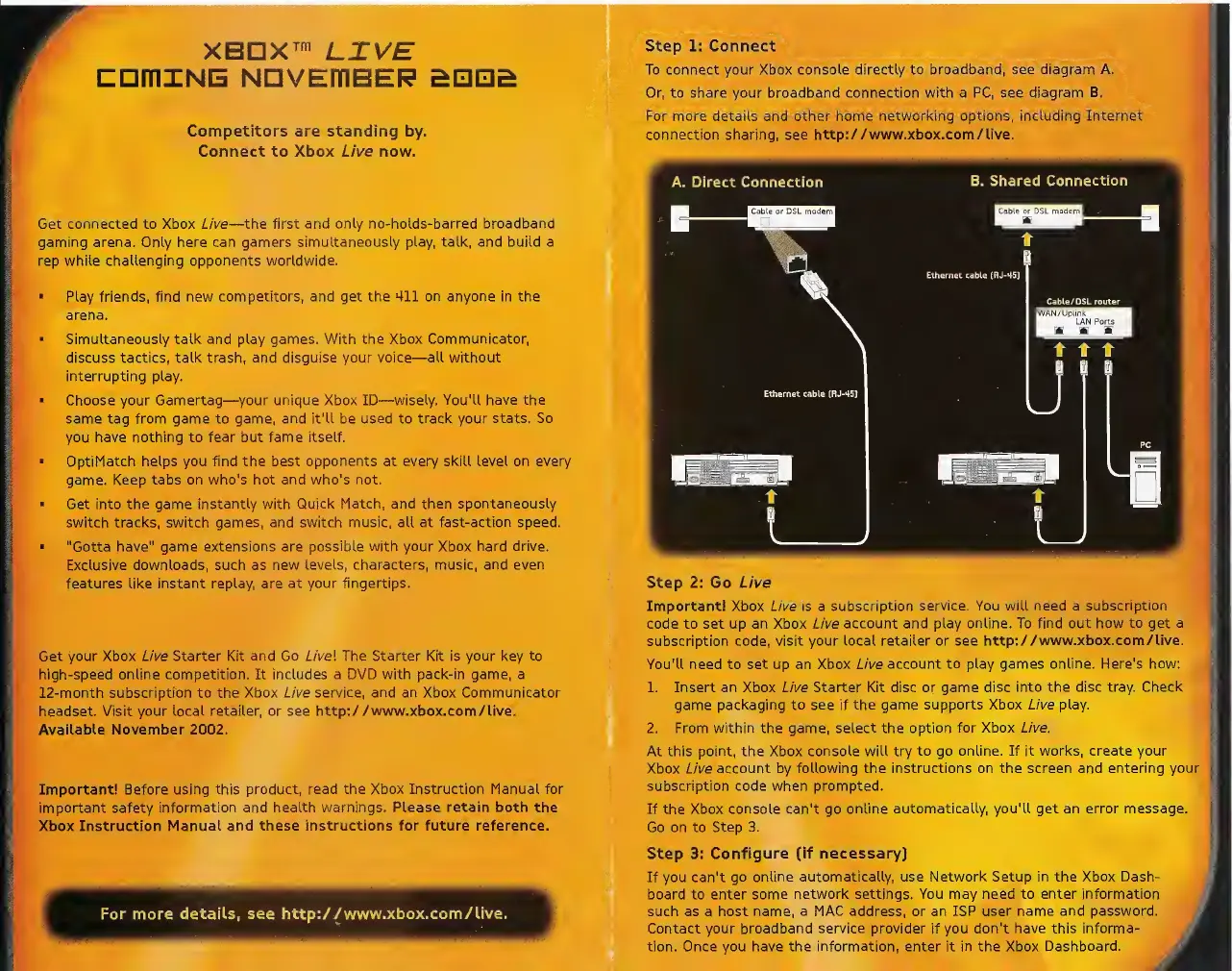
Step 1: Connect
To connect your Xbox console directly to
broadband, see diagram A.
Or, to share your broadband connection with a PC, see diagram
B.
For
more details and other
home networking options, including Internet
connection sharing, see http://www.xbox.com/live.
Step 2: Go Live
Important! Xbox Live is a
subscription service. You will need
a
subscription
code to set up an Xbox Live
account and play online. To find out
how to get a
subscription code, visit your local retailer or see
http://www.xbox.com/live.
You'U need to set up an Xbox
Live account to play games online. Here's how:
1. Insert an Xbox Live Starter Kit disc
or
game
disc into the disc tray. Check
game packaging
to
see if
the game supports Xbox Live play.
2. From within the game,
select the option for Xbox Live.
At this point, the Xbox console will try
to go online. If it works, create your
Xbox Live
account by following the instructions on the screen and
entering yoi
subscription code when prompted.
If the Xbox console can't go
online automatically, you'll get an error message.
Go on to
Step 3.
Step 3:
Configure (if necessary)
If you can't
go online automatically, use Network Setup in the
Xbox
Dash-
board to enter
some network settings. You may need to enter information
such as a host name,
a MAC address, or an ISP user name and password.
Contact your broadband
service provider
if you don't
have this informa-
tion. Once you have the
information,
enter it in the Xbox
Dashboard.


 To Previous Page
 Loading...