The Mach3 6 Axis MPG CNC Wireless Controller, Model WHB04B-6, is a portable handheld device designed to provide wireless control over Mach3 CNC software, enhancing the flexibility and convenience of operating CNC machines. This user manual outlines its installation, functionality, and display features, making it an essential tool for operators seeking to manage their CNC processes remotely.
Function Description:
The primary function of the WHB04B-6 is to serve as a wireless pendant for Mach3 CNC systems, allowing operators to control machine movements, initiate and pause operations, adjust speeds, and execute pre-programmed macros without being tethered to the control computer. It supports up to 6 axes (X, Y, Z, A, B, C), offering comprehensive control over complex machining operations.
Installation and Setup:
- USB Receiver Installation: The device connects to the PC via a USB receiver. Users must insert the USB receiver into an available USB port on their PC. The system will automatically install the necessary driver files.
- Driver File Copy: After the receiver installation, users need to locate the "PlugIns" folder within their Mach3 software installation directory. From the provided CD, the driver file "XHC-shuttlepro.dll" must be copied into this "PlugIns" folder. This step integrates the wireless controller with the Mach3 software.
- Macro File Installation: The CD also contains a "macro" folder. All files within this folder need to be copied into the
mach3/macros/Mach3Mill directory. These macro files enable the execution of specific predefined functions directly from the controller.
- Powering the Device: The controller requires two AA batteries. Users must open the battery cover, insert the batteries, and then press the power-on button to activate the device. Once powered on, it is ready for use.
Usage Features:
The WHB04B-6 features a robust set of buttons and a rotary encoder, each with specific functions to facilitate precise control:
- Reset Button: Immediately stops all machine operations and resets the system.
- Stop Button: Halts the current machining process.
- Start/Pause Button: Initiates a machining job when pressed to "Start" and temporarily suspends it when pressed to "Pause."
- Macro Buttons (Macro-1 to Macro-10): These buttons are programmable to execute specific macro functions defined within Mach3. For instance:
- Macro-1/Feed+: Executes macro function -1. When combined with the "Fn" (Function) button, it increases the processing speed.
- Macro-2/Feed-: Executes macro function -2. When combined with "Fn," it decreases the processing speed.
- Macro-3/Spindle+: Executes macro function -3. With "Fn," it increases spindle speed.
- Macro-4/Spindle-: Executes macro function -4. With "Fn," it decreases spindle speed.
- Macro-5/M-HOME: Executes macro function -5. With "Fn," it initiates a "refer all home" command, moving all axes to their home positions.
- Macro-6/Safe-Z: Executes macro function -6. With "Fn," it moves the Z-axis to a predefined safe height.
- Macro-7/W-HOME: Executes macro function -7. With "Fn," it commands the machine to go to the work zero position.
- Macro-8/S-ON/OFF: Executes macro function -8. With "Fn," it toggles the spindle on or off.
- Macro-9/Probe-Z: Executes macro function -9. With "Fn," it initiates a Z-axis probing operation.
- Macro-10: Executes macro function -10.
- Fn (Function) Button: This button acts as a modifier. When pressed in combination with other buttons (e.g., Macro-1, Macro-2), it activates an alternative function, typically related to speed adjustments or specific machine commands.
- MPG Button: Switches the handwheel (rotary encoder) into "Continuous" mode, allowing for smooth, continuous axis movement.
- Step Button: Switches the handwheel into "Step" mode, enabling incremental axis movements.
Axis Selection and Movement:
The device features a rotary switch for selecting the desired axis (X, Y, Z, A, B, C) or setting it to "OFF." The handwheel then controls the movement of the selected axis.
Movement Modes:
The WHB04B-6 supports two primary movement modes:
-
Step Mode:
- 0.001: Move unit is 0.001 mm/inch.
- 0.01: Move unit is 0.01 mm/inch.
- 0.1: Move unit is 0.1 mm/inch.
- 1.0: Move unit is 1.0 mm/inch.
These settings allow for precise, incremental adjustments of the selected axis.
-
Continuous Mode:
- 2%: 2 percent of max move speed.
- 5%: 5 percent of max move speed.
- 10%: 10 percent of max move speed.
- 30%: 30 percent of max move speed.
- 60%: 60 percent of max move speed.
- 100%: 100 percent of max move speed.
This mode enables variable-speed continuous movement, useful for rapid positioning or large-scale adjustments. The percentage indicates the proportion of the maximum configured feed rate in Mach3.
LCD Display:
The integrated LCD provides critical real-time feedback to the operator:
- Battery Level Indicator: Shows the remaining battery life.
- Radio Connection Quality Indication: Displays the strength and stability of the wireless connection to the PC.
- Key Success Indication: Confirms successful button presses or command executions.
- Step Indication: Shows the current step increment value when in Step mode.
- Axis Selected Location: Indicates the currently selected axis for movement.
- Coordinate Values: Displays the current X, Y, Z, A, B, C coordinates of the machine.
- Spindle Speed (S): Shows the current spindle RPM (e.g., S: 24000).
- Feed Speed (F): Displays the current feed rate (e.g., F: 8000).
Maintenance Features:
The manual primarily focuses on operational aspects, but implicitly, maintenance involves:
- Battery Replacement: The device requires 2pcs AA batteries, which should be replaced when the battery level indicator shows low power to ensure uninterrupted operation.
- Software Updates: While not explicitly stated, keeping the Mach3 software and associated plugin files updated is crucial for optimal performance and compatibility.
- Physical Care: As a handheld device, it should be protected from impacts, dust, and liquids to ensure longevity.
In summary, the Mach3 6 Axis MPG CNC Wireless Controller (WHB04B-6) is a comprehensive and user-friendly tool designed to enhance the efficiency and safety of CNC machine operation by providing flexible, wireless control over Mach3 software. Its intuitive interface, clear LCD feedback, and robust functionality make it an invaluable asset in any CNC workshop.

 Need help?
 General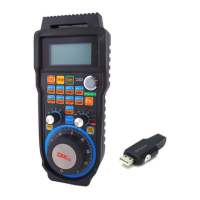

 To Next Page