Installation
15
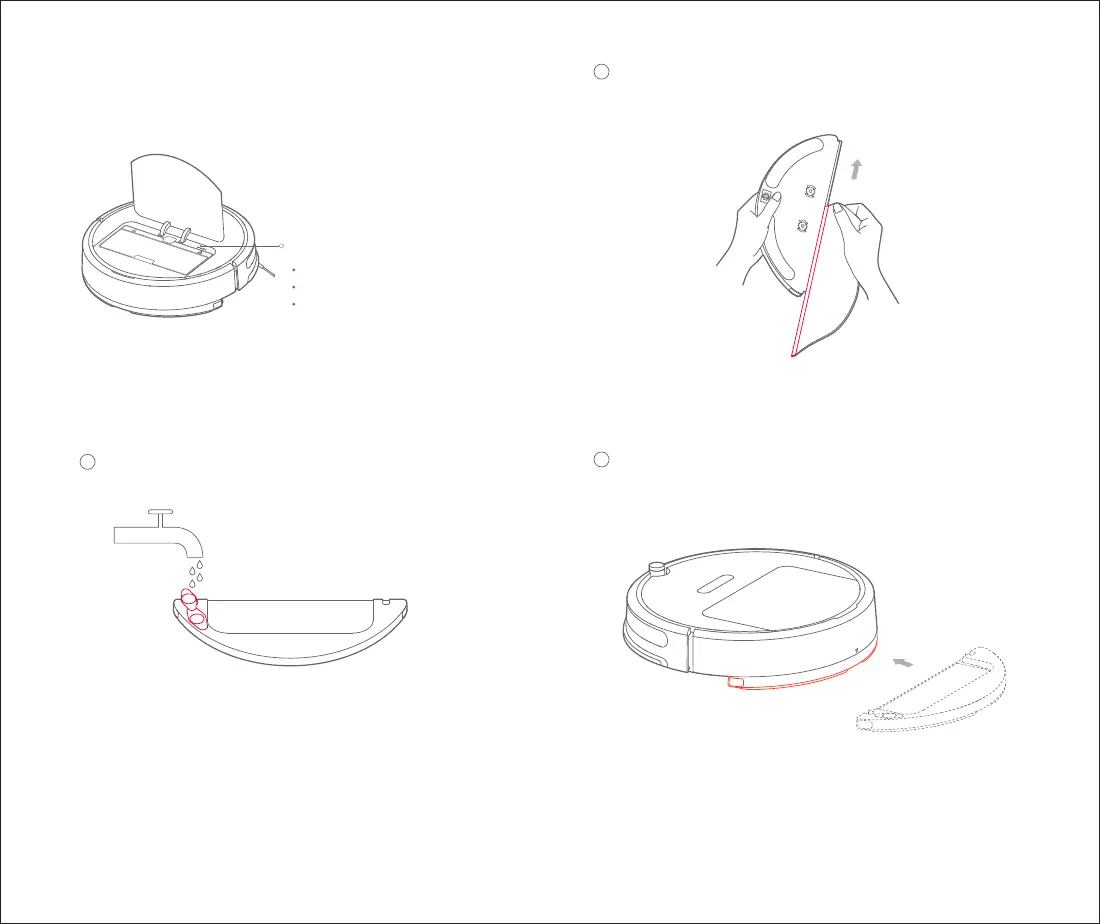
Note: When your mobile phone fails to connect to the machine,
please refer to "User Manual" - "Reset WIFI"
Slow flashing: Waiting for connection
Fast flashing: Connecting
Glowing: WIFI is connected
WIFI indicator
Install the mopping module5
1
Install the module: push the module in parallel along the
alignment signs on the rear of the machine and on the
mopping module. It is installed in place when you hear
a "click" sound.
Note: Do not use the mopping module when there is nobody at home
Note: To get better mopping effect, it is recommended to install
the mopping module after cleaning for 3 times
Refill the water tank: open the water tank and reinstall the water
tank cover after refilling with tap water
Note: Please be aware that some floor cleaners or disinfectants may
cause blockage of the water tank filter
Install the mopping cloth: dampen the mopping cloth and
squeeze it dry. Insert it to the end along the slot of the
water tank and stick it firmly
2
3


 To Next Page