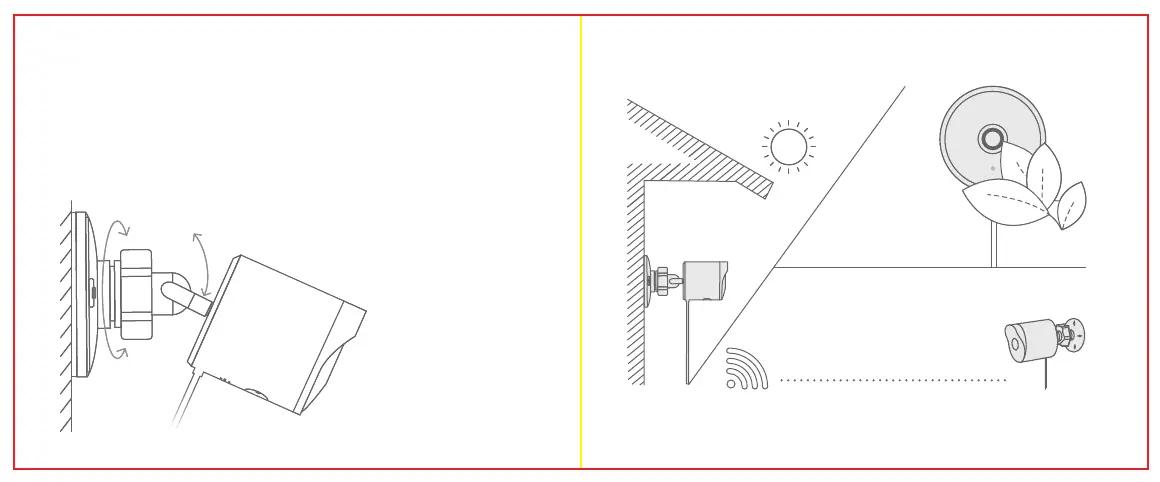
0~360°0~360°
0°~65°0°~65°
while mounting, pay attention to the following:
7
8
Avoid installing the
camera with the camera
lens facing direct sunlight.
Mind any plants or objects that
may obstruct the view.
Step 3
Attach your camera to the mounted base. Adjust the camera angle to a suitable position,
then tightly lock the universal ball mount.
Step 4
Use the cable clips to fasten the power cable. Ensure that you do not o-over-fasten the
cable clips.
We suggest you mount the camera within a
33 foot (10 meter) range of your Wi-Fi router.
The shorter the distance between your
Wi-Fi router and your camera, the better
the performance of your camera.
If you do not want to mount your camera to a wall, use the included camera stand to place
your camera anywhere.


 To Next Page