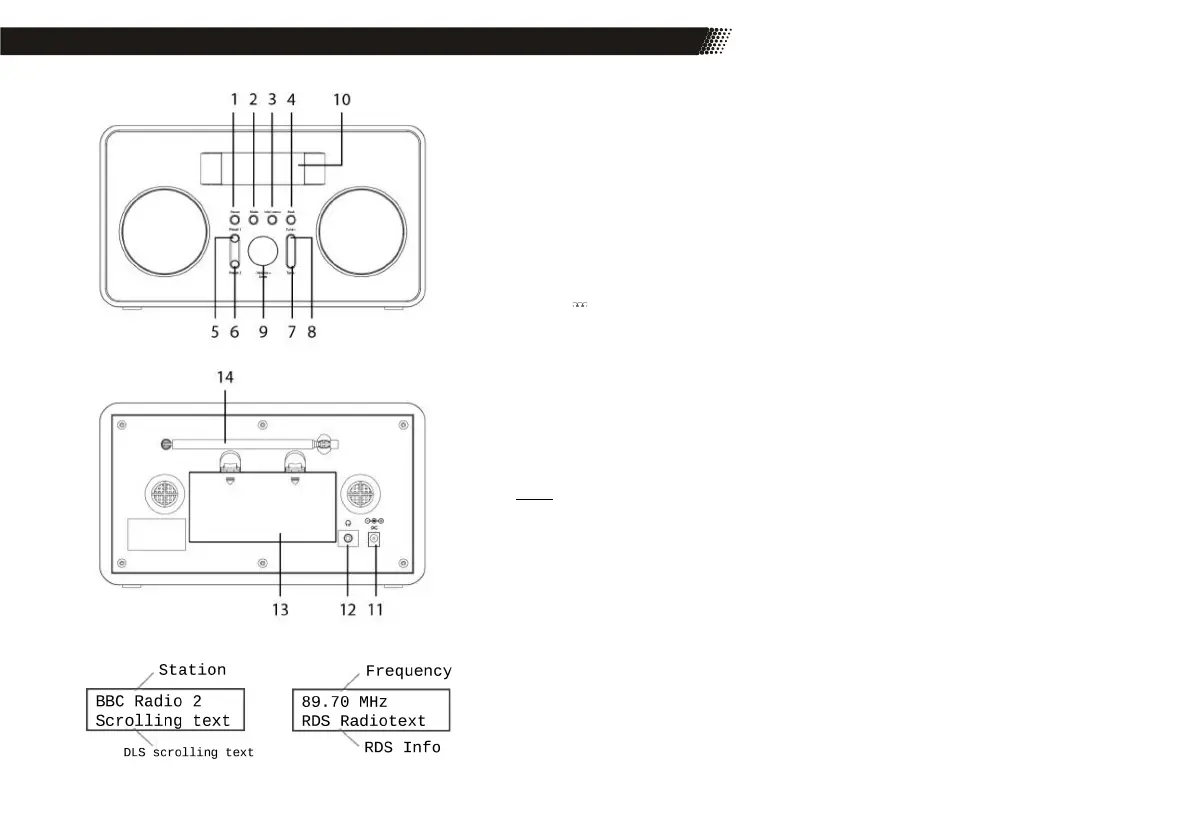
3 Device Overview & Power Supply
1 Power To turn the device on / off, standby mode
2 Mode Switch DAB+ / FM mode
3 Info/Menu Call up information / Call up the main menu
4 Alarm/Back Alarm / back
5 Preset 1 Station memory 1
6 Preset 2+ Station memory 1-10 / Speed dial key with Tune + controllable
7 Tune - Station search, back
8 Tune + Station search, forward
9 - VOLUME + / Enter Volume control / Enter
10 Display
11 DC Connection for the power supply
12 Headphone jack
13 Battery
14 Antenna
Power Supply
Use only the supplied AC adapter for power supply. Observe the information on the rating plate of the
power supply unit.
Notes:
The power supply provides a stabilized DC voltage of 6V. Operating with an unstabilized volta-
ge can damage the device. Only the included power supply ensures safe operation and compli-
ance with all regulations and standards.
The power supply is suitable for a mains voltage of 100-240 V and can therefore be used in
almost all AC-based power grids. Note that this may require a country-specific adapter.
With multiple sockets, make sure that the connected consumers do not exceed the permis-
sible total power consumption. Disconnect the product from the mains if you are not going to
use it for a long time.
For mobile use, you can alternatively use batteries for the power supply of the device. Please read the
notes on page 2 of this manual.
FM mode
DAB+ mode
Front
Back
Display Mode



 To Next Page