Home
xsto
Wheelchair
Mobility Robot M4
Page 44
xsto Mobility Robot M4 - Page 44
144 pages
Manual
Save Page as PDF
To Next Page
To Next Page
To Previous Page
To Previous Page
Loading...
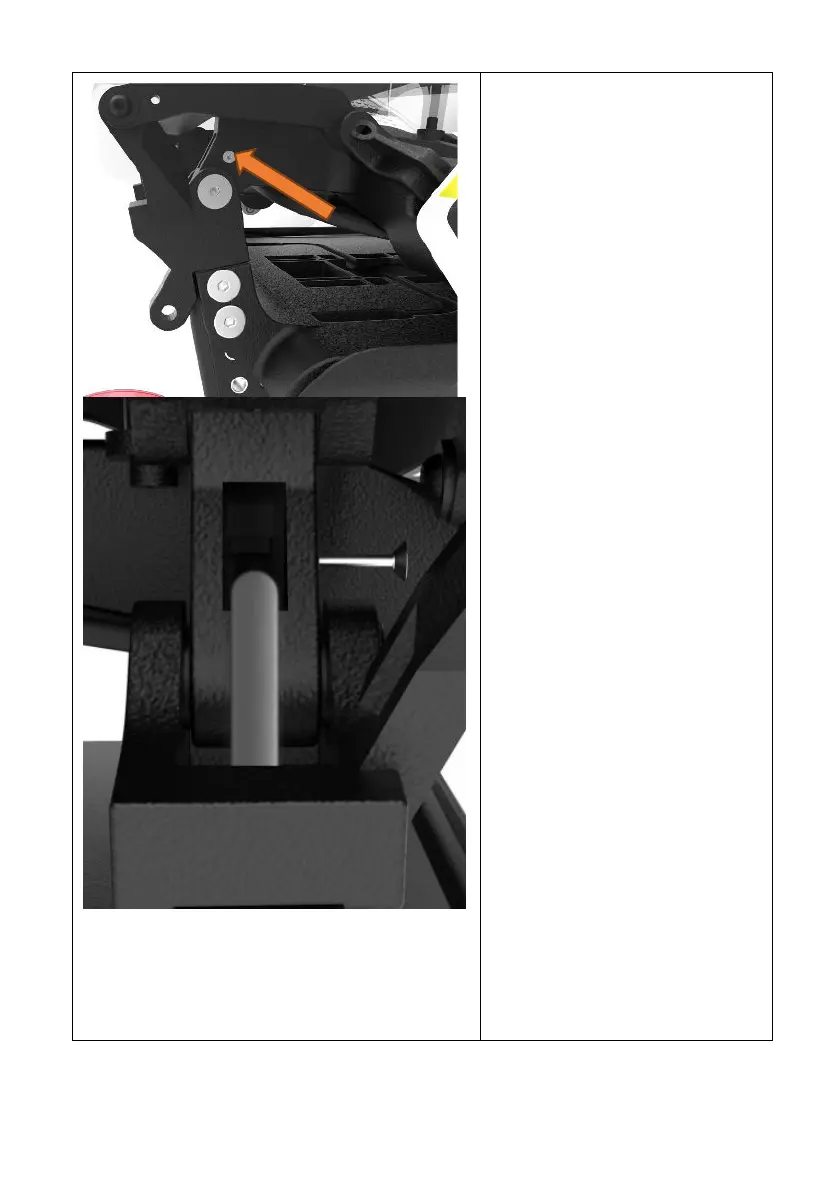
40
Fold
down
the
backrest,ret
urn
the
screw
on
the
left
picture.
When
installing,
ensure
that
the
wires
are
close
to
the
lower
parts,
as
shown
in
the
left
figure,
the
screws
should
slightly
squeeze
the
wire
43
45
Table of Contents
Main Page
Brief introduction
5
1Icons and use instructions
6
1.1Marking instruction
6
1.2Notice Before Use
6
1.3Tag instructions
7
2About the equipment
8
2.1Packing list
8
2.2Optional accessories
9
2.3Product Structure
10
2.4Product Parameter
11
2.5Overall size of equipment
15
2.6Initialization
17
3Method of operation
18
3.1Check before use
18
3.2Ride and leave
20
3.2.1Seating from the front
20
3.2.2Side seating
21
3.3Operation declaration
22
3.3.1Key function introduction
22
3.3.2Display Instruction
23
3.4 Leg support
24
3.5Head pillow adjustment
25
3.6Drive
27
3.6.1Applicable road conditions
27
3.6.2Advance
28
3.6.3Draw back
29
3.6.4Turn direction
29
3.6.5Speed Adjustment
30
3.6.6Seat Angle adjustment
31
3.6.7Up slope
32
3.6.8Down hill
32
3.7Lift and fold
33
3.7.1Lift function
33
3.7.2Folding function
34
3.8Adjust the handrail height
36
3.9protection mechanism
47
3.10Mechanical brake
48
3.11Unlock the control key
50
3.11.1The appearance of the remote control key
50
3.11.2Operation of remote control lock
50
3.11.3Replace the battery on the control key of battery
53
3.12 Handrest USB outlet description
55
3.13Uphill and downhill regulation and speed protecti
55
3.13.1Description of the uphill and downhill regulation
56
3.13.2Speed protection instructions
57
4Assembly and disassembly
57
4.1Component introduction
57
4.2Assembly Method
58
4.2.1Assembly pedal
58
4.2.2Assembly seat
59
4.3Removal method
60
4.3.1Remove the seat
61
4.3.2Remove the pedal
62
4.3.3Backrest removal and installation
63
4.3.4Mount cushion removal and installation
63
5Storage and transportation
64
5.1Storage
64
5.2Transportation
65
5.2.1Handling the whole machine
65
5.2.2Handling chassis
65
5.2.3Move the seat
66
5.2.4Move the pedal
66
6Battery instructions
67
6.1Battery Precautions
67
6.2Battery charging
71
6.3Battery installation and removal
73
6.4Battery storage
75
7 Tending
75
7.1User maintenance and testing
75
7.2Warranty
79
7.3Responsibility
81
7.4Cyclic utilization
83
8Troubleshooting
84
8.1Fault code
84
8.2Common fault list
86
9Mobile phone App function
91
9.1 Download
91
9.1.1iOS system
91
9.1.2Android system
92
9.2Registration and login
93
9.2.1Open App
93
9.2.2Register
95
9.2.3Entry
96
9.3Remote control and operation
103
9.3.1Device connection success interface
103
9.3.2Disconnect
103
9.3.3 Set up
106
9.3.3.1General settings
107
9.3.3.2Battery information
109
9.3.3.3Device version
110
9.3.3.4Emergency contact
111
9.3.4Mode switching
112
9.3.5Unlock/Lock
113
9.3.6One key folding
114
9.3.7Shut down
114
9.3.8Remote control
115
9.3.8.1The horn switch
117
9.3.8.2Holistic attitude regulation
117
9.3.8.3Seat Automatic Balance Switch
119
9.3.8.4Virtual operation rocker
120
9.3.8.5Speed gear regulation
120
9.3.9 Home page
121
9.3.10 Position
122
9.3.11 Trends
123
9.3.11.1Company profile
124
9.3.11.2Company profile
125
9.3.11.3 Equipment leasing
125
9.3.12Mine
126
9.3.12.1My information
127
9.3.12.2 Account number and security
127
9.3.12.3 Feedback
128
9.3.12.4User agreement
129
9.3.12.5 Privacy policy
130
9.3.12.6Check the update
132
9.3.12.7Clear cache
132
9.3.12.8 About Us
133
10Electromagnetic Compatibility Information
134


 To Next Page