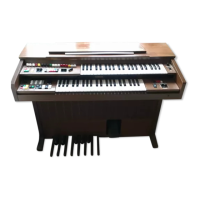
The Yamaha Electone B-20BR is an advanced musical instrument designed to provide a lifetime of musical enjoyment. This manual serves as a comprehensive guide to its features, operation, and maintenance, ensuring users can derive the most from its generous capabilities and durable IC & FET circuitry.
Overall Structure and Keyboards:
The Electone B-20BR features three keyboards: an Upper Manual, a Lower Manual, and Pedals.
- Upper Manual: Comprises 44 keys, spanning 3 3/4 octaves.
- Lower Manual: Also has 44 keys, covering 3 3/4 octaves.
- Pedals: Consists of 13 pedals, providing 1 octave.
The instrument is designed for versatile playing: melodies are typically played on the upper manual with the right hand, chords on the lower manual with the left hand, and bass notes on the pedals with either foot. All keys and pedals follow the traditional keyboard layout of two black keys, three black keys. The white key "C" is always located just below the left black key in the two-black-key group. A complete set of seven white keys constitutes an "octave." The pedals also follow this pattern, differing only in shape, with both end pedals being "C." The compass of the Electone B-20BR is tuned to 440Hz.
Tone Levers and Registration:
The Electone B-20BR features a series of tone levers located to the left of both upper and lower manuals. These levers control the instrument's voices (sounds) and are divided into groups for each keyboard, allowing for independent registration.
- Upper Manual Levers: Control 8 voices.
- Lower Manual Levers: Control 5 voices.
- Pedal Levers: Control 2 voices.
Exclusive Yamaha Tone Lever System:
Each tone lever offers two methods of control:
- Continuous Adjustment: Levers can be moved continuously from "off" to "full" to achieve precise tone settings and balance the overall tone volume.
- Click Stops: Each lever has two easy-to-feel click stops at 1/3 and 2/3 positions, enabling quick and precise recall of settings without guesswork.
The total tone lever settings for a particular manual affect its overall volume, serving as an expressive aid when used properly.
Tone Lever Registration Guidelines:
For optimal performance, it's crucial to consider the correlative tone volume balance among the three keyboards.
- Emphasizing Melody: To highlight the melody on the upper manual, the volume of the lower manual and pedals should be kept lower than that of the upper manual.
- Emphasizing Accompaniment: Conversely, to stress the accompaniment on the lower manual or pedals, their volume should be adjusted relatively higher.
Yamaha's unique variable volume control tone levers allow for continuous adjustment from off to full volume, providing sensitive balance control. The three distinct click stops facilitate quick and easy settings of favorite tonal combinations.
Harmonics:
The B-20BR offers four different tonal harmonics, indicated by standard musical abbreviations: 16', 8', 4', and 2 2/3'. These numbers denote the tone's pitch relative to the fundamental (written note).
- 8' Tone: Sounds at the written pitch (fundamental).
- 16' Tone: Sounds one octave lower than the written note (wave length twice as long, half as fast).
- 4' Tone: Sounds one octave higher than the written note.
- 2 2/3' Tone: Sounds one octave and a fifth higher than the 8' fundamental.
For example, pressing middle C will produce sounds corresponding to C at 16', 8', 4', and 2 2/3' pitches. The 16' lever extends the lower manual a full octave.
Upper Preset Tones:
To the left of the lower manual are eight Upper Preset Tone controls (seven tones plus a Cancel button). These on/off switches provide special tonal blends that mimic instruments like Accordion, Piano, Banjo, and Vibraphone, along with three special preset combinations.
- Factory Preset: These selectors are factory preset and automatically cancel all other upper manual tone lever settings, allowing for quick switching between sounds.
- Precedence to the Right: If multiple buttons are pressed, the one furthest to the right will take effect. It's not necessary to press the cancel button before switching between presets.
Effect Levers:
These levers introduce a variety of effects, adding tonal variations to the Electone's voices. Like tone levers, they offer continuous control and click-stop settings.
- Upper Percussive: This effect adds a subtle but important shading to the beginning of notes, enhancing lively selections. The special popping 4' and 2 2/3' percussive drive can be smoothly blended into all upper manual tones using two variable levers (Percussive 4' and Percussive 2 2/3') and a separate lever (Percussive Length) to regulate the decay length. For best results, use a detached fingering, playing each note cleanly to maximize percussive impact.
- Vibrato: This effect creates an emotional wavering, similar to the trembling left hand of violinists and cellists. It can add depth to passages, especially string voices. The Vibrato lever provides continuous adjustment of this effect's depth.
- Repeat Speed: This effect cuts and repeats each note, mimicking a double-strumming mandolin. The lever offers continuous speed adjustment for various moods and affects only upper manual notes.
Effect Controls and Selectors:
- Brilliance: A single, continuously-variable control that adjusts the overall softness or clarity of the sound. It enhances string voices but has no effect on flute voices.
- Reverb: Controls the reverberation quality, making the sound full and rich, as if playing in a large hall. This continuous control allows for any desired degree of strength.
- Reverb Balance: Balances the Reverb effect between the upper and lower manuals. When used to strengthen the upper manual, it produces an effect similar to SUSTAIN on more expensive models.
- Manual Balance: Governs the relative strength of the upper and lower manuals. Normally centered, it can be shifted to emphasize either the melody or accompaniment. It also compensates for higher total tone lever settings on one manual, which would otherwise result in higher volume.
- Pedal Sustain: Works with the 8' and 16' bass voices to create bass pizzicato effects. Releasing the pedal allows the sound to linger for a precisely adjustable duration.
Sound-in-Motion Tremolo:
The Electone's unique throbbing tremolo is generated by a smaller-sized Natural Sound speaker located behind the tremolo speaker grille on the side of the cabinet.
- Tremolo Selectors: Three selectors (Main, Voice, Tremolo, Chorus) are located on the right side of the lower manual, each with an on/off function.
- Tremolo Speed Control: A continuous knob above the selectors adjusts the tremolo speed.
- Speed Settings: When the speed control is centered, the Tremolo tablet spins the speaker at seven revolutions per second, while the Chorus tablet spins it at one revolution per second.
- Warm-up Time: After switching on either tablet, it takes several seconds for the tremolo speaker to reach its standard speed. This also applies when switching between Tremolo and Chorus. Speed variations during this transition period will be audible.
- Instant Tremolo/Chorus: To achieve an instant tremolo or chorus sound, activate the tablet well in advance of using the speaker selectors. This speed variation can also be used creatively by switching on the speaker first, then the Tremolo or Chorus switch.
- Upper Voice (Main/Rotary): Diverts upper manual tones to the tremolo speaker.
- Lower Voice (Main/Rotary): Performs the same function for lower manual tones.
Maintenance and Care:
The manual emphasizes the importance of reading it thoroughly before playing and keeping it handy for reference. With proper care, the Electone is expected to be a creative center of family enjoyment for decades. Specific care and maintenance instructions are detailed in sections "Care of Your Electone" and "Do Not Be Alarmed If," which would cover troubleshooting and routine upkeep.

 Need help?
 General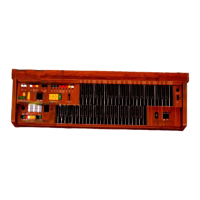


 To Next Page