EasyManua.ls Logo

Yamaha Electone C-55N - User Manual

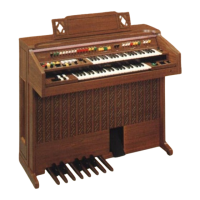
Yamaha Electone C-55N
47 pages
Print Icon
To Next Page IconTo Next Page
Loading...
Question and Answer IconNeed help?

Do you have a question about the Yamaha Electone C-55N and is the answer not in the manual?

Summary

Caution and Initial Advice

Precautions Before Operation

Essential safety and handling advice before operating the Electone.

Electone Layout and Components

C-35 N Electone Diagram

Visual overview of the C-35N model's controls and components.

C-55 N Electone Diagram

Visual overview of the C-55N model's controls and components.

Electone Component Guide Overview

Detailed list and descriptions of Electone components and features.

Keyboard and Pedal Functions

Keyboard and Pedal Layout Explained

Explanation of the upper, lower keyboards, and pedal layout and function.

Tone Control and Effects

Tone Levers and Settings

Guide on using tone levers for sound adjustment and their control methods.

Pitches and Footage Explained

Explanation of organ pipe pitch designations (16', 8', 4') and their effect.

Special Presets and Custom Voices

Introduction to preset tone selectors and unique voice selectors.

Ensemble and Lower Keyboard Preset Effects

Using ensemble effects and presets on the lower keyboard.

Vibrato and Tone Effects

Details on controlling vibrato depth, delay, and speed for expressive sound.

Upper Keyboard Attack and Sustain Effects

Explains slow attack and sustain effects for the upper keyboard.

Pedal Controls and Reverb

Guide to pedal sustain, expression pedal, and reverb effect.

Foot Switch and Master Controls

Foot Switch Functions: Glide and Rhythm Stop

How to use the foot switch for glide and rhythm control.

Manual Balance and Master Volume

Adjusting keyboard balance and overall Electone volume.

Tremolo and Rhythm Functions

Tremolo Section Controls

Using tremolo and chorus effects with various instrument voices.

Tremolo Speed Control

Fine-tuning the speed of the tremolo effect.

Symphonic Chorus Function

Applying a lively and expansive symphonic chorus effect.

Auto Rhythm Section Overview

Overview of 16 rhythms and their controls including Tempo, Volume, Balance.

Rhythm Start Modes

Methods for starting and synchronizing rhythms with keyboard or pedal input.

Rhythm Tempo, Volume, and Balance Settings

Adjusting tempo, volume, and balance for auto rhythm accompaniment.

Rhythm Variation and Break Patterns

Adding variations and accents to rhythms using specific buttons.

Accompaniment and Arpeggio Features

Auto Bass;Chord Fun Blocks

Introduction to the Auto Bass/Chord Fun Blocks feature.

Multi Bass Functionality

Using the Multi Bass feature for complex bass patterns.

Single Finger Chord Operation

Playing chords easily with single finger input and pedal functions.

Custom ABC Operation

Using Custom ABC for independent chord and pedal note accompaniment.

Constant and Memory Accompaniment Modes

Using Constant and Memory functions for accompaniment.

Auto Arpeggio Function

Overview of the Auto Arpeggio feature and its capabilities.

Arpeggio Voice, Pattern, Volume, and Sustain

Details on selecting arpeggio voice, pattern, volume, and sustain.

Connectivity and Troubleshooting

Tone Cabinet Connector

Connecting external tone cabinets for enhanced sound output.

Headphone Connection

Using the headphone jack for private practice without disturbing others.

External Sound Input;Output

Connecting external audio devices via EXP. IN, AUX OUT, and AUX IN jacks.

Important Troubleshooting Advice

Guidance on common problems like no power or static.

Troubleshooting Radio Interference and Noise

Addressing issues with radio/TV signals and sympathetic vibrations.

Technical Specifications

Keyboard and Tone Lever Specifications

Detailed specifications for keyboards, pedals, and tone levers.

Rhythm, Arpeggio, and Effect Specifications

Detailed specifications for rhythm, arpeggio, and effect sections.

Summary

Caution and Initial Advice

Precautions Before Operation

Essential safety and handling advice before operating the Electone.

Electone Layout and Components

C-35 N Electone Diagram

Visual overview of the C-35N model's controls and components.

C-55 N Electone Diagram

Visual overview of the C-55N model's controls and components.

Electone Component Guide Overview

Detailed list and descriptions of Electone components and features.

Keyboard and Pedal Functions

Keyboard and Pedal Layout Explained

Explanation of the upper, lower keyboards, and pedal layout and function.

Tone Control and Effects

Tone Levers and Settings

Guide on using tone levers for sound adjustment and their control methods.

Pitches and Footage Explained

Explanation of organ pipe pitch designations (16', 8', 4') and their effect.

Special Presets and Custom Voices

Introduction to preset tone selectors and unique voice selectors.

Ensemble and Lower Keyboard Preset Effects

Using ensemble effects and presets on the lower keyboard.

Vibrato and Tone Effects

Details on controlling vibrato depth, delay, and speed for expressive sound.

Upper Keyboard Attack and Sustain Effects

Explains slow attack and sustain effects for the upper keyboard.

Pedal Controls and Reverb

Guide to pedal sustain, expression pedal, and reverb effect.

Foot Switch and Master Controls

Foot Switch Functions: Glide and Rhythm Stop

How to use the foot switch for glide and rhythm control.

Manual Balance and Master Volume

Adjusting keyboard balance and overall Electone volume.

Tremolo and Rhythm Functions

Tremolo Section Controls

Using tremolo and chorus effects with various instrument voices.

Tremolo Speed Control

Fine-tuning the speed of the tremolo effect.

Symphonic Chorus Function

Applying a lively and expansive symphonic chorus effect.

Auto Rhythm Section Overview

Overview of 16 rhythms and their controls including Tempo, Volume, Balance.

Rhythm Start Modes

Methods for starting and synchronizing rhythms with keyboard or pedal input.

Rhythm Tempo, Volume, and Balance Settings

Adjusting tempo, volume, and balance for auto rhythm accompaniment.

Rhythm Variation and Break Patterns

Adding variations and accents to rhythms using specific buttons.

Accompaniment and Arpeggio Features

Auto Bass;Chord Fun Blocks

Introduction to the Auto Bass/Chord Fun Blocks feature.

Multi Bass Functionality

Using the Multi Bass feature for complex bass patterns.

Single Finger Chord Operation

Playing chords easily with single finger input and pedal functions.

Custom ABC Operation

Using Custom ABC for independent chord and pedal note accompaniment.

Constant and Memory Accompaniment Modes

Using Constant and Memory functions for accompaniment.

Auto Arpeggio Function

Overview of the Auto Arpeggio feature and its capabilities.

Arpeggio Voice, Pattern, Volume, and Sustain

Details on selecting arpeggio voice, pattern, volume, and sustain.

Connectivity and Troubleshooting

Tone Cabinet Connector

Connecting external tone cabinets for enhanced sound output.

Headphone Connection

Using the headphone jack for private practice without disturbing others.

External Sound Input;Output

Connecting external audio devices via EXP. IN, AUX OUT, and AUX IN jacks.

Important Troubleshooting Advice

Guidance on common problems like no power or static.

Troubleshooting Radio Interference and Noise

Addressing issues with radio/TV signals and sympathetic vibrations.

Technical Specifications

Keyboard and Tone Lever Specifications

Detailed specifications for keyboards, pedals, and tone levers.

Rhythm, Arpeggio, and Effect Specifications

Detailed specifications for rhythm, arpeggio, and effect sections.

Yamaha Electone C-55N Specifications

General IconGeneral
BrandYamaha
ModelElectone C-55N
CategoryMusical Instrument
LanguageEnglish

Related product manuals