EasyManua.ls Logo

Yamaha Electone FE-40 - Troubleshooting Guide

Yamaha Electone FE-40
24 pages
Print Icon
To Next Page IconTo Next Page
To Previous Page IconTo Previous Page
Loading...
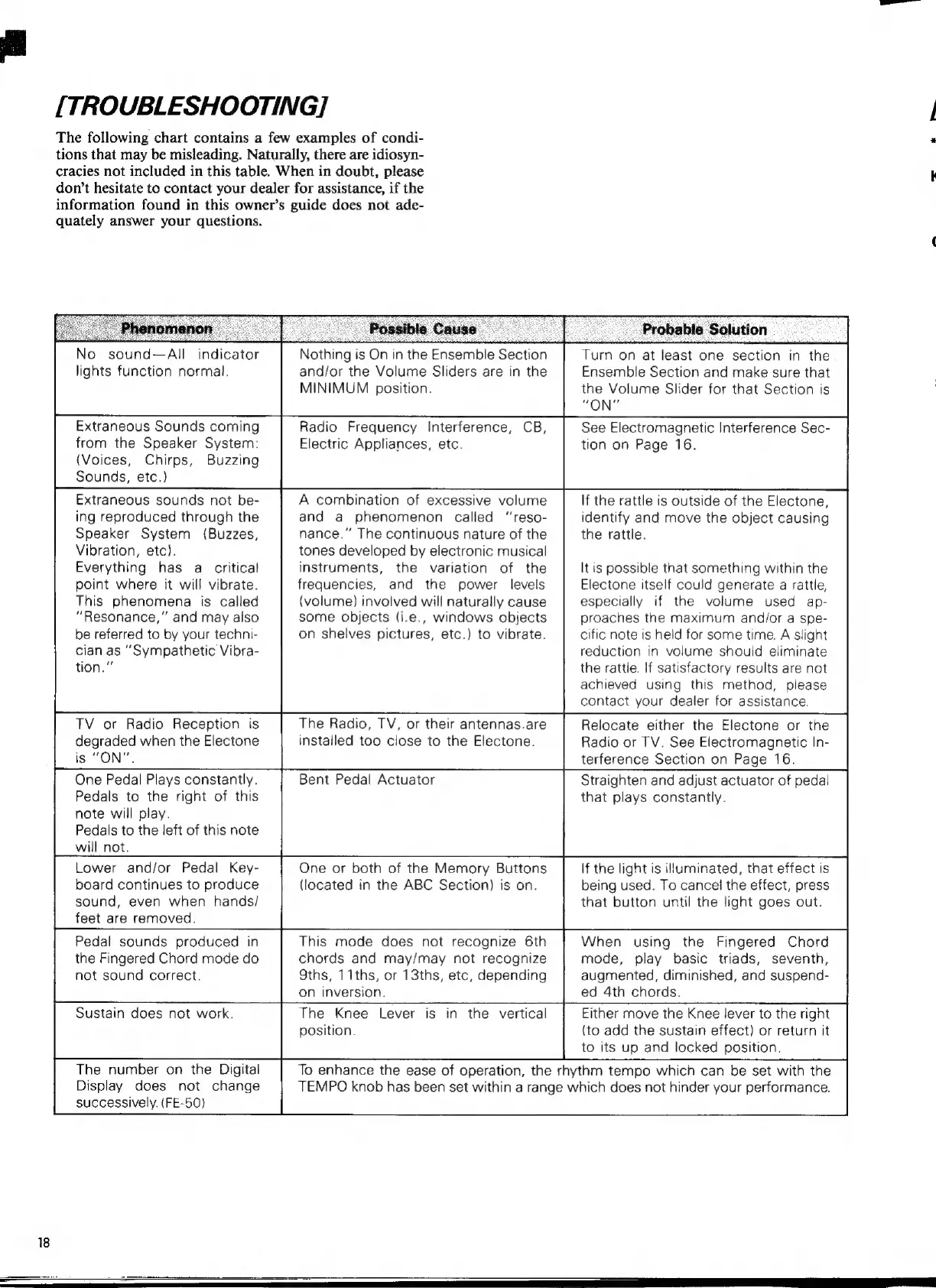
[TROUBLESHOOTING]
The
following
chart
contains
a
few
examples
of
condi-
tions
that
may
be
misleading.
Naturally,
there
are
idiosyn-
cracies
not
included
in
this
table.
When
in
doubt,
please
don’t
hesitate
to
contact
your
dealer
for
assistance,
if
the
information
found
in
this
owner’s
guide
does
not
ade-
quately
answer
your
questions.
No
sound—All
indicator
lights
function
normal.
Extraneous
Sounds
coming
from
the
Speaker
System:
(Voices,
Chirps,
Buzzing
Sounds,
etc.)
Extraneous
sounds
not
be-
ing
reproduced
through
the
Speaker
System
(Buzzes,
Vibration,
etc).
Everything
has
a
critical
point
where
it
will
vibrate.
This
phenomena
is
called
"Resonance,"
and
may
also
be
referred
to
by
your
techni-
cian
as
"Sympathetic
Vibra-
tion."
TV
or
Radio
Reception
is
degraded
when
the
Electone
is
"ON".
One
Pedal
Plays
constantly.
Pedals
to
the
right
of
this
note
will
play.
Pedals
to
the
left
of
this
note
will
not.
Lower
and/or
Pedal
Key-
board
continues
to
produce
sound,
even
when
hands/
feet
are
removed.
Pedal
sounds
produced
in
the
Fingered
Chord
mode
do
not
sound
correct.
Sustain
does
not
work.
The
number
on
the
Digital
Display
does
not
change
successively.
(FE-50)
Nothing
is
On
in
the
Ensemble
Section
and/or
the
Volume
Sliders
are
in
the
MINIMUM
position.
Radio
Frequency
Interference,
CB,
Electric
Appliances,
etc.
A
combination
of
excessive
volume
and
a
phenomenon
called
"reso-
nance."
The
continuous
nature
of
the
tones
developed
by
electronic
musical
instruments,
the
variation
of
the
frequencies,
and
the
power
levels
(volume)
involved
will
naturally
cause
some
objects
(i.e.,
windows
objects
on
shelves
pictures,
etc.)
to
vibrate.
The
Radio,
TV,
or
their
antennas.are
installed
too
close
to
the
Electone.
Bent
Pedal
Actuator
One
or
both
of
the
Memory
Buttons
(located
in
the
ABC
Section)
is
on.
This
mode
does
not
recognize
6th
chords
and
may/may
not
recognize
Sths,
11ths,
or
13ths,
etc,
depending
on
inversion.
Turn
on
at
least
one
section
in
the
Ensemble
Section
and
make
sure
that
the
Volume
Slider
for
that
Section
is
"ON"
See
Electromagnetic
Interference
Sec-
tion
on
Page
16.
If
the
rattle
is
outside
of
the
Electone,
identify
and
move
the
object
causing
the
rattle.
It
is
possible
that
something
within
the
Electone
itself
could
generate
a
rattle,
especially
if
the
volume
used
ap-
proaches
the
maximum
and/or
a
spe-
cific
note
is
held
for
some
time.
A
slight
reduction
in
volume
should
eliminate
the
rattle.
If
satisfactory
results
are
not
achieved
using
this
method,
please
contact
your
dealer
for
assistance.
Relocate
either
the
Electone
or
the
Radio
or
TV.
See
Electromagnetic
In-
terference
Section
on
Page
16.
Straighten
and
adjust
actuator
of
pedal
that
plays
constantly.
If
the
light
is
illuminated,
that
effect
is
being
used.
To
cancel
the
effect,
press
that
button
until
the
light
goes
out.
When
using
the
Fingered
Chord
mode,
play
basic
triads,
seventh,
augmented,
diminished,
and
suspend-
ed
4th
chords.
The
Knee
Lever
is
in
the
vertical
position.
Either
move
the
Knee
lever
to
the
right
(to
add
the
sustain
effect)
or
return
it
to
its
up
and
locked
position.
To
enhance
the
ease
of
operation,
the
rhythm
tempo
which
can
be
set
with
the
TEMPO
knob
has
been
set
within
a
range
which
does
not
hinder
your
performance.

Related product manuals