EasyManua.ls Logo

Yamaha Electone FE-40 - Special Presets; Ensemble Voices

Yamaha Electone FE-40
24 pages
Print Icon
To Next Page IconTo Next Page
To Previous Page IconTo Previous Page
Loading...
SPECIAL
PRESETS
——
SPECIAL
PRESETS
——
MIN
C
PIANO
ELECTRIC
JAZZ
|
нні
РАМО
GUITAR
7
ae
ад
SOLID
BRASS
GUITAR
=
kna
н
БЕ
BANJO
JAZZ
BRASS
BRASS
GUITAR
1
2
MAX
VOLUME
(UPPER)
[SPECIAL
PRESETS]
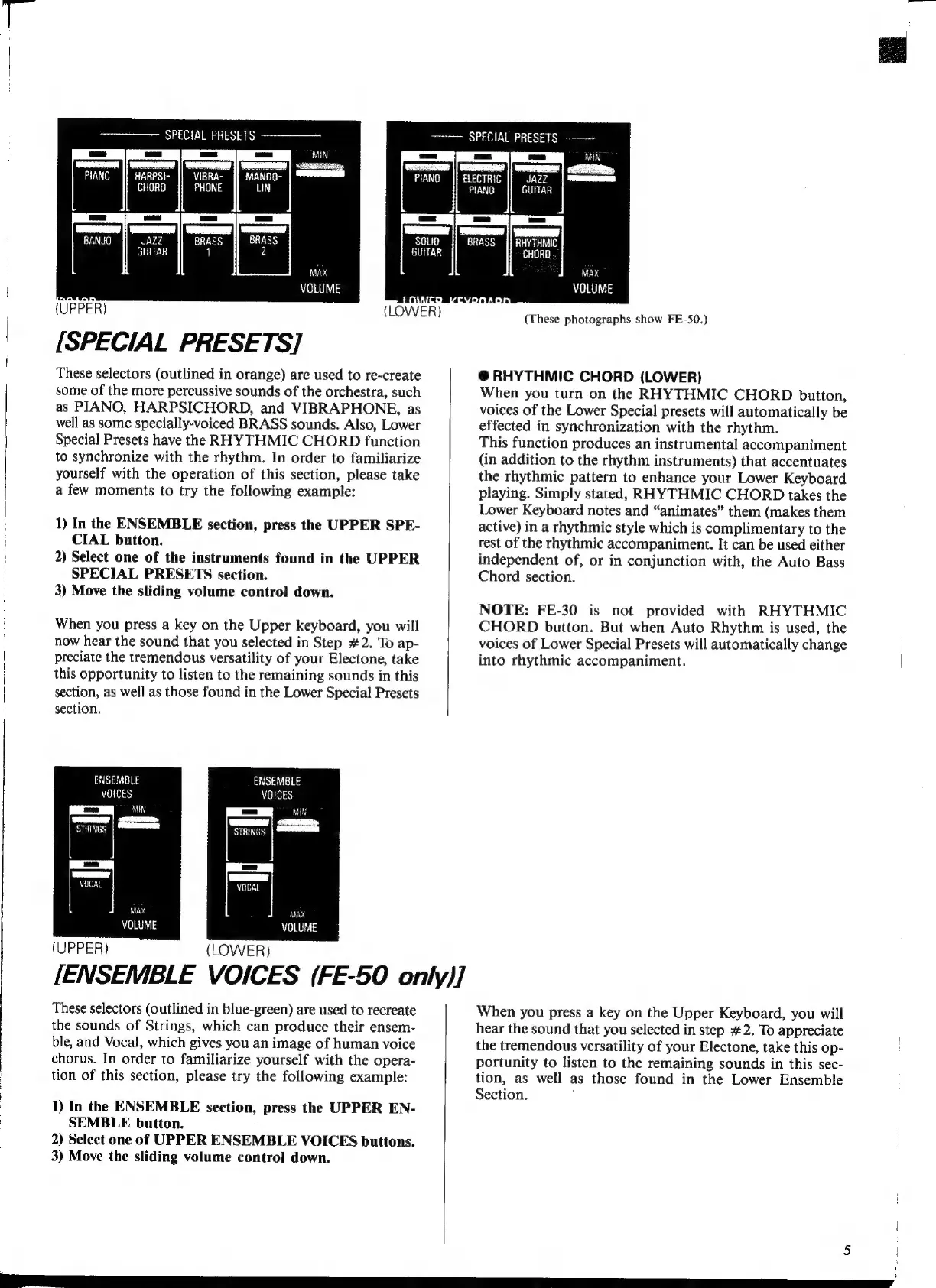
These
selectors
(outlined
in
orange)
are
used
to
re-create
some
of
the
more
percussive
sounds
of
the
orchestra,
such
as
PIANO,
HARPSICHORD,
and
VIBRAPHONE,
as
well
as
some
specially-voiced
BRASS
sounds.
Also,
Lower
Special
Presets
have
the
RHYTHMIC
CHORD
function
to
synchronize
with
the
rhythm.
In
order
to
familiarize
yourself
with
the
operation
of
this
section,
please
take
a
few
moments
to
try
the
following
example:
(
1)
In
the
ENSEMBLE
section,
press
the
UPPER
SPE-
CIAL
button.
2)
Select
one
of
the
instruments
found
in
the
UPPER
SPECIAL
PRESETS
section.
3)
Move
the
sliding
volume
control
down.
When
you
press
a
key
on
the
Upper
keyboard,
you
will
now
hear
the
sound
that
you
selected
in
Step
#2.
To
ap-
preciate
the
tremendous
versatility
of
your
Electone,
take
this
opportunity
to
listen
to
the
remaining
sounds
in
this
section,
as
well
as
those
found
in
the
Lower
Special
Presets
section.
ЕМБЕМВІЕ
VOICES
Wd
ымыра
STRINGS
аша
ENSEMBLE
Ү0ІСЕ5
STRINGS
(UPPER)
(LOWER)
[ENSEMBLE
VOICES
(FE-50
only)]
These
selectors
(outlined
in
blue-green)
are
used
to
recreate
the
sounds
of
Strings,
which
can
produce
their
ensem-
ble,
and
Vocal,
which
gives
you
an
image
of
human
voice
chorus.
In
order
to
familiarize
yourself
with
the
opera-
tion
of
this
section,
please
try
the
following
example:
1)
In
the
ENSEMBLE
section,
press
the
UPPER
EN-
SEMBLE
button.
2)
Select
one
of
UPPER
ENSEMBLE
VOICES
buttons.
3)
Move
the
sliding
volume
control
down.
LOWER)
(These
photographs
show
FE-50.)
@
RHYTHMIC
CHORD
(LOWER)
When
you
turn
on
the
RHYTHMIC
CHORD
button,
voices
of
the
Lower
Special
presets
will
automatically
be
effected
in
synchronization
with
the
rhythm.
This
function
produces
an
instrumental
accompaniment
(in
addition
to
the
rhythm
instruments)
that
accentuates
the
rhythmic
pattern
to
enhance
your
Lower
Keyboard
playing.
Simply
stated,
RHYTHMIC
CHORD
takes
the
Lower
Keyboard
notes
and
“animates”
them
(makes
them
active)
in
a
rhythmic
style
which
is
complimentary
to
the
rest
of
the
rhythmic
accompaniment.
It
can
be
used
either
independent
of,
or
in
conjunction
with,
the
Auto
Bass
Chord
section.
NOTE:
FE-30
is
not
provided
with
RHYTHMIC
CHORD
button.
But
when
Auto
Rhythm
is
used,
the
voices
of
Lower
Special
Presets
will
automatically
change
into
rhythmic
accompaniment.
When
you
press
a
key
on
the
Upper
Keyboard,
you
will
hear
the
sound
that
you
selected
in
step
#2.
To
appreciate
the
tremendous
versatility
of
your
Electone,
take
this
op-
portunity
to
listen
to
the
remaining
sounds
in
this
sec-
tion,
as
well
as
those
found
in
the
Lower
Ensemble
Section.

Related product manuals