EasyManua.ls Logo

Yamaha Electone FE-50 - Automatic Features; Knee Lever Control

Yamaha Electone FE-50
24 pages
Print Icon
To Next Page IconTo Next Page
To Previous Page IconTo Previous Page
Loading...
AU
ALUN
i
С
С]
MELODY
MELODY
VOLUME
DN ON
SOFT
Wgd
CHORD
2
—
PLAY
ASSIST
—
[PLAY
ASSIST]
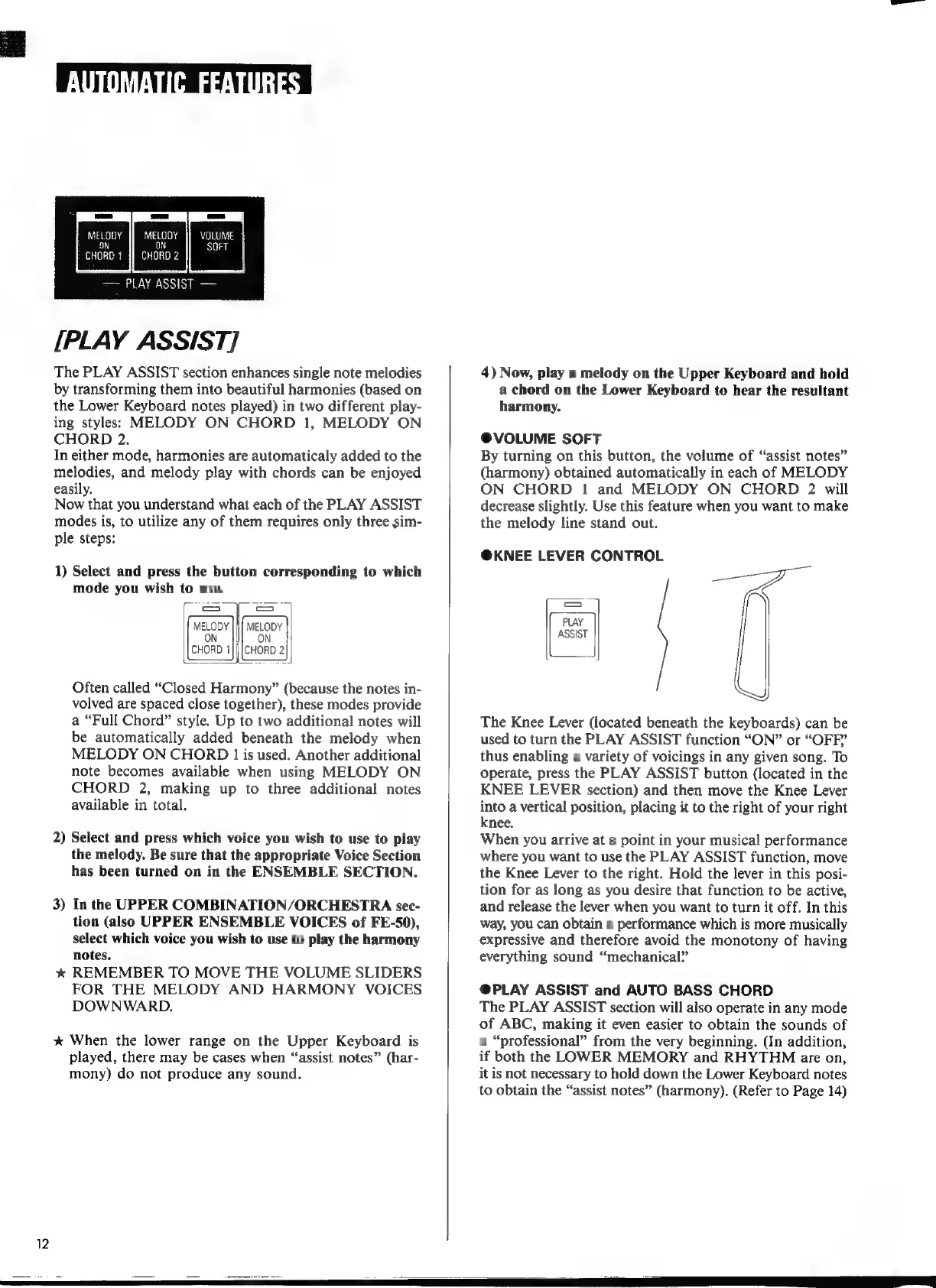
The
PLAY
ASSIST
section
enhances
single
note
melodies
by
transforming
them
into
beautiful
harmonies
(based
on
the
Lower
Keyboard
notes
played)
in
two
different
play-
ing
styles:
MELODY
ON
CHORD
1,
MELODY
ON
CHORD
2.
In
either
mode,
harmonies
are
automaticaly
added
to
the
melodies,
and
melody
play
with
chords
can
be
enjoyed
easily.
Now
that
you
understand
what
each
of
the
PLAY
ASSIST
modes
is,
to
utilize
any
of
them
requires
only
three
sim-
ple
steps:
1)
Select
and
press
the
button
corresponding
to
which
mode
you
wish
to
use.
ON
ON
CHORD
1|||CHORD
2
Often
called
*Closed
Harmony"
(because
the
notes
in-
volved
are
spaced
close
together),
these
modes
provide
a
"Full
Chord"
style.
Up
to
two
additional
notes
will
be
automatically
added
beneath
the
melody
when
MELODY
ON
CHORD
1
is
used.
Another
additional
note
becomes
available
when
using
MELODY
ON
CHORD
2,
making
up
to
three
additional
notes
available
in
total.
2)
Select
and
press
which
voice
you
wish
to
use
to
play
the
melody.
Be
sure
that
the
appropriate
Voice
Section
has
been
turned
on
in
the
ENSEMBLE
SECTION.
3)
In
the
UPPER
COMBINATION/ORCHESTRA
sec-
tion
(also
UPPER
ENSEMBLE
VOICES
of
FE-50),
select
which
voice
you
wish
to
use
to
play
the
harmony
notes.
*
REMEMBER
TO
MOVE
THE
VOLUME
SLIDERS
FOR
THE
MELODY
AND
HARMONY
VOICES
DOWNWARD.
*
When
the
lower
range
on
the
Upper
Keyboard
is
played,
there
may
be
cases
when
"assist
notes"
(har-
mony)
do
not
produce
any
sound.
4)
Now,
play
a
melody
on
the
Upper
Keyboard
and
hold
a
chord
on
the
Lower
Keyboard
to
hear
the
resultant
harmony.
@®VOLUME
SOFT
By
turning
on
this
button,
the
volume
of
“assist
notes”
(harmony)
obtained
automatically
in
each
of
MELODY
ON
CHORD
1
and
MELODY
ON
CHORD
2
will
decrease
slightly.
Use
this
feature
when
you
want
to
make
the
melody
line
stand
out.
@KNEE
LEVER
CONTROL
PLAY
ASSIST
The
Knee
Lever
(located
beneath
the
keyboards)
can
be
used
to
turn
the
PLAY
ASSIST
function
“ON”
or
“OFF”
thus
enabling
a
variety
of
voicings
in
any
given
song.
To
operate,
press
the
PLAY
ASSIST
button
(located
in
the
KNEE
LEVER
section)
and
then
move
the
Knee
Lever
into
a
vertical
position,
placing
it
to
the
right
of
your
right
knee.
When
you
arrive
at
a
point
in
your
musical
performance
where
you
want
to
use
the
PLAY
ASSIST
function,
move
the
Knee
Lever
to
the
right.
Hold
the
lever
in
this
posi-
tion
for
as
long
as
you
desire
that
function
to
be
active,
and
release
the
lever
when
you
want
to
turn
it
off.
In
this
way,
you
can
obtain
a
performance
which
is
more
musically
expressive
and
therefore
avoid
the
monotony
of
having
everything
sound
“mechanical?”
@PLAY
ASSIST
and
AUTO
BASS
CHORD
The
PLAY
ASSIST
section
will
also
operate
in
any
mode
of
ABC,
making
it
even
easier
to
obtain
the
sounds
of
a
“professional”
from
the
very
beginning.
(In
addition,
if
both
the
LOWER
MEMORY
and
RHYTHM
are
on,
it
is
not
necessary
to
hold
down
the
Lower
Keyboard
notes
to
obtain
the
“assist
notes”
(harmony).
(Refer
to
Page
14)