EasyManua.ls Logo

Yamaha Electone FE-50 - Auto Bass Chord; Single Finger Chord; Major Chords; Minor Chords

Yamaha Electone FE-50
24 pages
Print Icon
To Next Page IconTo Next Page
To Previous Page IconTo Previous Page
Loading...
SINGLE
FINGER
—
AUTO BASS
CHORD
—
[AUTO
BASS
CHORD]
The
AUTO
BASS
CHORD
section
is
sometimes
referred
to
as
the
*Easy
Play"
section
in
that
with
almost
no
musical
background,
advanced
styles
of
chord
and
bass
accompaniment
can
be
produced.
From
the
beginners
to
the
advanced
players,
the
Auto
Bass
Chord
feature
will
always
add
to
your
performance.
@SINGLE
FINGER
CHORD
SINGLE
FINGER
CHORD
is
the
fastest
and
easiest
mode
of
play
in
the
AUTO
BASS
CHORD
section.
When
in
use,
you
can
obtain
a
total
of
48
different
chords
and
bass
notes
by
pressing
one,
two
or
three
notes
on
the
Lower
Keyboard
as
follows:
1)
Major
Chords
By
pressing
only
one
note,
a
major
chord
(whose
root
or
fundamental
is
the
key
played
on
the
Lower
Keyboard),
will
result.
The
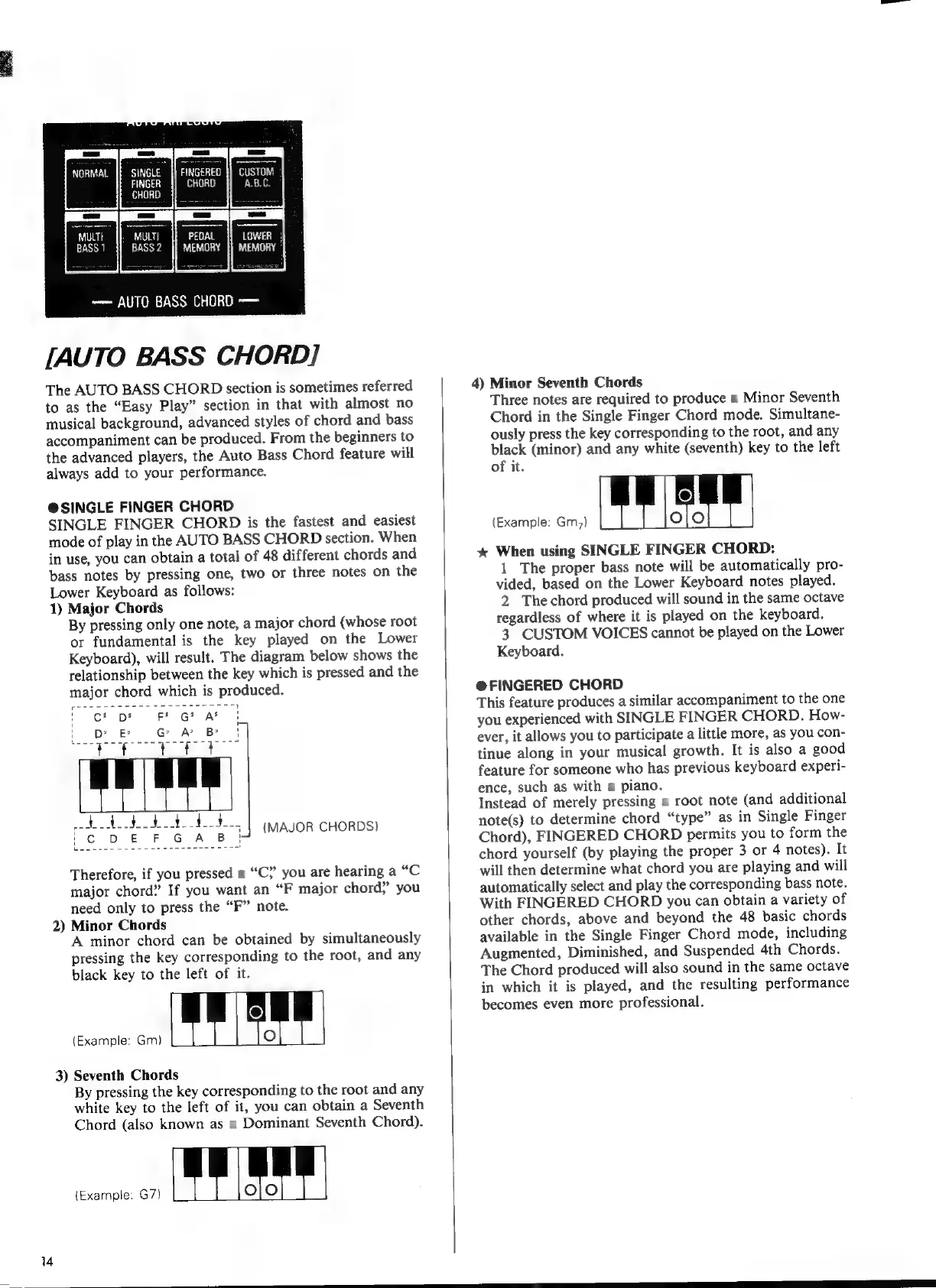
diagram
below
shows
the
relationship
between
the
key
which
is
pressed
and
the
major
chord
which
is
produced.
ct
pt
F*
G*
Af
DE
GAB
|
abusos
cee
op
Ce
ee
ee
c
DEF
GASB
(MAJOR
CHORDS)
Therefore,
if
you
pressed
a
*C?
you
are
hearing
a
“С
major
chord”
If
you
want
an
“F
major
chord?
you
need
only
to
press
the
“F”
note.
2)
Minor
Chords
A
minor
chord
can
be
obtained
by
simultaneously
pressing
the
key
corresponding
to
the
root,
and
any
black
key
to
the
left
of
it.
ОЕ
3)
Seventh
Chords
By
pressing
the
key
corresponding
to
the
root
and
any
white
key
to
the
left
of
it,
you
can
obtain
a
Seventh
Chord
(also
known
as
a
Dominant
Seventh
Chord).
ee
EE
4)
Minor
Seventh
Chords
Three
notes
are
required
to
produce
a
Minor
Seventh
Chord
in
the
Single
Finger
Chord
mode.
Simultane-
ously
press
the
key
corresponding
to
the
root,
and
any
black
(minor)
and
any
white
(seventh)
key
to
the
left
of
it.
(Example:
Gm;)
x
When
using
SINGLE
FINGER
CHORD:
]
The
proper
bass
note
will
be
automatically
Dro:
vided,
based
on
the
Lower
Keyboard
notes
played.
2
Thechord
produced
will
sound
in
the
same
octave
regardless
of
where
it
is
played
on
the
keyboard.
3
CUSTOM
VOICES
cannot
be
played
on
the
Lower
Keyboard.
@
FINGERED
CHORD
This
feature
produces
a
similar
accompaniment
to
the
one
you
experienced
with
SINGLE
FINGER
CHORD.
How-
ever,
it
allows
you
to
participate
a
little
more,
as
you
con-
tinue
along
in
your
musical
growth.
It
is
also
a
good
feature
for
someone
who
has
previous
keyboard
experi-
ence,
such
as
with
a
piano.
Instead
of
merely
pressing
a
root
note
(and
additional
note(s)
to
determine
chord
“type”
as
in
Single
Finger
Chord),
FINGERED
CHORD
permits
you
to
form
the
chord
yourself
(by
playing
the
proper
3
or
4
notes).
It
will
then
determine
what
chord
you
are
playing
and
will
automatically
select
and
play
the
corresponding
bass
note.
With
FINGERED
CHORD
you
can
obtain
a
variety
of
other
chords,
above
and
beyond
the
48
basic
chords
available
in
the
Single
Finger
Chord
mode,
including
Augmented,
Diminished,
and
Suspended
4th
Chords.
The
Chord
produced
will
also
sound
in
the
same
octave
in
which
it
is
played,
and
the
resulting
performance
becomes
even
more
professional.