63
ENGLISH
Display DisplayControl panel Control panel
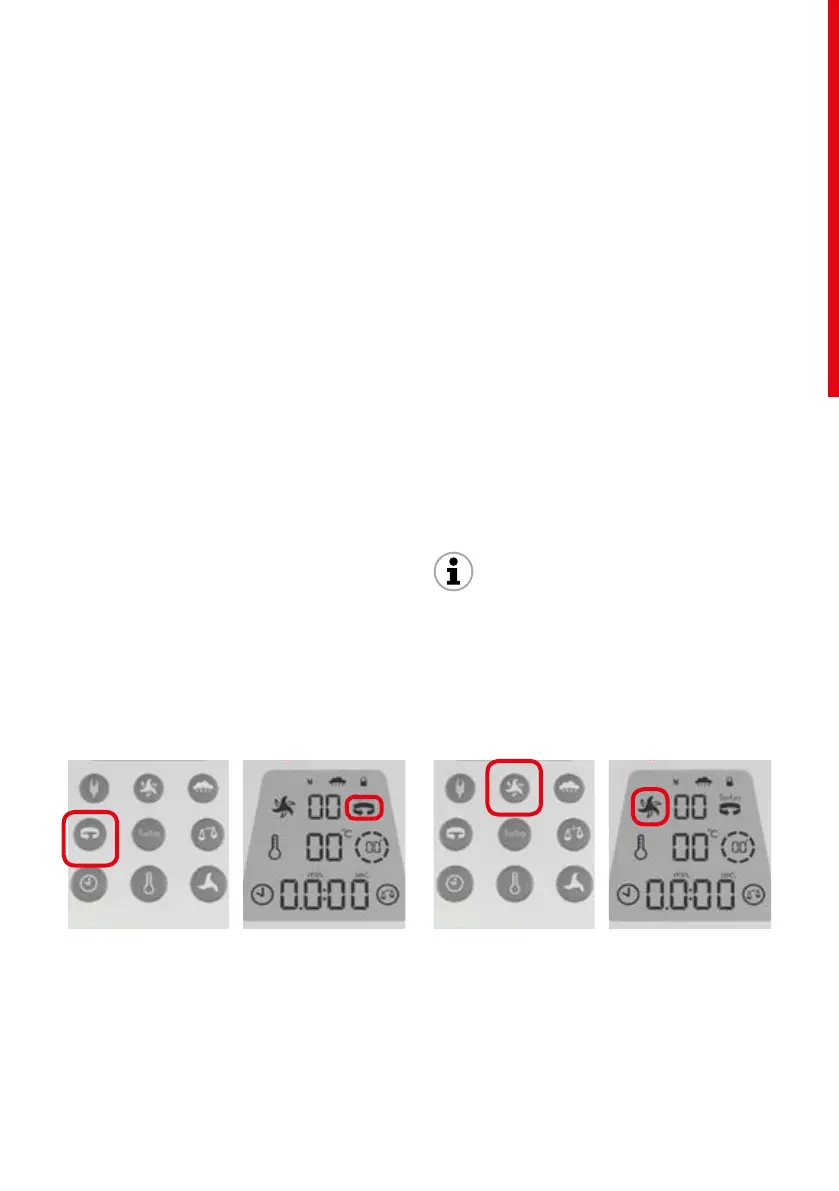
/ Reverse Rotation function
The Reverse Rotation function is intended for mixing
ingredients, whenever you do not need to cut.
To activate the Reverse Rotation function:
touch the Reverse Rotationbuttonfunction
once. Automatically, the direction of blade rotation
changes from right to left when the food processor
is in operation. While the Reverse Rotation function
is activated, the corresponding symbol is displayed
on the LCD.
To deactivate Reverse Rotation, simply
tap again on the button Reverse Rotation func-
tion.
The Reverse Rotation function can be activated
before or during preparation. To work, a speed must
be set, unless on Turbo speed.
The Reverse Rotation function is not available when
the Grinding or Kneading functions are activated.
/ Grinding function
The Grinding function is used for chopping the
ingredients through intermittent variations
in the rotation speeds of the blade, in cycles of 10
seconds.
To activate the Grinding function: touch the
Grinding function button once for one grinding
cycle. When the function is activated, the correspond-
ing symbol is displayed on the LCD.
For the Grinding function, the blade rotation is in the
direction of the cut (clockwise).
To deactivate the Grinding function while in the
grinding cycle, simply touch the Grinding function
button again.
Information!
The Grinding function is not available when the food
processor is running.
06
CONTROL PANEL


 To Next Page
 Loading...