® Shanghai Yatai Instrument Ltd JC Series Electric Counter User Manual
Address: Marketing Department: 8F Rongxin Mansion, 1851 North Sichuan Road Shanghai China, Tel: 021-51053127; 51053128
Technical support and Factory: No. 128 Zhenyuan Rd, Baoshan City industrial Park, Shanghai China, Tel: 021-36160962, 36160096 (English)
Email://yatai@yatai.sh.cn Website:HTTP://WWW.yatai.sh.cn
JC Series Electric Counter – User Manual
General Description
JC series electronic counter provides excellent performance by
using the single chip micro-processor with high accuracy, wide
counting range, digital display, soft contact operating key, data
protection during blackout, strong anti-disturbance capability,
modern design of appearance, etc.
JC series electronic counter can be used in many industrial
applications such as packaging, printing, pharmacy, food, textile,
papermaking, ceramic, petroleum, chemical engineering, metallurgy,
etc. It can also display and control other parameters like rotating
revolution and length.
A:12DC、20~42VAC/DC
J C
S
-
20:36×76 (Panel size)
48:48×48
72:72×72
80:80×160
Single preset model
Power Voltage:
B:187~242VAC
C: 85~264VAC
Technical Parameters and Functions
1.Mounting:panel mounting or socket mounting.
2.Power supply:4.5W;Single input impedance:≥5KΩ
3.Maximum counting frequency:high speed:5000times/s;medium
speed:250 times/s;low speed:25 times/s. (duty ratio is 1:1)
4.Counting type:counting up and counting down according to user
selection
5.Input signals and the frequency options:
⑴.Contact signal:For relay, distance switch, micro switch, the
frequency should be set to low speed (30 times/s) when the signal
duty ratio is 1:1.
⑵.Non-contact signal:For proximity switch, photoelectric switch,
ect, the frequency can be set to either high (1000 times/s) or low(30
times/s) according to requirement when the signal duty ratio is 1:1.
⑶.Pulse signal: For TTL circuit and impulse voltage (low level VL
=0~1.3V, high level VH=4.5~30V). The frequency can be set to
either high (1000 times/s) or low (30 times/s) according to
requirement.
6.Modes for control output
mode: When the meter counting value reaches its preset value, the
output contact is emitted and continue counting.
mode: When the meter counting value reaches its preset value, the
output contact is emitted and counting stops.
mode: When the meter counting value reaches preset value, display
is reset to zero automatically and meter counting repeats, and the
control contact is activated until the mono-stable time is elapsed.
( R)
mode: When the meter counting value reaches its preset
value, counting stops ,control contact acts as output, the control
contact is activated until the mono-stable time is elapsed
,
display
is reset to zero automatically and meter counting repeats.
7.anti-jamming intensity:3 level(IEC801).
8. Data backup (optional): >10 year.
9. Reset (to zero) types: The display values and control output
reset simultaneously.
⑴Press the reset (to zero) key on the surface panel (only during
counting);
⑵Reset with the terminals(by short the RST and the COM
pin),the width of the reset pulse>0.1S;
⑶Automatic reset with mono-stable delay::select from 0~99.9s.
10. External power supply for sensor:DC12V,current value is
listed in Table 1.
11.Contact capacity of the control output:3A/250VAC(for
resistance load).
12.Operating environment:temperature 0~50℃;relative
humidity≤95%(without dew)。
Specification 表 1
Size of
mounting
hole(mm)
Options available including
preset mode, counting
frequency mode, counting
mode, counting output mode,
output mono-stable time delay,
data back up with power failure
NOTE: JC20S socket length:106mm, insert depth 100mm; terminal type length:90mm, insert depth 84mm.
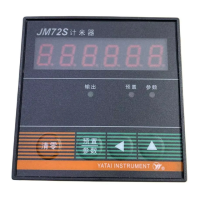
Display Panel
JC20S COUNTER
PARAM ETER
PRE SET
CLEAR
▲
JC48SCOUNTER
CLEAR
PARAMETER
PRESET
JM80S COUNTER
OUTPUT
PARAMET ER
PRESE T
▲
CLEAR
▲
PRESET
PARAMETER
JC20S JC48S/JM72S JC80S


 To Next Page
 Need help?
 General