| Yealink Connect Application | 23
Environment Adaption Adjust the headset performance in different usage environment.
• Adaptive
• Noise Environment
• Quiet Environment
• Off
Platform Change the platform between UC and Teams.
Calling Settings
Equalizer for Calls
Select an audio preference to use for all calls.
Default: Normal.
• Normal: The bass and treble are balanced.
• Bass: The bass is enhanced.
• Treble: The treble is enhanced.
PC Call Device
Connect headset to multiple PC softphones, the feature supports
specifying a PC softphone enter the dialing screen to make a call.
Hearing Protection
Anti-Startle Protection Select to automatically adjust the volume level in the headset to limit
your daily exposure to excessive audio volume. The headset always
provides protection against sound spikes.
• Peak Block Protection
• Australian G616 Protect
Daily Noise Exposure Configure the daily noise exposure levels.
• No Limiting
• 80dBA
• 85dBA
Factory Reset/Reboot
You can reset the headset via the Yealink USB Connect.
1. In the Yealink USB Connect.
2. Go to Device Support.
3. Select Reboot device or Restore factory settings.
Yealink Connect Application
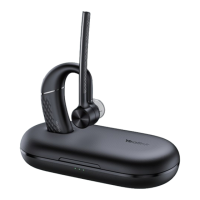
Yealink Connect is a mobile application designed to manage Bluetooth headsets, allowing you to quickly
access device status, manage and control your Bluetooth devices, and personalize your experience even
more.
Download the Yealink Connect App from:


 To Next Page
 Loading...