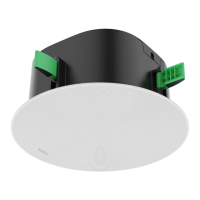
CS10CS10
IntroductionIntroduction
The Yealink CS10, a low-profile (120mm) 2-way coaxial network speaker, excels in video conferencing with its
exceptional audio performance. Designed specifically for the modern meeting environment, the CS10 blends high-
quality audio with an elegant, minimalist design, making it a perfect match for contemporary conference rooms.
Versatile and engineered for ease of use, the CS10 is a PoE-enabled speaker that can optionally deployed with
variety of supplementary components, simplifying installation across diverse ceiling types. Its covert design,
establishes the CS10 as more than just a speaker ‒ it is an essential addition to your meeting space, enhancing both
visual and auditory experiences.
The CS10 is not just a functional device for your conference room; it's a statement of elegance and technological
prowess, representing the ideal audio solution for your professional needs.
Device CompatibilityDevice Compatibility
For the CS10 maximum number of compatible devices that can be connected to MeetingEye, please refer to Zoom
Rooms Accessories Compatibility Lists.
How to UseHow to Use
InstallationInstallation
Please refer to CS10 Deployment and Connection.
Connect CS10 to MeetingEyeConnect CS10 to MeetingEye
Method 1: Directly connect to the endpoint's audio portMethod 1: Directly connect to the endpoint's audio port

 Need help?

 To Next Page
 General