9. Forward Call
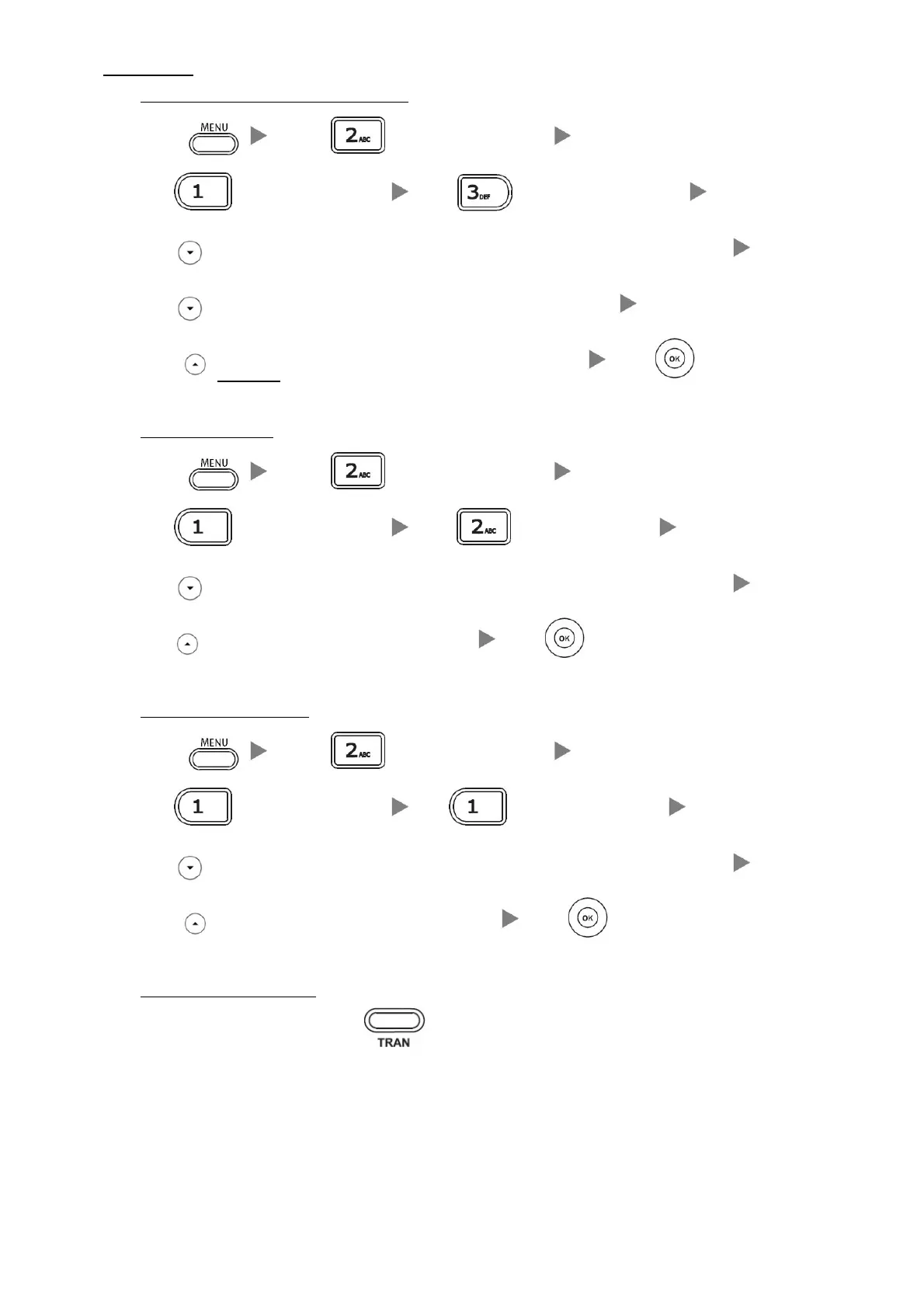
i. To set up Time Limited / No Answer Mode
Press Press (or choose “Features”)
Press
(or choose “Forward”) Press (or choose “No Answer”)
Press
to select the “Forward to “option and input the target extension Number (e.g. 108)
Press
to select “After Ring Time “and select the Time Limit (e.g. 18s)
Press
two times and select Enable form the “No answer” Field Press
ii. To set up Busy Mode
Press Press (or choose “Features”)
Press
(or choose “Forward”) Press (or choose “Busy”)
Press
to select the “Forward to “option and input the target extension Number (e.g. 108)
Press
and select Enable form the “Busy” Field Press
iii. To set up the Always mode
Press Press (or choose “Features”)
Press
(or choose “Forward”) Press (or choose “Always”)
Press
to select the “Forward to “option and input the target extension Number (e.g. 108)
Press
and select Enable form the “Always” Field Press
iv. To Cancel Calls Forwarding
Back to the Main Screen and Press to cancel call forward


 To Previous Page
 Loading...