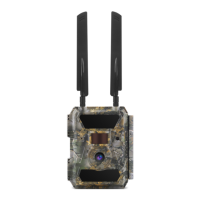
The Yellowstone.ai 4G LTE Trail Camera is a robust and user-friendly device designed for remote monitoring and image capture, offering both 100° and 52° lens models. It integrates 4G LTE cellular connectivity, allowing users to receive images and videos directly to their phone or computer via the Yellowstone.ai Command Center. The camera is built for ease of use, with a focus on reliable performance and continuous improvement based on user feedback.
Function Description:
The primary function of the Yellowstone.ai trail camera is to capture still images and videos of wildlife or other subjects in remote locations and transmit them wirelessly over a 4G LTE network. It features a Passive Infrared (PIR) sensor to detect motion, triggering the camera to record. Users can configure various settings, including camera mode (photo, video, or both), image resolution, night mode, multi-shot capabilities, and video length. The camera also supports time-lapse photography and can be set to operate during specific time windows using its timer functions. All captured media is stored on an SD card and, if enabled, transmitted to the Yellowstone.ai Command Center for remote viewing and management.
Important Technical Specifications:
- Image Sensor: 5 Megapixel Color CMOS
- Effective Pixels: 2560x1920
- Day/Night Mode: Yes
- IR Range: 65 feet
- IR Flash: 940nm invisible flash - 57 LEDs
- Memory: SD Card (4GB – 32GB)
- Field of View: 52° for standard lens; 100° for wide lens
- LCD Screen: 2"
- PIR Distance: 65 feet
- Picture Size: 5MP/8MP/12MP (2560x1920/3264x2448/4032x3024)
- Picture Format: JPEG
- Video Resolution: FHD (1920x1080), HD (1280x720), SD (WVGA - 848x480)
- Video Format: MOV
- Video Length: 5-10 seconds (programmable for wireless transmission), 5-59 seconds (programmable for no wireless transmission)
- Picture Size for Wireless Transmission: 640x480/1920x1440/Original (5MP/8MP or 12MP)
- Multi-Shot: 1-5 pictures per trigger
- Trigger Time: 0.4s
- Image + Video: Yes
- Time Lapse: Yes
- SD Card Cycle: ON/OFF (deletes oldest photos/videos when full)
- Operation Power: Battery: 9V; DC: 12V
- Battery Type: 12 AA batteries
- External DC: 12V
- Stand-by Current: 0.135mA
- Stand-by Time: 5-8 months (with 6-12 AA batteries)
- Wireless Module: LTE Cat.4 module; 2G & 3G networks also supported
- Interface: USB/SD Card/DC Port
- Mounting: Strap; Bracket; Tripod (industry standard 1/4 in x 20)
- Operating Temperature: -13°F to 140°F (manual restart may be required in cold weather)
- Storage Temperature: -22°F to 158°F
- Operation Humidity: 5%-90%
- Dimensions: 6 in x 4 1/2 in x 3 in
- Weight: 1 pound
- Certification: CE FCC RoHs
Usage Features:
- Activation Guide: The camera requires activation through the Yellowstone.ai Command Center website (my.yellowstone.ai). This involves creating an account, locating the camera's 20-digit ICCID, entering a location label, and providing payment information for the data plan. An optional mobile app is available for download to manage cameras and receive push notifications.
- Camera Setup: To prepare the camera, users must open the case, insert 12 AA batteries (new and of the same type are recommended), and screw in the two 4G antennas.
- Network Connection: The camera connects to the network by flipping the switch to 'SETUP' mode. The LCD screen will display 'Searching...' or 'GPS Searching...' during this process, which can take up to 3 minutes. If 'No Signal' is displayed after activating a data plan, users may need to power cycle the camera multiple times.
- First Image Transmission: Once connected, users can send a test picture by pressing the 'OK' button in 'SETUP' mode. The camera will display "Sending..." then "Send Succeed," and the image should appear in the Yellowstone.ai Command Center.
- SD Card Management: The camera supports SD cards up to 32 GB (FAT32 format is required). Users can format the SD card directly on the camera, via a computer's SD port, or by connecting the camera to a computer via USB. The camera can be set to automatically delete the oldest images when the SD card is full to make room for new ones.
- Viewing Images/Videos: Media can be viewed on the camera's LCD screen by switching to 'SETUP' mode and using the arrow buttons. Alternatively, users can insert the SD card into a computer or connect the camera via USB to access the 'DCIM' folder.
- Deleting Images/Videos: Images and videos can be deleted from the SD card through the camera's menu ('Del' option) or when viewing files on a computer.
- Camera Settings Adjustment: Settings are accessed by flipping the switch to 'SETUP' and pressing the 'MENU' button. Users navigate through categories (Cam, PIR, 4G, Other) and options using arrow buttons and the 'OK' button.
- Cam Settings: Control media type (Photo/Video/Both), flash brightness, image resolution (12M, 8M, 5M), night mode (Max.Range/Balanced/Min.Blur), multi-shot count (1-5P), video resolution (FHD-1080P/HD-720P/SD-480P), and video length (5-59 seconds).
- PIR Settings: Enable/disable the PIR sensor, adjust sensitivity (High/Middle/Low), set PIR delay (minimum delay between triggers), enable time-lapse photography, and configure two timers for specific operating hours.
- 4G Settings: Control which media types are wirelessly transmitted (Photo/Video), transmitted picture resolution (Low, Med, High), maximum daily picture count (0-99 or Unlimited), web control frequency (Daily/Instant), and GPS (ON/OFF for image coordinates).
- Other Settings: Adjust language, date/time (Auto/Manual), SD cycle (ON/OFF for automatic deletion of old files), password protection, FW update, and factory reset.
- Mounting Recommendations: Mount the camera 3-4 feet off the ground (up to 8 feet to avoid blowing grasses/branches), facing north to prevent false triggers from sun. Use high-quality batteries (Energizer ultimate lithium or Panasonic Eneloop rechargeable are recommended). Mount on a sturdy tree at waist height. For travel corridors, increase PIR sensitivity to High and reduce night mode exposure time to Min.Blur. Avoid branches and grass within 15 ft and heat sources. Brighten night photos by having reflective objects in the background. Minimize "profile" visibility by hanging on a big tree, wiping down after handling, and limiting visits.
Maintenance Features:
- Battery Replacement: Requires 12 AA batteries. New, same-type batteries are recommended for optimal performance and lifespan.
- SD Card Formatting: Regular formatting of the SD card is recommended, especially when replacing the card, to ensure FAT32 compatibility and prevent data issues.
- Firmware Updates: The camera supports firmware updates, which can be downloaded from www.Yellowstone.ai/firmware.
- Troubleshooting: A dedicated troubleshooting section is available on the Yellowstone.ai website (https://yellowstone.ai/troubleshooting) for common issues.
- Customer Support: Users can contact support@yellowstone.ai or call (970) 821-8525 for assistance.

 Need help?
 General

 To Next Page