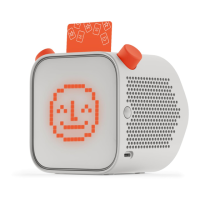
The Yoto Player 1 is a screen-free audio player designed for children, allowing them to listen to audio content by inserting physical cards. It emphasizes a simple, intuitive user experience and includes features for parental control through a companion mobile app.
Function Description:
The primary function of the Yoto Player 1 is to play audio content. This content is accessed by inserting specially designed physical cards into a slot on the device. Each card is linked to specific audio, such as stories, music, or podcasts. The device is designed to be child-friendly, with minimal controls and a robust build. It connects to Wi-Fi to download and stream content associated with the cards, and also allows for parental control and device management through a mobile application. The Yoto Player 1 displays simple pixel-art animations on its front screen, which can include a "Yoto face" or other relevant graphics, enhancing the interactive experience without relying on a traditional screen.
Important Technical Specifications:
- Product Name: Yoto Player 1
- Connectivity: Wi-Fi for content download and streaming.
- Power Supply: External power supply (AC/DC adaptor) is required for operation.
- Operating Environment: Designed for reliable operation at normal ambient room temperatures. Requires a well-ventilated environment and should not be covered.
- Compliance:
- RoHS Directive: Complies with relevant provisions for the European Union.
- WEEE Directive: Complies with the WEEE Directive Statement for the European Union, meaning it should not be disposed of in household waste.
- EMC Compliance (EU): Conforms to EU Council Directive 2004/108/EC and European Standard EN 55022 (Class B Information Technology Equipment).
- Radio Equipment Directive (EU): Complies with essential requirements and other relevant provisions of Directive 1999/5/EC.
- FCC Emissions Compliance (US): Complies with Part 15 of the FCC Rules. Operation is subject to two conditions: (1) device may not cause harmful interference, and (2) device must accept any interference received.
- FCC Radiation Exposure: Complies with FCC radiation exposure limits for an uncontrolled environment. Minimum installation distance of 20cm between the user and the device.
- Industry Canada Class B Emissions Compliance (Canada): Complies with Industry Canada licence-exempt RSS standard(s). Operation is subject to two conditions: (1) device may not cause interference, and (2) device must accept any interference received. Complies with Canadian ICE-003.
Usage Features:
- Powering On: The device is turned on by plugging it into a power socket using the provided power supply. After approximately two minutes, it will indicate readiness with a white "Yoto face" on its display.
- Wi-Fi Connection:
- To initiate Wi-Fi setup, users press and hold both blue buttons on the device for five seconds until a beep is heard.
- The device then broadcasts a Wi-Fi network (e.g., "Yoto_Wi-Fi_Network") that users connect to via their mobile device's Wi-Fi settings.
- Once connected to the Yoto's network, users return to the companion app to select their home Wi-Fi network from a list and enter the password.
- Mobile Device Pairing:
- After connecting to Wi-Fi, the Yoto Player can be paired with a mobile device via the Yoto app.
- The app will prompt the user to confirm pairing and may display a code on the Yoto Player's screen, which needs to be entered into the app for verification.
- Pairing allows parents to control features like maximum volume and sleep times through the app.
- Audio Playback: Audio content is played by inserting a physical Yoto card into the slot on the top of the device. The device will automatically begin playing the associated audio.
- General Controls:
- Right Blue Button: Used to skip tracks or navigate content.
- Left Blue Button: Used to skip tracks or adjust volume.
- Screen-Free Experience: The Yoto Player focuses on audio and physical interaction with cards, minimizing screen time for children. The front display shows simple pixel-art animations rather than complex visuals.
- Parental Control (via App): The companion mobile app provides parents with control over various device settings, including volume limits and sleep timers, enhancing the safety and usability for children.
Maintenance Features:
- Safe Handling: Users are advised to handle the Yoto Player with care to avoid mechanical damage.
- Environmental Protection:
- Do not expose the device to water or moisture during operation.
- Do not expose the device to heat from any source.
- Ensure the device is operated in a well-ventilated environment and is not covered.
- Place the device on a stable, flat surface during use and ensure it does not come into contact with conductive items.
- Peripheral Compatibility: All peripherals used with the Yoto Player must comply with relevant standards for the country of use and be marked accordingly to ensure safety and performance requirements are met.
- Disposal: In accordance with the WEEE Directive, the Yoto Player should not be disposed of in household waste. Users should follow alternative arrangements for disposal that may apply in their jurisdiction.
- Firmware/Software Updates: While not explicitly detailed in the provided manual, devices with Wi-Fi connectivity typically receive over-the-air firmware updates to improve functionality and address issues.
- Troubleshooting (Interference): In case of radio or television interference, users are advised to reorient or relocate the receiving antenna, increase separation between equipment and receiver, connect the equipment to a different circuit, or consult a dealer/experienced technician.

 Need help?

 To Next Page
 General