7
Use Method
Operation
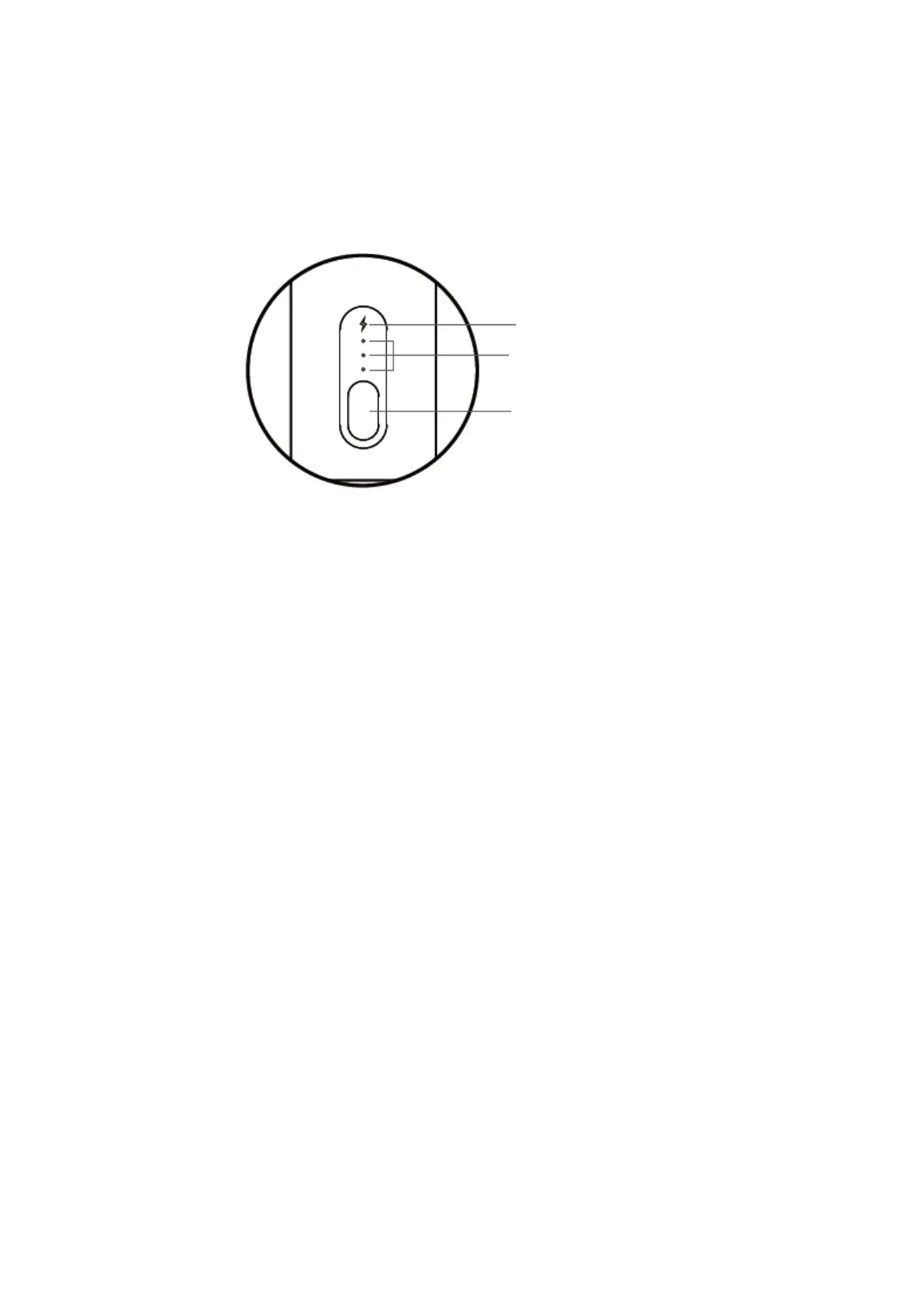
1. Gear indicator: Gear 1 to Gear 3.
2. Power indicator:
1 When the indicator light turns white, the battery power is equal to or greater
than 20%. to or greater than 20%.
2. When the indicator light turns red, the battery power is less than 20%, please
charge in time. (In the process of charging, if the indicator light flashes white, it
means the product is charging; if the white light is always, it means the product is
charging; if the white light is always on, it means the product is fully charged)
3. When the indicator light flashes red, the battery power is less than 5%, and the
product will stop working.
3. ON/OFF key:
1. After pressing and holding the ON/OFF key for 2s, the product will be turned
on, and the power indicator and gear indicator will be on simultaneously to enter
Gear 1 by default. Then press the ON/OFF key to enter Gear 2, followed by Gear
3, Neutral (Standby) and Gear 1 if pressed once again and again after the
previous operation, and enter the recycle.
2.Press and hold for shutdown in any mode.
3.In neutral (standby) status, the product will automatically shut down in case of
no operation for 15s. down in case of no operation for 15s.
4. The product will enter the intelligent power-off protection mode after
continuous use of 10min. In this case, restart the product if you need to use it.


 To Next Page