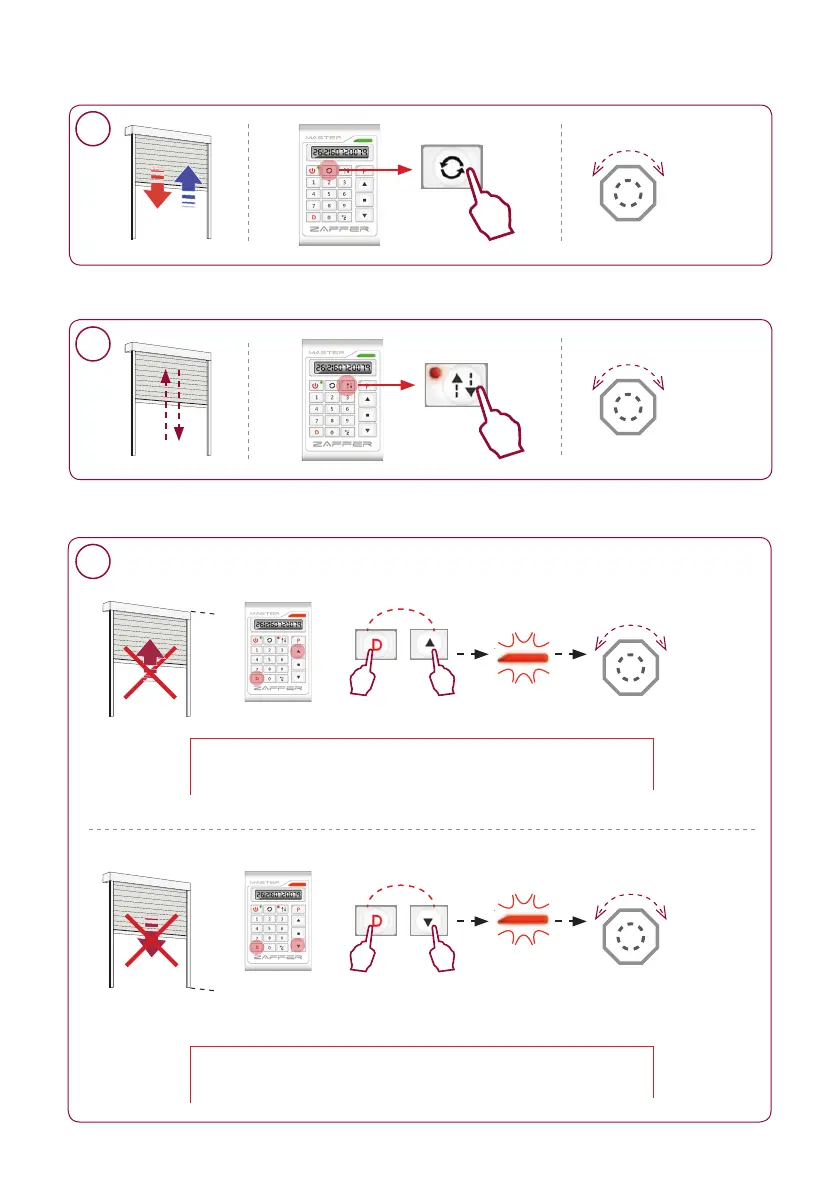
Verandering draairichting - Changer sens de rotation - Changing direction
click - clak
Reactie
Réaction
Reaction
MOTOR
= OK
click - clak
Reactie
Réaction
Reaction
MOTOR
= OK
1x
1x
Invoeren «stap per stap» functie - Entrer fonction «pas à pas» - Enter «step by step» function
6
Verwijderen Bovenlimiet / Onderlimiet - Supprimer course Haut / Bas - Deleting limit setting Up / Down
click - clak
Reactie
Réaction
Reaction
MOTOR
= OK
click - clak
Reactie
Réaction
Reaction
MOTOR
= OK
Onder - Bas - Down
Druk eerst op de toets D en vervolgens op de toets op de twee toetsen blijven drukken
Appuyer d’abord sur la touche D puis sur la touche rester appuyez sur les deux touches
First press the key D then on the key keep pressing on the two keys
Druk eerst op de toets D en vervolgens op de toets op de twee toetsen blijven drukken
Appuyer d’abord sur la touche D puis sur la touche rester appuyez sur les deux touches
First press the key D then on the key keep pressing on the two keys
7
Boven - Haut - Up
5
6
7


 To Next Page
 Loading...