EasyManua.ls Logo

Zagg ipad air - User Manual

Zagg ipad air
20 pages
Print Icon
To Next Page IconTo Next Page
Loading...
*WARRANTY REGISTRATION
Your ZAGG® Cover comes with a one-year manufacturers warranty. In order to activate
the warranty, you must register your Cover as well as keep your purchase receipt. If you
purchased your ZAGG Cover from ZAGG.com, ZAGG has already registered it and has a
copy of your proof of purchase.
NEED MORE HELP? PLEASE SEE OUR FAQ SECTION AT: www.ZAGG.com/faq
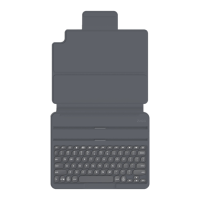
Cover
iPad Air
Keyboard Instructions
Question and Answer IconNeed help?

Do you have a question about the Zagg ipad air and is the answer not in the manual?

Summary

Inserting and Removing Your iPad

Powering On and Off

Pairing Your ZAGG Cover

Charging

Battery Life

Special Function Keys

HOME Key

Displays your iPad's home screen.

LOCK Key

Activates and deactivates your iPad's sleep mode.

MIC Key

Activates Siri from your keyboard.

UNDO Key

Undoes your last keystroke.

REDO Key

Repeats your last keystroke.

KEYBOARD HIDE;SHOW Key

Hides or shows your iPad's on-screen keyboard.

COPY Key

Copies selected text to your clipboard.

PASTE Key

Pastes clipboard content in your selected field.

PREVIOUS TRACK Key

Skips to the previous track on your current playlist.

PLAY;PAUSE Key

Starts or stops your current playlist.

NEXT TRACK Key

Skips to the next track on your current playlist.

MUTE Key

Mutes your iPad's audio.

VOLUME DOWN Key

Decreases your iPad's volume.

VOLUME UP Key

Increases your iPad's volume.

CAPS LOCK Key

Activates the Caps Lock feature. A blue indicator light remains lit.

WORLD SYMBOL Key

Toggles between international keyboards.

BATTERY SYMBOL Key

Indicates remaining battery life.

BACKLIGHT SYMBOL Key

Activates your Cover's backlight feature.

BACKLIGHT COLOR OPTIONS

Select your preferred backlight color by holding the backlight button and pressing the right arrow.

COMMAND + DELETE

Performs forward delete.

Troubleshooting

Summary

Inserting and Removing Your iPad

Powering On and Off

Pairing Your ZAGG Cover

Charging

Battery Life

Special Function Keys

HOME Key

Displays your iPad's home screen.

LOCK Key

Activates and deactivates your iPad's sleep mode.

MIC Key

Activates Siri from your keyboard.

UNDO Key

Undoes your last keystroke.

REDO Key

Repeats your last keystroke.

KEYBOARD HIDE;SHOW Key

Hides or shows your iPad's on-screen keyboard.

COPY Key

Copies selected text to your clipboard.

PASTE Key

Pastes clipboard content in your selected field.

PREVIOUS TRACK Key

Skips to the previous track on your current playlist.

PLAY;PAUSE Key

Starts or stops your current playlist.

NEXT TRACK Key

Skips to the next track on your current playlist.

MUTE Key

Mutes your iPad's audio.

VOLUME DOWN Key

Decreases your iPad's volume.

VOLUME UP Key

Increases your iPad's volume.

CAPS LOCK Key

Activates the Caps Lock feature. A blue indicator light remains lit.

WORLD SYMBOL Key

Toggles between international keyboards.

BATTERY SYMBOL Key

Indicates remaining battery life.

BACKLIGHT SYMBOL Key

Activates your Cover's backlight feature.

BACKLIGHT COLOR OPTIONS

Select your preferred backlight color by holding the backlight button and pressing the right arrow.

COMMAND + DELETE

Performs forward delete.

Troubleshooting

Zagg ipad air Specifications

General IconGeneral
BrandZagg
Modelipad air
CategoryCell Phone Accessories
LanguageEnglish

Related product manuals