

EasyManua.ls Logo

ZIGBEE ENVILAR ZG302 - User Manual

ZIGBEE ENVILAR ZG302
4 pages
Print Icon
To Next Page IconTo Next Page
Loading...
BRADICO ApS Fåborgvej 15A, 9220 Aalborg Øst CVR: 39445409 Tlf. 71 99 29 23
!
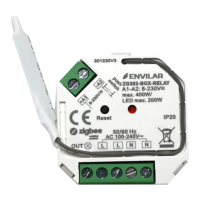
ENVILAR ZG302-BOX-RELAY
EAN: 5712716078529
Sikkerhed og advarsler/Safety & Warnings
DA:
Sluk strømmen før installation af produktet.
Udsæt ikke produktet for fugt.
Skal installeres af autoriseret el-installatør.
Kan monteres i el godkendte samledåser
EN:
DO NOT install with power applied to device.
DO NOT expose the device to moisture.
Must be installed by certified electrician.
Tilslutningsdiagram/Connection diagram
Produktdata/Product data
Belastning/Compatible Load
Egenskaber/Specifications
DA
EN
Zigbee universal relæ baseret på
seneste ZigBee 3.0 protocol
100-240VAC input and output V
1 kanal output, up to 400w
Skrueterminaler til
ledningsfastgørelse
Styring af Tænd/Sluk
Kan parres direkte via Touchlink
Kompatibel med universale ZigBee
gateway produkter.
Kan kontrolleres via 8-230V input via
fjedertryk (push).
Radio Frekvens : 2.4GHz
IP20
ZigBee in-wall switch based on
latest ZigBee 3.0 protocol
100-240VAC wide input and output
1 channel Output, Up to 400w
Input and Output with Screw
Terminals.
Enables to control ON/OFF
Can directly pair via Touchlink .
Compatible with universal ZigBee
gateway products
Can be controlled by universal 8-
230V input single wire push switch
Radio Frequency : 2.4GHz
IP20
!
Input Voltage
Output Voltage
Output Current
Size(LxWxH)
100-240VAC
100-240VAC
1.8A max
45.5x45x20.3mm
Question and Answer IconNeed help?

Do you have a question about the ZIGBEE ENVILAR ZG302 and is the answer not in the manual?

Overview

This document describes the ENVILAR ZG302-BOX-RELAY, a Zigbee-enabled universal in-wall switch designed for controlling various lighting types.

Function Description

The ENVILAR ZG302-BOX-RELAY is a wireless receiver that communicates with and is controlled by Zigbee compatible systems. It functions as an in-wall switch, allowing users to control connected lighting fixtures via Zigbee gateways or directly paired remotes. The device supports a wide range of input and output voltages (100-240VAC) and can handle a maximum output of 400W on a single channel. It is designed to be installed in electrical junction boxes.
Important Technical Specifications

  • EAN: 5712716078529
  • Compliance: CE, RoHS, Zigbee 3.0 protocol
  • Input Voltage: 100-240VAC
  • Output Voltage: 100-240VAC
  • Output Current: 1.8A max
  • Output Channels: 1 channel
  • Maximum Load: Up to 400W
    • LED lamps with transformers: 200W @ 220V / 100W @ 110V (Note: Actual maximum number of LED lamps depends on power factor)
    • LED drivers: 200W @ 220V / 100W @ 110V (Note: Maximum permitted number of drivers is 200W divided by driver nameplate power rating)
    • Incandescent lighting, HV Halogen lamps: 400W @ 220V / 200W @ 110V
    • Low voltage halogen lighting with electronic transformers: 200W @ 220V / 100W @ 110V
  • Dimensions (LxWxH): 45.5 x 45 x 20.3mm
  • Radio Frequency: 2.4GHz
  • IP Rating: IP20
  • Terminals: Screw terminals for input and output wiring.

Usage Features

Installation and Safety

  • Safety First: Always switch off power before installation.
  • Moisture Protection: Do not expose the device to moisture.
  • Professional Installation: Must be installed by a certified electrician.
  • Mounting: Can be mounted in electrically approved junction boxes.
  • Connection: Connects to 8-230V AC push switches for local control.
  • Wiring: Utilizes screw terminals for secure wiring of live, neutral, and output leads, as well as push switch connections.

Zigbee Pairing and Control

  • Zigbee 3.0 Protocol: Based on the latest Zigbee 3.0 protocol for universal compatibility.
  • Gateway Compatibility: Compatible with universal Zigbee gateway products (e.g., Philips HUE).
  • Network Pairing Mode:
    • To enter pairing mode, power on the device. The connected light will flash twice slowly.
    • Pairing mode lasts until the device is added to a Zigbee network.
    • From the Zigbee controller or hub interface, select "add light" and follow the controller's instructions to enter pairing mode.
    • Once added, the connected light will blink 5 times and then stay solid on, indicating successful pairing. The device will then appear in the controller's menu and can be controlled.
  • Touchlink Pairing (Direct Remote Control):
    • The device can be directly paired with a Touchlink Zigbee Remote (e.g., ZGR904-S). Note: Only one remote can be linked.
    • Method 1 (Device not added to Zigbee network): Short press the 'Reset' button or re-power the device 4 times to immediately start Touchlink commissioning. There is a 180-second timeout; repeat if necessary.
    • Method 2 (Device already added to a Zigbee network): The device will immediately enter Touchlink mode. There is a 180-second timeout; re-power the device to set it into Touchlink commissioning again if needed.
    • Remote Pairing: Keep the remote within 10cm of the device. Put the remote into Touchlink commissioning mode (refer to the remote's manual).
    • Confirmation: The connected light will flash twice, indicating successful pairing. The device can then be controlled by the remote.
  • ON/OFF Control: Enables control of connected lights for switching them ON or OFF.
  • Local Control: Can be controlled via a universal 8-230V input single-wire push switch. Supports single and multiple push switches for multi-control points.

LED Indicator

  • Status Indication: The LED indicator lamp remains off when power is applied to the relay after it has been added to a Zigbee hub.
  • Programming Feedback: The LED indicates the same status as the connected load during programming (network pairing, Touchlink, factory reset).

Maintenance Features

Factory Reset

  • Purpose: Resets all configurations and removes the device from any previous Zigbee network.
  • Procedure:
    • Method 1 (Short Press Reset Key): Short press the 'Reset' key 5 times in a row.
    • Method 2 (Re-power Device): Alternatively, re-power the device 5 times in a row.
  • Confirmation: The connected light will blink 3 times to indicate a successful reset.
  • Important Notes:
    • If the device is already at factory default settings, there will be no indication when factory resetting again.
    • All configurations are deleted upon reset.
    • It is crucial to remove the device from any previous Zigbee network before attempting to pair it with a new one; otherwise, pairing will fail. A factory reset ensures the device is ready for new pairing.

ZIGBEE ENVILAR ZG302 Specifications

General IconGeneral
BrandZIGBEE
ModelENVILAR ZG302
CategoryRelays
LanguageEnglish