Non-Sound Decoder MX600 - MX638 and Sound Decoder MX640 - MX659 Page 51
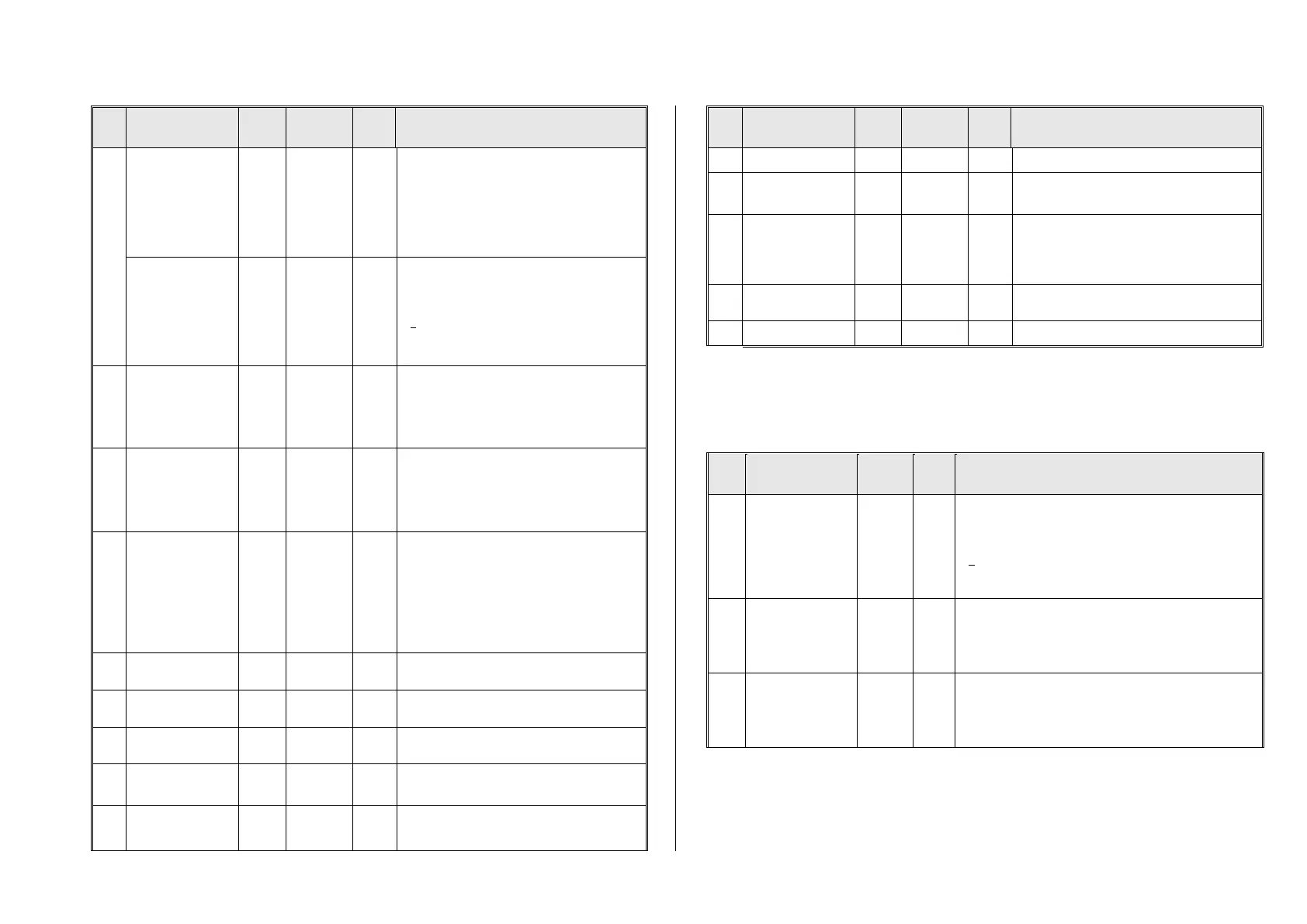
Electric switch gear
sound,
Switch gear playback
duration during
speed changes
for ELECTRIC
engines
Time in tenth of a second the switch gear should
be heard during speed changes (adjustable from
0 – 25 sec.).
Effective only if switch gear sound is part of the
sound project.
Electric switch gear
sound
Switch gear playback
duration after coming
to a stop
for ELECTRIC
engines
Time in tenth of a second the switch gear should
be heard after the engine comes to a full stop (ad-
justable from 0 – 25 sec.).
= 0: no sound after stop.
Switch gear sound
Playback delay
for ELECTRIC
engines
During rapid successions in speed changes the
switch gear sound would be played back too of-
ten.
CV #361: Time in tenths of a second (0 – 25 sec.)
defines minimum delay between multiple play-
backs.
Switch gear sound
Dividing the speed
into shift steps
for ELECTRIC
engines
Number of shift steps to cover the whole speed
range; i.e. if 10 shift steps are programmed, the
switch gear sound is played back at internal
speed step 25, 50, 75… (a total of 10 times)
= 0: synonymous with 5 (5 switch steps over
the whole speed range).
Bit 2=0: Always start with 1st sample of high
speed switch gear
Bit 2=1: Use one sample after the other, if at the
end, start again with 1
st
sample
Bit 3=0: play first and last part when shifting up
(middle part only when shifting down)
Bit 3=1: skip first and last part also when shifting
up (like shifting down)
Manual electric brake
key
Defines a function key to manually control the
sound of a “dynamic” or “electric” brake.
Electric brake -
minimum speed
The electric brake shall only be heard between
the value defend in CV #381…
Electric brake -
maximum speed
…and the value in CV #382
= 0: Pitch independent of speed
= 1…255: …depends increasingly on speed.
Electric brake –
Deceleration
The number of speed steps to be reduced during
deceleration before the electric brake sound is
played back.
Electric brake –
Downhill
= 0: no effect at “negative” load
= 1 – 255: Sound triggered at “negative” load.
Bit 3 = 0: Sound fades out at the sample end
= 1: Sound ends without fading at end
Bit 2…0: Increases minimum playback time by 0
… 7 seconds, to prevent an interruption in break
sound between speed steps.
If this key is activated, the speed controller
changes the driving sound, not the speed
Bit 0-3 = 1: deactivate Script 1-4
Coasting and Notching functions are required for driving situations where the correct engine sound
cannot be derived from speed, acceleration and load only.
Primarily in diesel locomotives (but not necessarily limited to diesels), the motor’s idle sound or a cer-
tain specified speed step sound is enforced by keystroke.
This method can be used for “downshifting” (often to neutral) as well as “upshifting” (i.e. elevated idle
for heating). Future software versions will expand this function to a fully independent sound effect.
Coasting-Key
(or Notching) (for
diesel soundprojects)
Function key that activates “Coasting“, which forces the motor
sound to a specified speed independent of the driving situa-
tion. Define the (sound) step in CV #375 (often used for idle
sound while coasting).
= 0: does NOT mean F0, but rather that NO key is assigned
for coasting.
= 1 ... 28: One of the function keys F1 … F28 for “Coasting“
Coasting-Step
(or Notching)
Motor sound (speed) to be activated with the coasting key (as
per CV #374), independent of the driving situation.
= 0: Idle sound (typical coasting situations)
= 1 … 10: Sound speed (Diesel engines typically have 5 to 10
notches, which can be activated with the coasting key.
The number of speed steps the train’s speed has to be re-
duced within 0.5 seconds in order for the automatic coasting
effect to set the motor sound to idle (without assigning a
coasting key above). The motor sound will not return to idle if
the speed is reduced at a slower rate.
It is especially expedient for diesel engines to be able to raise the sound step manually with a func-
tion key.



 To Next Page