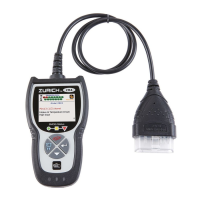
Using the Code Reader
CODE RETRIEVAL PROCEDURE
18
Green LED – Indicates that all
engine
systems are “OK”
and
operating
normally. All mo
nitors
supported
by the vehicle have
run
and
performed their diagnostic
testing, and no trouble codes
are
present.
All Monitor icons will be
solid.
Yellow LED - Indicates one of the
following cond
itions:
A.
A PENDING CODE IS PRESENT –
If the yellow LED is illuminated, it
may indicate a Pending code is
present. Check the Code Reader’s
display for confirmation. A Pending
code is confirmed by the presence
of a numeric code and the word
“Pending” in the code type.
B. MONITOR NOT RUN STATUS – If
the Code Reader’s display shows a
zero (indicating there are no DTC’s
present in the vehicle’s computer
memory), but the yellow LED is
illuminated, it may be an indication
that some of the Monitors supported
by the vehicle have not yet run and
completed their diagnostic testing.
Check the Code Reader’s display
for confirmation. All Monitor icons
that are blinking have not yet run
and completed their diagnostic
testing; all Monitor icons that are
solid have run and completed their
diagnostic testing.
Red LED – Indicates there is a
problem with one or more of the
vehicle’s systems. The red LED is
also
used to indicate that
DTC(s)
are
present (displayed on the Code
Reader’s screen). In this case, the
Malfunction Indicator (Check Engine)
lamp on the vehicle’s instru
ment
pane
l will be illu
minated.
DTC’s that start with “P0”, “P2” and some “P3” are
considered
Generic (Universal). All Generic DTC defini
tions
are
the same on all OBD2 equipped vehicles. The Code
Reader automatically displays the code definitions (if
available) for Generic
DTC’s.


 To Next Page
 Loading...