EasyManua.ls Logo

10Gtek G0101-MSFP Series - User Manual

10Gtek G0101-MSFP Series
5 pages
Print Icon
To Next Page IconTo Next Page
Loading...
1000Base-T to 1000Base-X
Mini Gigabit
Ethernet Media
Converter
PB2S-02(v1.0)
50mm
69mm
25mm
Question and Answer IconNeed help?

Do you have a question about the 10Gtek G0101-MSFP Series and is the answer not in the manual?

Summary

1000 Base-T to 1000 Base-X Mini Gigabit Ethernet Media Converter

Overview

Product Description

Describes the small size, function, and compliance of the Gigabit Ethernet Media Converter Series.

Product Options

Details the two options: integrated SFP slot or fixed 1X9 optical transceiver.

LED Indicators

FX LED Status

Indicates the status of the FX connection, lit when the connection is good.

Power LED Status

Indicates the power status, lit when the device is powering up.

RJ45 Left LED Status

Shows 1000M speed (Orange Lit) or 100Mbps speed (Blink).

RJ45 Right LED Status

Indicates link connection (Lit) and data transmission (Blinks).

Dip Switch Settings

Link Fault Pass-Through Setting

Enables link fault pass-through functionality.

Converter Mode Setting

Configures the converter mode, specifically for 9k byte frames.

Flow Control Setting

Enables flow control for network traffic management.

FX Speed Setting

Sets the FX port speed to 100Mbps.

Installation Guide

SFP Transceiver Installation

Instructions for inserting SFP transceiver and connecting fiber optic patch cords.

RJ45 Connection and Power Up

Steps for connecting RJ45 patch cords and power, and checking Power LED.

Power Supply Information

Input Voltage

Specifies the required input voltage for the converter.

Power Dissipation

Details the maximum power consumption of the converter.

Technical Specifications

Standards Compliance

Lists IEEE standards the converter complies with.

Port Speed Support

Details supported Ethernet speeds and cable types.

Advanced Features

Includes jumbo frame support, auto-negotiation, and auto-crossover.

Limited Warranty Information

Warranty Period and Coverage

Details the one-year warranty, repair/replace policy, and exclusions.

Obtaining Warranty Service

Instructions for contacting support and shipping the device for service.

Overview

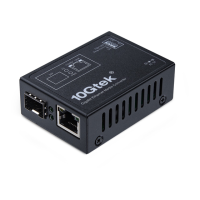
This document describes the 10Gtek Mini Gigabit Ethernet Media Converter, specifically the G0101-MSFP series, designed to expand existing Gigabit Ethernet networks.

Function Description:

The 10Gtek Mini Gigabit Ethernet Media Converter acts as a bridge between 1000Base-T (copper) and 1000Base-X (fiber) networks. Its primary function is to convert electrical signals from a copper Ethernet cable into optical signals for fiber optic cabling, and vice versa. This allows for the integration of fiber optic segments into a Gigabit Ethernet network, extending the network's reach beyond the limitations of copper cabling. The device is compliant with the IEEE 802.3ab standard, ensuring interoperability with other standard-compliant network equipment. Its compact, modular design is particularly advantageous for deployments in narrow desktop locations or environments where space is a premium, being approximately 50% smaller than traditional media converters. The G0101-MSFP series offers two main configurations: one with an integrated SFP slot, providing flexibility to insert various SFP transceivers, and another with a fixed 1X9 optical transceiver internally.

Important Technical Specifications:

  • Conversion Type: 1000Base-T to 1000Base-X
  • Standards Compliance: Complies with IEEE 802.3, 802.3u, 802.3z, and 802.3ab.
  • Ethernet Compatibility: Supports 10/100/1000Base-TX/FX.
  • Copper Cable Support: Supports Cat.5E Ethernet cables up to 100 meters.
  • Jumbo Frame Support: Supports jumbo frame sizes up to 9K bytes, which can improve network efficiency for large data transfers.
  • Duplex Mode: Supports Full/Half Duplex auto-negotiation, allowing the device to automatically determine the optimal duplex mode with connected devices.
  • Crossover Functionality: Features MDI/MDIX auto-crossover, eliminating the need for specific straight-through or crossover cables.
  • Input Voltage: 5VDC.
  • Power Dissipation: ≤3 Watts, indicating a low power consumption device.
  • Dimensions: Approximately 50mm (width) x 69mm (length) x 25mm (height).

Usage Features:

The media converter is designed for straightforward installation and operation, indicated by its LED indicators and DIP switch settings.

Installation:

  1. SFP Transceiver (if applicable): If the converter has an SFP slot, insert a compatible SFP transceiver into the slot.
  2. Fiber Optic Connection: Connect fiber optic patch cords to the SFP transceiver (or the fixed optical transceiver if that's the model).
  3. RJ-45 Connection: Insert an RJ-45 patch cord into the RJ-45 port of the Media Converter.
  4. Power Connection: Connect the power cord to the Media Converter.
  5. Verification: Check if the Power LED lights up. The "1000M" and "LINK" LEDs will illuminate once all cable connections are properly established.

LED Indicators:

  • FX: Lights up when the fiber (FX) connection is good.
  • PWR: Lights up when power is supplied to the device.
  • RJ45 Left (1000M): Lights up orange when the LINK speed is 1000Mbps. Blinks when the LINK speed is 100Mbps.
  • RJ45 Right (LINK/ACT): Lights up when the RJ45 LINK connection is good. Blinks when LINK data is being transmitted.

DIP Switch Settings:

The device includes a 4-position DIP switch for configuring specific operational parameters:

  • Sw1 (On): Enables link fault pass-through, a feature that propagates link status from one interface to the other, helping network management systems detect link failures more effectively.
  • Sw2 (On): Activates converter mode (9k), likely referring to the jumbo frame support of 9K bytes.
  • Sw3 (On): Enables flow control, which helps prevent packet loss during network congestion by regulating data transmission rates.
  • Sw4 (On): Sets the FX (fiber) speed to 100Mbps, allowing for compatibility with 100Base-FX networks if needed, rather than the default 1000Mbps.

Maintenance Features:

The product comes with a Limited Warranty of one year from the date of purchase. During this period, 10Gtek will repair or replace products that fail under normal use at no charge for parts or labor, though the customer is responsible for transportation costs.

The warranty does not cover:

  • Product damage due to improper installation, accidents, natural disasters, abuse, misuse, low power or over-voltage, incorrect operation, poor/bad environmental conditions, or unauthorized disassembly, repair, or modification.
  • Products modified without authorization, including changes to internal electronic information or EEPROM information.
  • System problems caused by third-party software, upgraded software, or upgraded IOS of connecting devices.

For warranty service, users should contact their local 10Gtek authorized dealer or original purchase channel for shipping instructions. The device must be securely packed and sent to the designated address with prepaid freight.

Technical support is available via the manufacturer's website: www.10gtek.com/support. The manufacturer is 10GTEK TRANSCEIVERS CO.,LTD.

10Gtek G0101-MSFP Series Specifications

General IconGeneral
Brand10Gtek
ModelG0101-MSFP Series
CategoryMedia Converter
LanguageEnglish