Quick User Guide for B03 Pro
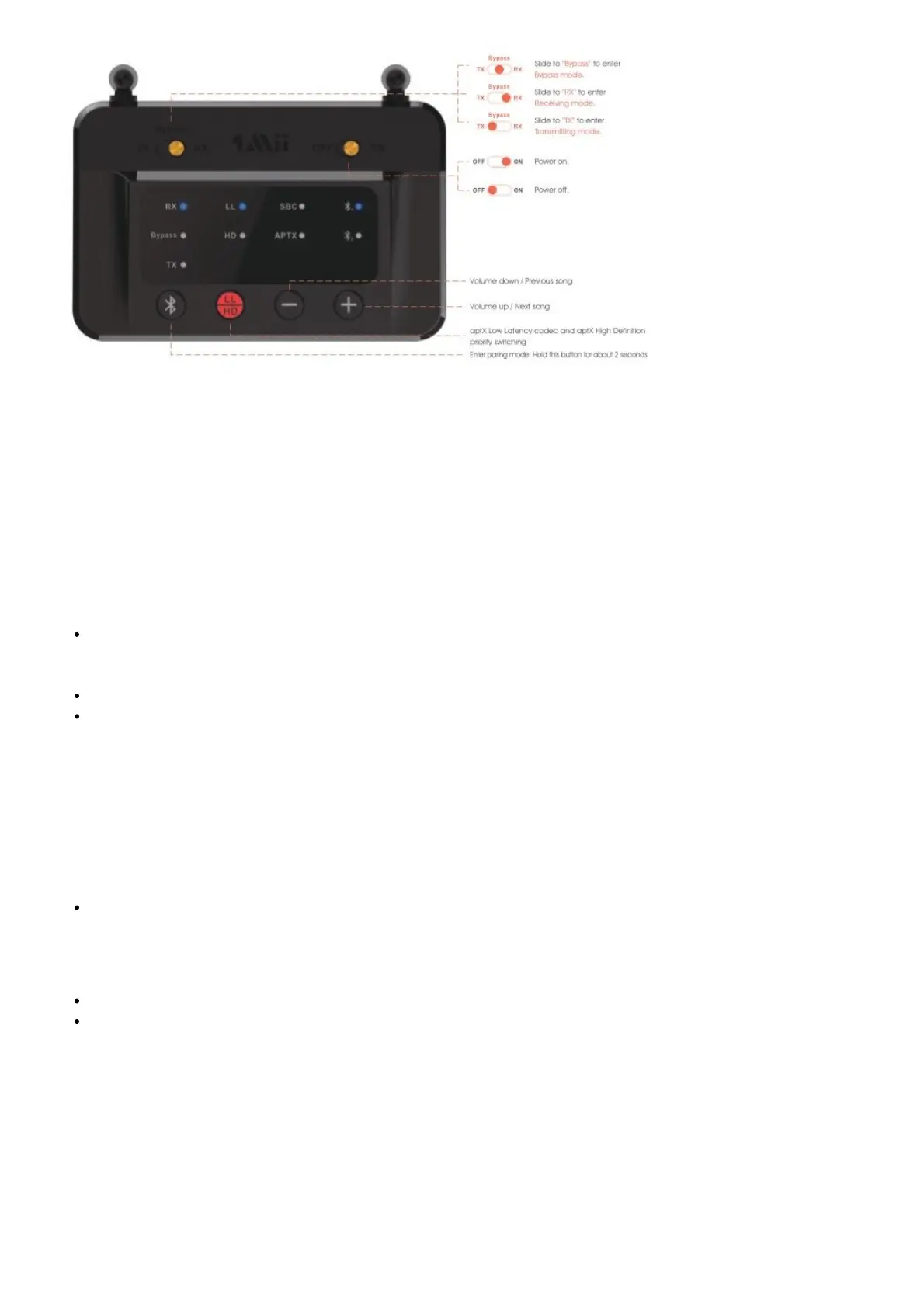
As a Wireless Transmitter (TX Mode)
1. Connect audio source (TV, DVD etc.) to B03 Pro “From TV” port with the audio cables provided (optical or
AUX/RCA).
2. Connect B03 Pro to power source (TV, PC USB socket or power adapter) with USB cable.
3. Slide Power switch to the “ON” position.
4. Slide Mode switch to the “TX” position.
5. Pair B03 Pro with your Bluetooth-enabled headsets/speakers
B03 Pro pairing mode = TX LED flash blue / red alternately fast.
– First time use: B03 Pro auto enter pairing mode (with clear memory).
– Afterward: press button for 2 seconds to enter.
Set your headsets/speakers to pairing mode refer to its user manual.
Wait and connected.
As a Wireless Receiver (RX mode)
1. Connect your speaker to B03 Pro “To Speaker” port with the audio cable provided (optical or AUX/RCA).
2. Connect B03 Pro to power source with USB cable and adapter.
3. Slide Power switch to the “ON” position.
4. Slide Mode switch to the “RX” position.
5. Pair B03 Pro with your Bluetooth-enabled phone/pc/tablet.
B03 Pro pairing mode = RX LED flash blue / red alternately fast.
– First time use: B03 Pro auto enter pairing mode (with clear memory).
– Afterward: press button for 2 seconds to enter.
Active Bluetooth on your phone or other device to find “B03 Pro” to connect.
Wait and connected.
Bypass mode (Non-Bluetooth mode)
1. Connect audio source (TV, DVD etc.) to B03 Pro “From TV” port with the audio cables provided (optical or AUX/
RCA).
2. Connect your speaker to B03 Pro “To Speaker” port with your own audio cable (optical or AUX/RCA).
3. Connect B03 Pro to power source with USB cable and adapter.
4. Slide Power switch to the “ON” position.
5. Slide Mode switch to the “Bypass” position.
6. Ready for use.
Important Notice:



 To Next Page