5
3. CONNECTIONS AND ON-SITE PREPARATIONS
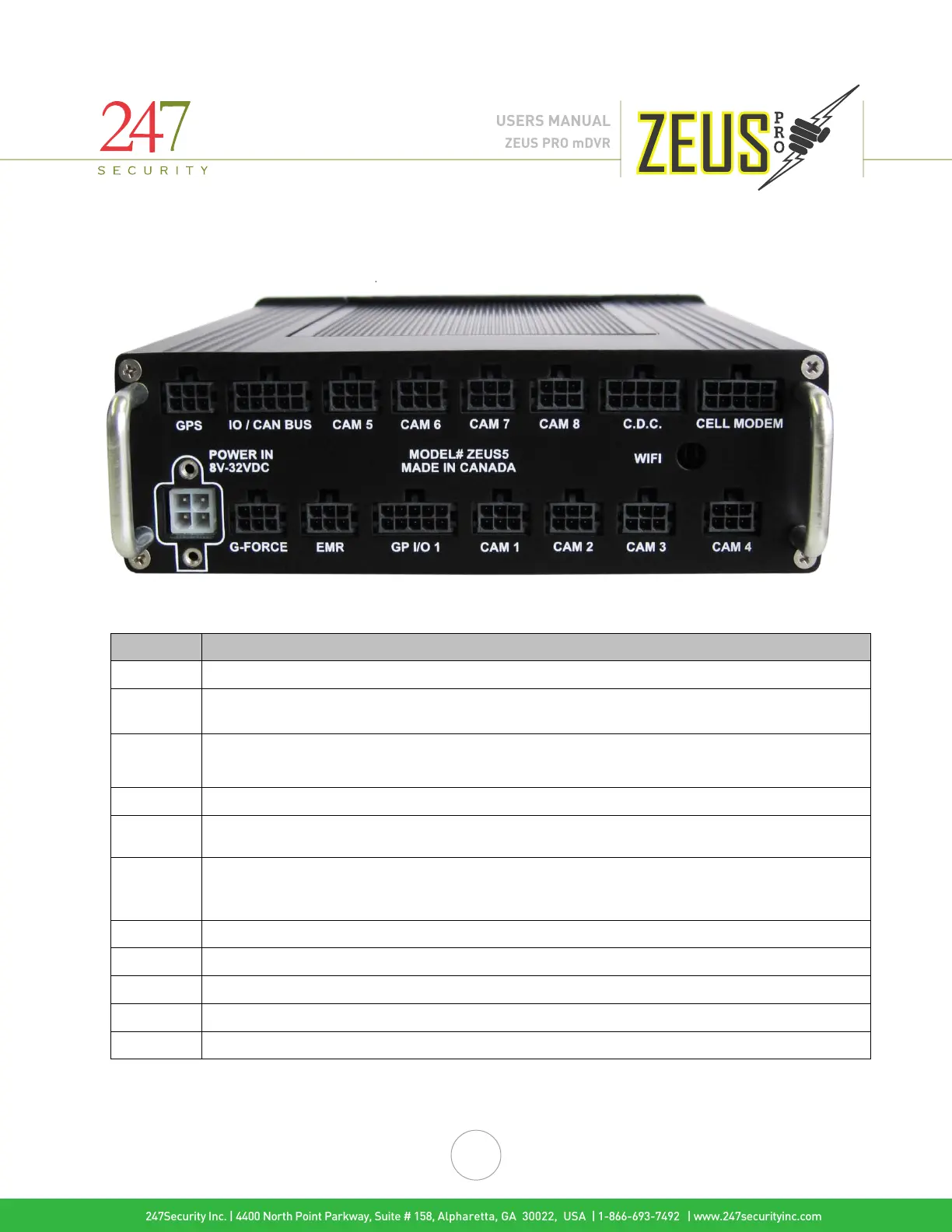
Rear view of a Zeus PRO 6/8 Channel DVR
2x3 Molex to connect GPS external module and antenna
For future use
Camera inputs for camera’s 5 – 8 (NOTE: IF ZEUS PRO 6 CHANNEL IS PURCHASED, CAMERA
PORTS 7 & 8 WILL STILL PHYSICALLY BE THERE BUT THE SOFTWARE WILL NOT ALLOW
ENABLING THOSE CHANNLES FOR USE.
Port used to connect OPTIONAL 3G/4G/LTE Cell Modem
For future use
Power input for 8V to 32V DC. Includes two #4-threaded screw holes for securing the power cable.
Make sure to install 7.5A in-line fuses on the constant hot (red) and ignition (white) wires.
Connection for optional external Drive-Safe™ G-Force module
Connection for event marker cable
Digital I/O interface is used for connecting the vehicle’s electrical functions to the DVR.
Camera connections
RP-SMA Jack for connecting WIFI antenna
247Security Inc. | 4400 North Point Parkway, Suite # 158, Alpharetta, GA 30022, USA | 1-866-693-7492 | www.247securityinc.com
ZEUS PRO mDVR
USERS MANUAL



 To Next Page