EasyManua.ls Logo

2Boom PRIME HPBT295 - User Manual

2Boom PRIME HPBT295
7 pages
Print Icon
To Next Page IconTo Next Page
Loading...
1
LE
D HEADPHONE
M
odel: HPBT295
USER MANUAL
Question and Answer IconNeed help?

Do you have a question about the 2Boom PRIME HPBT295 and is the answer not in the manual?

Summary

Getting Started and Safety

Package Contents

Lists all items included in the product package.

Key Features

Highlights the main functionalities and design aspects of the wireless headphones.

Safety Instructions

Provides critical safety precautions for using the headphones to prevent damage or injury.

Device Description and Usage

Description of Parts

Identifies and describes the physical components and controls of the headphones.

Instructions for Use

Details how to operate the device, including charging and power functions.

Charging Instructions

Explains the process of charging the headphone's built-in battery.

Turning on;off the device

Provides steps for powering the Bluetooth headphones on and off.

Bluetooth Connectivity and Functionality

Pairing the device with Bluetooth devices

Guides users on how to connect the headphones to Bluetooth-enabled devices.

Function Summary

Summarizes the device's operational functions.

Listening to Music

Details control functions for music playback, including volume and track navigation.

Advanced Features and Indicators

Making a call with the Bluetooth Headphone

Explains how to manage calls, such as answering, ending, or rejecting them.

RGB LED LIGHT

Describes the control and behavior of the headphone's RGB LED lighting.

Indicator light

Details the meaning of various LED indicator lights during operation.

Charging Indication

Specifies LED behaviors during the charging process.

LED Indication

Explains LED patterns for pairing mode.

Specifications and Regulatory Information

Specifications

Provides technical details such as operating distance, working time, and battery capacity.

FCC Statement

Outlines compliance with FCC rules for device operation and interference.

FCC Radiation Exposure Statement

States compliance with FCC requirements for radio frequency exposure.

Overview

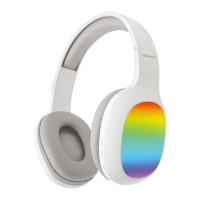
This document describes the 2Boom PRIME Wireless LED Headphone, model HPBT295. It is a Bluetooth stereo headset designed for wireless audio playback and hands-free calling.

Function Description:

The 2Boom PRIME headphone operates as a wireless audio device, connecting to Bluetooth-enabled devices such as smartphones or music players. It features a built-in microphone for hands-free communication, allowing users to answer, end, or reject calls directly from the headset. The headphone also includes an RGB LED light feature, which can be turned on or off. Its design is comfortable and adjustable, and it has the ability to automatically connect to previously paired devices when within range and Bluetooth is active.

Important Technical Specifications:

  • Operating Distance: 32.8 feet
  • Working Time (RGB LED on): 1.5 hours
  • Working Time (RGB LED off): 4-5 hours
  • Charging Input Voltage: DC 5V
  • Charging Time: 1.5-2.5 hours
  • Driver Unit: 40mm, 32Ω
  • Built-In Battery: 150mAh
  • Model: HPBT295
  • FCC ID: 2AIDL-SS-HPBT295

(Note: Battery life and charging time may vary based on usage and types of devices used.)

Usage Features:

Controls:

The headphone features several control buttons:

  • "II<" button: Power on/off, Play/pause, Phone button (answer/end/reject calls).
  • "+<<" button: Volume up, Next track.
  • ">>-" button: Volume down, Previous track.

Charging:

The headphone has a built-in rechargeable battery. It is recommended to fully charge the battery before first use.

  • Connect the supplied USB charging cable to a computer USB port and the Micro USB plug to the headphone's charging port.
  • A Red LED light indicates charging.
  • The Red LED light turns off when charging is complete.
  • Full charge takes approximately 1.5-2.5 hours.

Powering On/Off:

  • Press and hold the "II<" button for 2-4 seconds to turn the device ON or OFF. An indication tone will sound.

Bluetooth Pairing:

  1. Place the headphone and the Bluetooth device (phone or music device) within 33 feet of each other.
  2. Activate the Bluetooth function on your device.
  3. Select "2BOOM-HPBT295" from the list of available Bluetooth devices.
  4. Upon successful pairing, an alert tone will be heard, and the LED will flash blue slowly.
  5. The pairing mode lasts for approximately 3 minutes; if no device is paired, the headphone will power off automatically.
  6. The headphone remembers paired devices and will attempt to automatically connect to the last paired device when switched on and in range. To pair with a new device, follow the steps above.

Music Playback:

  • Increase Volume: Long press the "+<<" button.
  • Decrease Volume: Long press the ">>-" button.
  • Pause/Play: Short press the "II<" button to pause, then short press again to play.
  • Previous Track: Short press the ">>-" button.
  • Next Track: Short press the "+<<" button.

Call Management (in Bluetooth mode):

  • Answer an Incoming Call: Short press the "II<" button.
  • End a Call: Short press the "II<" button after the conversation.
  • Reject an Incoming Call: Press and hold the "II<" button for 1.5-2 seconds.
  • Increase Call Volume: Long press the "+<<" button.
  • Decrease Call Volume: Long press the ">>-" button. (Note: Not all mobile phones support all call functions; refer to your phone's manual. Functions and indication tones may vary by mobile phone.)

RGB LED Light:

  • The RGB LED light turns on when the headphone is powered on.
  • Short press the "II<" button twice to turn off the RGB LED.
  • Short press the "II<" button twice again to turn on the RGB LED.

Indicator Light Status:

  • Solid Red LED: Charging.
  • Red LED turns off: Charging Completed.
  • LED red and blue lights flashing alternately: Pairing mode.

Maintenance Features:

The manual provides safety instructions to ensure the longevity and proper functioning of the device:

  • Keep the unit away from heat sources, direct sunlight, humidity, water, and other liquids.
  • Do not operate if exposed to water or moisture to prevent electric shock or damage.
  • Do not use if dropped or damaged.
  • Repairs should only be performed by a qualified electrician.
  • Do not use with wet hands or insert objects into openings.
  • Keep free from dust and lint.
  • Use only for its intended purpose.
  • Keep out of reach of children (not a toy).
  • Avoid excessive volume levels to prevent hearing damage.

The device is designed for portable exposure conditions without RF restriction, complying with FCC radiation exposure requirements.
2Boom PRIME HPBT295 Specifications

General IconGeneral
Brand2Boom
ModelPRIME HPBT295
CategoryHeadphone
LanguageEnglish