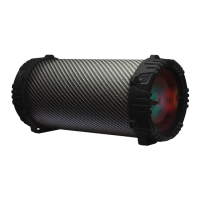
This document is a user guide for the 2Boom Bass King Wireless Speaker System, model BX390.
The device is a 2.1 outdoor Passive HIFI Bluetooth Speaker featuring a 5 1/4 inch subwoofer. It is designed to deliver very clear sound with heavy bass and dynamic sound effects. The speaker system supports A2DP Bluetooth, enabling wireless music streaming from any Bluetooth-enabled device such as mobile phones, notebooks, iPhones, or iPads. It offers secure and simple pairing for user-friendly operation with an operating range of 10 meters.
Key features include support for USB and SD cards, an FM radio, and an EQ function for sound customization. An LED display shows digital numbers and the current working status. It also has a Line-in function, making it suitable for use with PCs, MIDs, TVs, and other audio devices. The speaker system incorporates two gears for volume control, one for overall volume and another for bass. It is equipped with a built-in 1500mAh lithium rechargeable battery and comes with a handle and strap for easy portability.
Technical Specifications:
- Horn Size: 3 inches
- Subwoofer Size: 5 1/4 inches
- Horn Output: 3W*2, 4Ω
- Subwoofer Output: 12W, 4Ω
- Battery Capacity: 1500mAh
- Frequency Response: 100-20KHz
- Power Supply: DC3.7V
Accessories:
The package includes a USB charging cable, an audio cable, a user manual, and a strap.
Device Layout and Controls:
The speaker features several ports and buttons:
- USB port: For connecting USB flash drives.
- Charging jack: For connecting the charging cable.
- LED indicator: Provides visual feedback, especially during charging.
- LED screen: Displays information like mode, track number, and working status.
- SD slot: For inserting SD cards.
- Speaker: The main sound output component.
- ON/OFF button: To power the device on or off.
- Aux-in jack: For connecting external audio devices via an audio cable.
- Backward button: To go to the previous track or FM channel.
- Play/Pause button: To play or pause audio, or auto-search FM channels.
- Forward button: To go to the next track or FM channel.
- Mode button: To switch between Bluetooth, USB disk, SD, FM, and AUX-IN modes.
- EQ button: To adjust equalization settings (works for USB and SD modes only).
- Bass Gear: A rotary control for adjusting bass levels.
- Volume Gear: A rotary control for adjusting overall volume levels.
Usage Instructions:
Bluetooth Mode:
- Turn the power button to "ON." The LED screen will display "bt" and beep twice, blinking rapidly.
- Activate Bluetooth on your mobile phone and search for "2BOOM-BX390." Connect to it. The "bt" indicator on the screen will stop blinking and beep three times upon successful connection.
- Play music from your mobile phone.
- Use the LAST or NEXT buttons on the speaker or your mobile phone to select songs.
- Press the Play/Pause button on the speaker or your mobile phone to play or stop music.
- Use the "Volume Gear" to adjust the volume up or down, or adjust the mobile phone's volume.
- Use the "Bass Gear" to adjust the bass.
- Remark: The EQ function is only available for USB and SD modes; it does not support Bluetooth or Aux-in modes.
Playing Music from USB Disk & SD Card:
- Turn the Power button to "ON."
- Insert an SD card or USB flash disk into the slot. Music stored on the device will play automatically, and the LED screen will display the song information.
- In playing mode, short press the Forward or Backward buttons to select songs. Long press them to fast forward or backward through the song.
- Press PLAY/PAUSE to play or pause.
- Turn the Power button to "OFF" when not in use.
- Remark: If an SD card or USB disk is inserted while in Bluetooth playing mode, the Bluetooth connection will be disconnected, and playback will switch to the USB or SD card. You can press the MODE button to switch back to Bluetooth mode.
FM Radio:
- In FM radio mode, insert the audio cable to enhance the FM signal.
- Turn the power button to "ON," then press the "MODE" button to switch to FM radio state.
- In playing mode, short press the "Play/Pause" button to auto-search and store FM channels.
- Press the LAST or NEXT buttons to change the stored FM channel.
AUX-IN Mode:
For other compatible music devices or MP3/MP4 players, use the supplied audio line cable to connect the device's "Line Out" to the speaker's "Aux In." Then, press the "MODE" button to switch to AUX-IN state.
- When using an external device, all functions will be controlled by the external device, except for the "Play/Pause" button on the speaker.
- Pressing the MODE button cycles through the different modes in the order: Bluetooth, SD, USB disk, FM radio, and AUX-IN.
- Turn the power button to "off" to cut off the power supply when the device is not in use.
Charging Instructions:
- Power off the unit. Insert the provided charging cable into the charge slot of the unit and connect the other end to a PC or another charger with a 5V output (not included). The red charging indicator will light up.
- Charging typically takes 3-5 hours. When fully charged, the indicator light will switch off.
- To prolong battery life, avoid charging for more than 8 hours.

 Need help?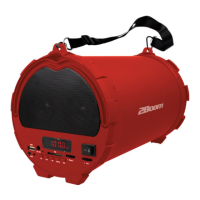

 To Next Page
 General