Need help?
Do you have a question about the 2Boom BT268 and is the answer not in the manual?
Instructions for charging the Bluetooth speaker using a Micro USB cable and a powered USB source.
Steps to turn on the speaker, pair with a device, and start playing music within range.
Adjusting device volume and turning off the speaker when not in use.
Details on speaker output, drive unit, battery capacity, and frequency response.
Safety warnings regarding handling, environment, low power, and battery care.
Details device compliance with Part 15 of FCC Rules and conditions for operation.
Confirms compliance with FCC radiation exposure requirements for portable use.
This document outlines the operational and maintenance procedures for the 2Boom Bluetooth Speaker, Model BT268.
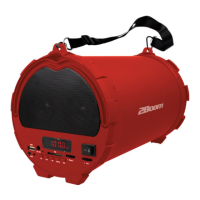
The 2Boom Bluetooth Speaker is a portable audio device designed for wireless music playback. It connects to other devices via Bluetooth, allowing users to stream audio without the need for physical cables. The speaker is equipped with an internal rechargeable battery, providing portability and convenience for use in various settings. Its primary function is to amplify audio from a connected Bluetooth source, delivering a clear sound experience.
To begin using the speaker, it is recommended to fully charge the battery before its initial operation. Charging is straightforward: connect the included Micro USB Charging Cable to the micro USB port on the back of the speaker. The other end of the cable should be plugged into a powered USB source, such as a computer, laptop, or a USB AC adapter. During the charging process, a red indicator light will illuminate. Once the speaker is fully charged, this red light will turn off, signaling that it is ready for use.
For playing music, the speaker must first be powered on. This is achieved by sliding the power switch, located on the back of the speaker, to the 'ON' position. Upon activation, an indicator light will turn on. The next step involves enabling the Bluetooth function on your source device (e.g., smartphone, tablet, computer). Once Bluetooth is active on your device, you will need to search for available Bluetooth devices. The speaker will appear in the list of discoverable devices under the name "2BOOM-BT268". Select this name to initiate the pairing process. A distinct tone will be heard from the speaker once it has successfully paired with your device, confirming the connection.
After successful pairing, you can begin playing music from your connected device. It is important to maintain your source device within a range of approximately 33 feet (10 meters) from the Bluetooth speaker to ensure a stable and uninterrupted connection. The volume of the audio can be adjusted directly from your connected device to achieve a comfortable listening level. When you are finished using the speaker, it is advisable to turn off the unit to conserve battery life.
Proper care and maintenance are crucial for the longevity and optimal performance of the 2Boom Bluetooth Speaker. The device is not a toy and should be kept out of reach of children to prevent accidental damage or misuse.
To protect the internal components and ensure safe operation, it is imperative to keep the speaker away from water and excessive heat. Exposure to moisture can lead to electrical malfunctions, while high temperatures can damage the battery and other sensitive parts.
The speaker's performance, particularly its Bluetooth connection, can be affected by low power levels. If the battery is running low, you might experience poor connection quality or even a complete inability to establish a Bluetooth link. Therefore, it is important to recharge the speaker promptly when the battery level is low.
Overcharging the battery should be avoided. While modern devices often have built-in protection against overcharging, continuous exposure to charging current after the battery is full can potentially reduce its lifespan over time. Always disconnect the charging cable once the red indicator light turns off, signifying a full charge.
Furthermore, the battery pack itself should not be exposed to extreme heat sources such as direct sunshine, open flames, or similar conditions. Such exposure can pose a safety risk and severely damage the battery, potentially leading to swelling, leakage, or even fire. Adhering to these maintenance guidelines will help ensure the speaker remains in good working condition and provides a reliable audio experience for an extended period.
 General
| Brand | 2Boom |
|---|---|
| Model | BT268 |
| Type | Portable Bluetooth Speaker |
| Bluetooth Version | 5.0 |
| Charging Time | 3 hours |
| Connectivity | Bluetooth, AUX, USB |
| Power Source | Battery |


 To Next Page