P O Box 159 • Crestwood, KY 40014 • (502) 243-0042 • (502) 243-0039 fax
www.e2di.com • info@2di.com
QUICKSTART
Your TV2 can be installed and operating in just a few minutes by following these simple steps.
1. Connect the TV2 to a power supply and touch the screen (LCD).
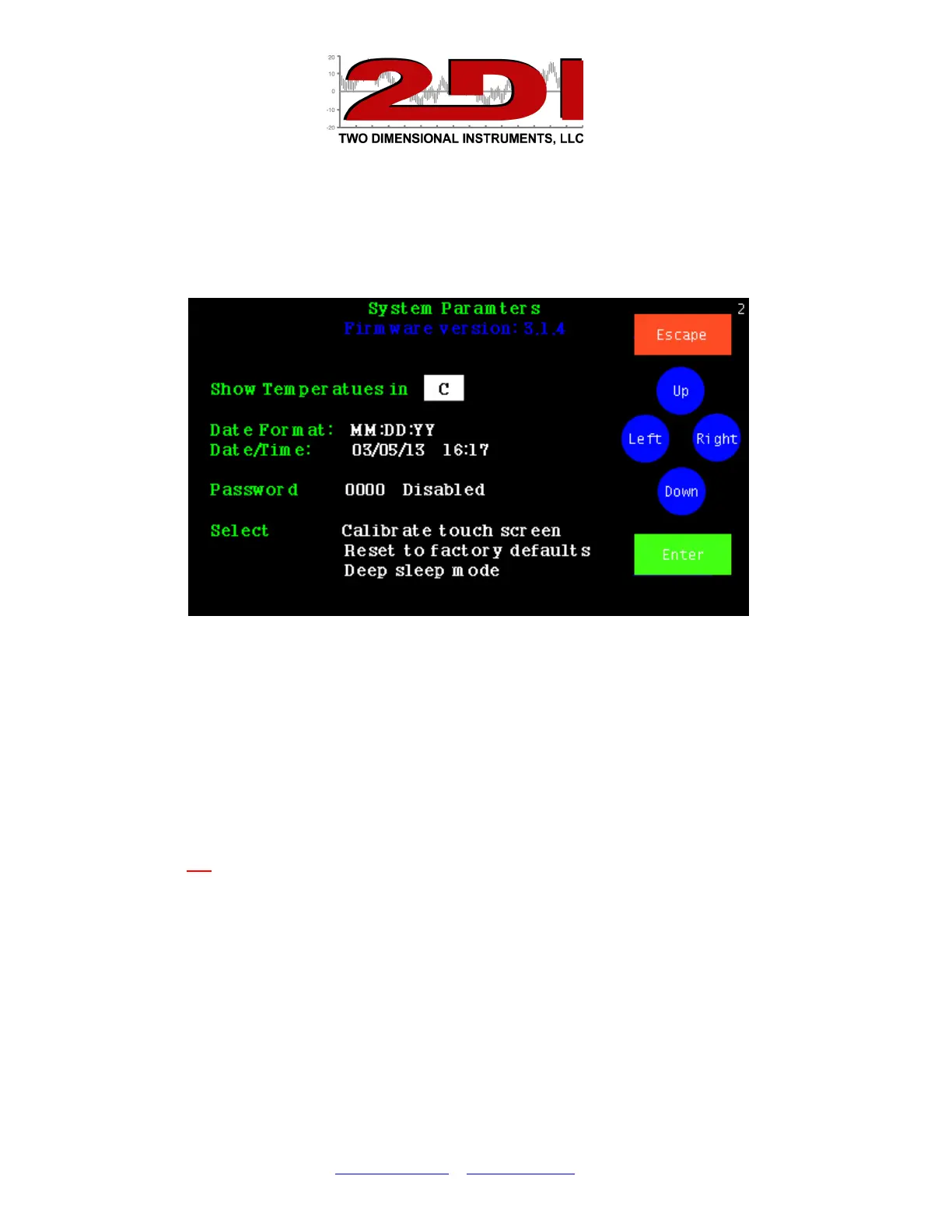
This display will appear.
2. Touch ‘Up’ or 'Down' to select C° or F° and touch ‘Enter’.
3. Touch ‘Up’ to select the date format (MM/DD/YY, DD/MM/YY or YY/MM/DD) and
then 'Enter'. The date format defaults to the US style (MM/DD/YY).
4. Set the day, month, year, hour and minute in the appropriate field by scrolling through
the possible values with 'Up' or 'Down' after moving to the appropriate field with
'Enter'.
(Note: It is possible to move to another field with the ‘Right’ button but your entries
will not be recorded).
5. Touch ‘Escape’. You will be asked to verify that you want to erase all data. Use
‘Right’ to highlight YES and touch 'Enter'.
6. Touch 'Escape' to return to the previous menu.
The TV2 is now set and operating.
Next TV2 will help you setup sensors and alarms


 To Next Page
 Loading...