P O Box 159 • Crestwood, KY 40014 • (502) 243-0042 • (502) 243-0039 fax
www.e2di.com • info@2di.com
Setting the sensor alarms
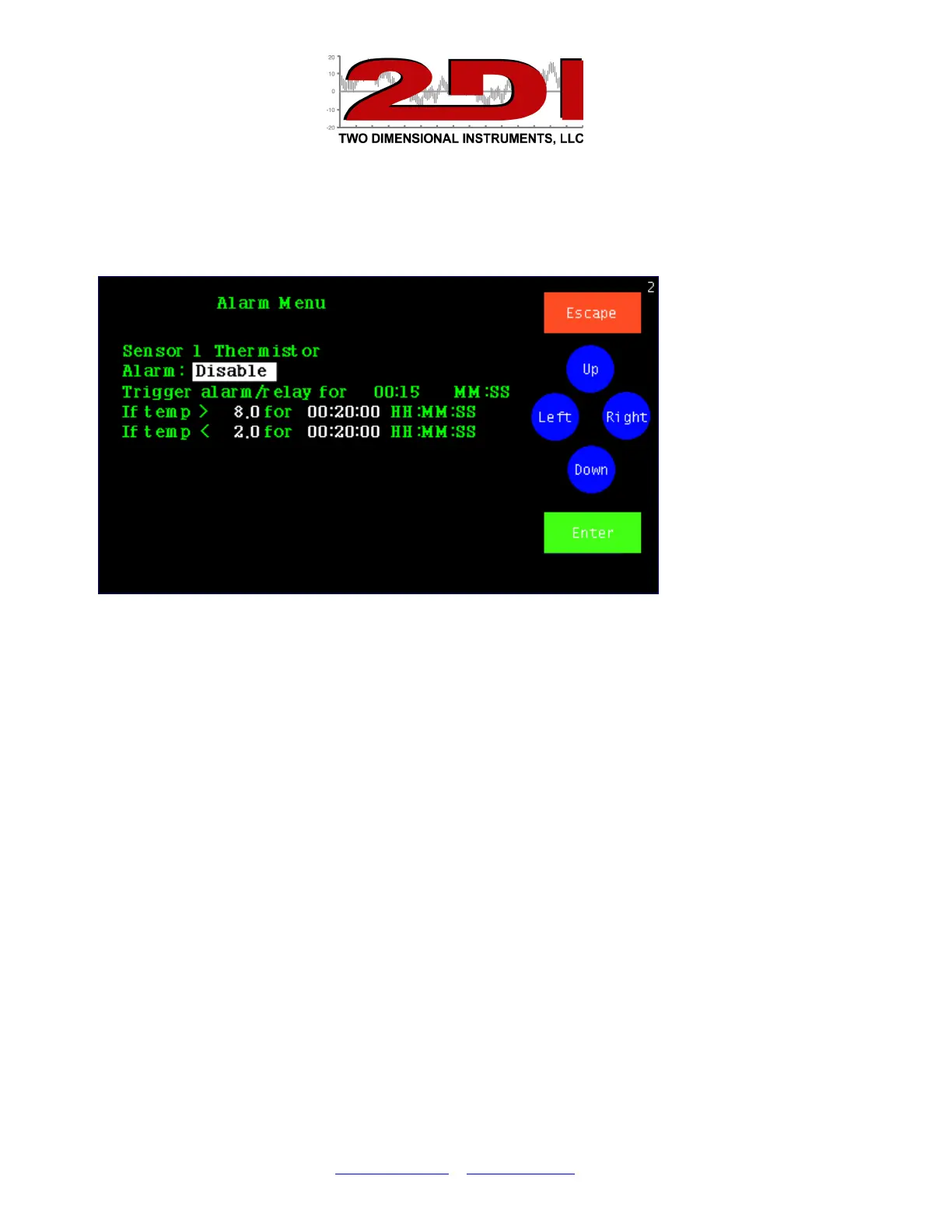
6. Set the Alarm by highlighting the ‘Set Alarm’ button on the 'Sensor # Setup' screen
with 'Left' or 'Right' and touching ‘Enter’.
7. Enable the alarm by touching 'Up' and then 'Enter'.
8. Set the trigger-alarm-time to any value between 0:00 and 99:00. This controls how
long the alarm and the relay will be activated.
Note: If you are using a dialer set it for at least 00:30 (30 seconds) but not
longer than 06:00 (Six minutes).
9. Scroll in the upper alarm temperature limit and delay time and then the lower alarm
limit and delay with 'Up’ and ‘Down’ touching 'Enter' to move to each field in turn.
Note: The delay time is how long the temperature must remain above (or below)
the limit before the alarm occurs.
10. You do not need to enter the Calibration Menu at this time. (For calibration
procedures see the document Entitled ‘Calibration Procedures’ on the CD. It can
also be downloaded from our website http://www.e2di.com/PDFs/Calibration
Procedures.pdf)
11. Touch 'Escape' until you return to the Status Screen.
You are done!


 To Previous Page
 Loading...