6
EN
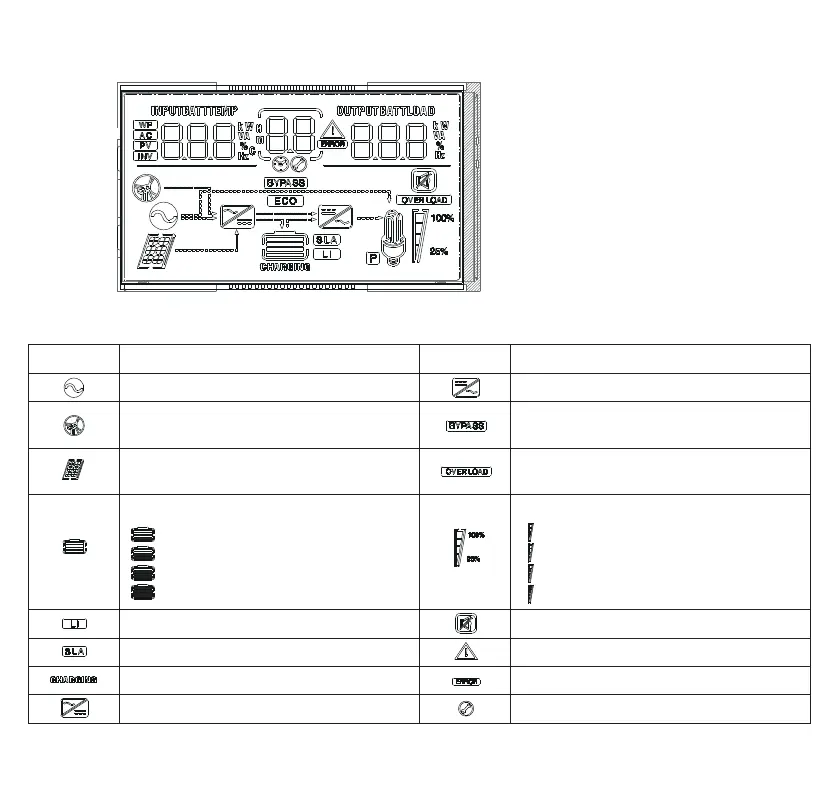
2) LCD Screen
Icon Function Icon Function
AC input is connected to the grid Inverter is working
Wide voltage AC input mode (APL
mode) 90-280V
Bypass working mode (UPS mode)
170-280V
Solar Panel is connected to PV input
Indicates that the AC output is in an
overload state
Internal battery remaining power:
0%~24%
25%~49%
50%~74%
75%~100%
AC output load:
0%~24%
25%~49%
50%~74%
75%~100%
Lithium battery is installed Buzzer is disabled
Lead-acid battery is installed Alarm
Battery is charging Error has occurred
AC/PV charging is working Setup Mode



 To Next Page