7
EN
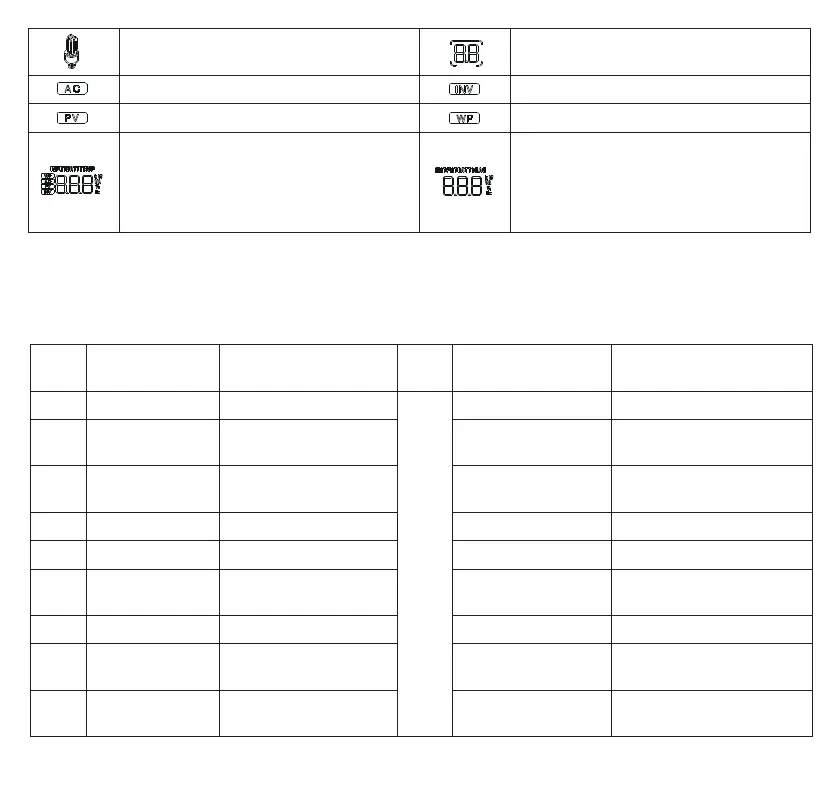
AC output is working
Non-setup mode: Alarm or Fault code
Setup mode: current parameter
AC input is working Inverter is working
PV input is working Icon in nod displayed
Battery voltage, charging current,
mains charging power, AC input
voltage/frequency, PV input voltage,
internal radiator temperature,
software version
Non-setup mode: output power,
discharge current, software version
Setup mode: current parameter value
3) Data viewing in real time
Press “UP” and “DOWN” buttons on LCD screen to view real-time data.
Page
Parameter on
the left side
Description Icon Function Description
1 Input batt V Battery input voltage
Fault
code
Output load V Output voltage
2 PV temperature
Solar panel heat sink
temperature
PV output KW
Solar panel output
power
3 PV input V
Solar panel input
voltage
PV output A PV output current
4 Input batt A Battery input current Output batt A Battery output current
5 Input batt KW Battery input power Output batt KW Battery output power
6 AC input Hz
Mains input
frequency
AC output load Hz AC output frequency
7 AC input V Mains input voltage AC output load A AC output current
8 Input V
Maintenance
parameter
Output load KVA Total output power
9
INV
temperature
Invertor temperature INV output load KW
Invertor output reactive
power


 To Next Page
 Loading...