Read it. Know it. There will be a quiz. Share the love.
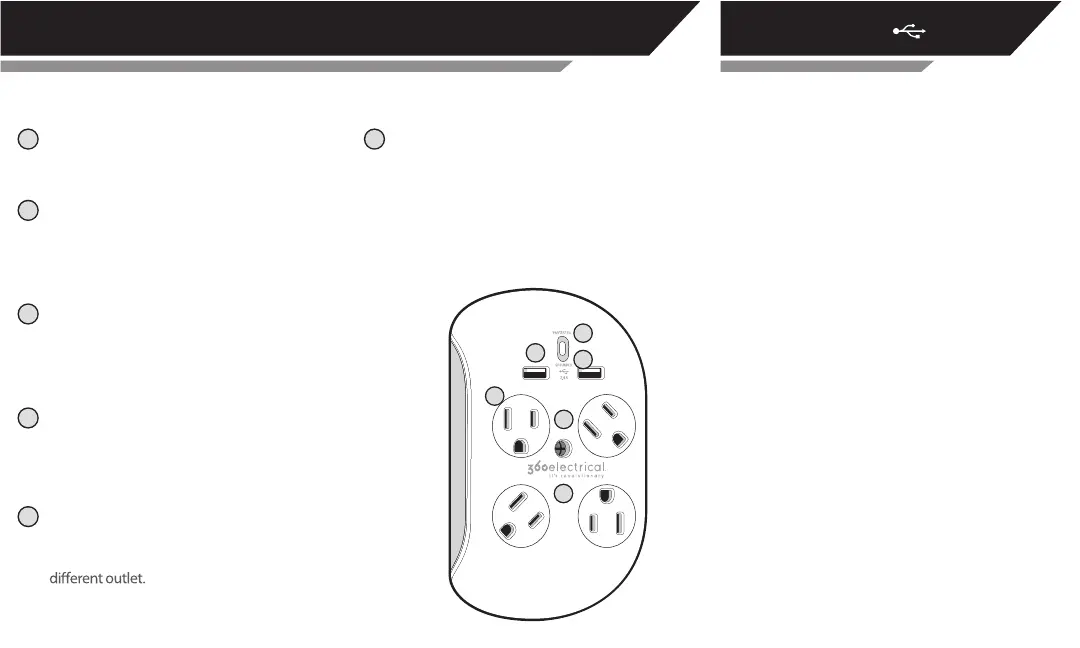
Advanced Surge Protection - Deep inside lies
the defender of the connected devices you
Green “Grounded” Light – Lets you know the
outlet you’re plugged into is grounded. If this
light doesn’t come on, no bueno, use a
REVOLVE3.4 ANATOMY USB CHARGING PORTS
A
F
B
C
plug into the rotating outlets. It’s there
waiting to act on your behalf when evil
transient voltage rears it ugly head.
Dual USB Charging - Packing 3.4 Amps (that’s
(4) 360° Rotating AC Outlets – We invented
these for exibility in dealing with giganto
plugs. Just fully insert a plug and turn to t.
Blue “Protected” Light – This blue beacon
of truth tells you everything’s alright. If it
goes out, your Revolve3.4 has absorbed a
surge and sacriced itself to save your
electronics. Shed a tear, then replace it.
A
B
C
D
F
E
D
E
Center Mounting Screw – Yes, this is supposed
to be here. Allows you to rmly anchor your
Revolve3.4 in the wall socket. Have one of them
fancy decorator outlets? Remain calm and
simply remove the screw by holding the little
red tab in place and use your favorite
screwdriver real lefty-loosey like.
17 Watts for all you Apple users) this little
powerhouse can charge all your electronics
with ease. Feeling über ecient? Plug in
two gadgets to charge at once.
Did you know that almost all multi-port USB
chargers share power from a single source?
What does this mean? Think of it like a
pipe with several faucets, the more faucets
you turn on, the less water there is to ow
through each faucet.
The USB ports on the Revolve3.4 share a total of
3.4 amps/17watts of power, which is plenty of
juice to charge any combination of devices.
However, for those times when you need to
get charged extra fast, follow the outline below.
I need a charge and I need it now!
I just charge my stu at night.
Plug in any combination of devices and they’ll
both be charged long before your alarm goes o.
To get the fastest charge, plug in up to a
smartphone and a tablet together, or two
smartphones at the same time.


 To Next Page