
 Need help?
Do you have a question about the 3DActive PDA-100 and is the answer not in the manual?
Press the RESET button on the back with the included pin to prepare the pedometer for setup.
Details 8 pieces of user information needed before starting the pedometer setup process.
Instructions on how to enter and remain in setup mode for the pedometer.
Explains the function of RESET, MODE, and SET buttons for navigating setup options.
Guides through setting time format, time, date, year, units, stride length, weight, and step goal.
Instructions for clearing records or resetting to factory settings.
The 3DActive 3D Pedometer, model PDA-100, is a compact and user-friendly device designed to help individuals track their daily physical activity. Its primary function is to count steps, measure distance, calculate calories burned, and record exercise time, providing a comprehensive overview of daily movement. The pedometer incorporates a 3D Motion Sensor, allowing for flexible carrying options such as clipping to the waist, placing in a pocket, or carrying in a bag, ensuring accurate tracking regardless of its position.
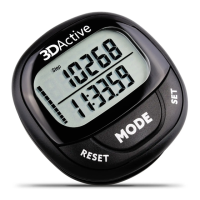
One of the key usage features of the 3DActive Pedometer is its intuitive display and button layout. The LCD screen clearly shows various metrics, including step count, time, distance, calories, and exercise duration. The device features three main buttons: RESET, MODE, and SET. The RESET button is primarily used to increase numbers during setup and to clear records in different modes. The MODE button allows users to scroll through the various tracking modes (Step, km/Mile, Kcal, Min, Step, Total Step) and to decrease numbers during setup. The SET button confirms selections during setup and advances to the next setting, as well as browsing through records in memory modes.
Before initial use, the pedometer requires a simple setup process to personalize settings for optimal accuracy. This involves pressing the RESET button on the back of the device with an included pin to enter setup mode. Users then configure settings such as time format (12Hr or 24Hr), current time, date (MONTH - DAY format), current year, units of measurement (Metric/Kilometre/Kg/Cm or Imperial/Miles/Lb/Inch), personal stride length, current weight, and a daily step goal. The stride length measurement is crucial for accurate distance records and can be calculated by walking 10 steps, measuring the total distance, and dividing by 10. During setup, the RESET button increases values, the MODE button decreases values, and the SET button confirms and moves to the next setting. If no buttons are pressed for 10 seconds during setup, the pedometer will exit setup mode, and users will need to re-enter it from Step Mode by pressing and holding SET until the time format flashes.
The pedometer offers several operating modes to track different aspects of activity. The first four modes—Step Mode, Distance Mode, Calories Mode, and Exercise Time Mode—automatically reset at midnight, providing daily records. Step Mode displays the daily step count and time. Distance Mode shows the daily distance walked, indicated by 'Km' or 'Mile' icons. Calories Mode displays daily calories burned with a 'Kcal' icon, and Exercise Time Mode shows daily active time with a 'Min' icon.
Beyond daily tracking, the 3DActive Pedometer also includes two memory modes that do not reset at midnight. The 30 Day Memory Mode, indicated by a 'Step' icon and a '-01 Record' icon, stores up to 30 days of previous records. Users can browse through past days using the RESET button and view specific records for a selected day using the SET button. The Total Step Mode, marked by a 'Total Step' icon, accumulates all records regardless of time, allowing users to see their overall progress across all pedometer modes by pressing SET.
A notable usage feature is the 10-step error prevention. This intelligent function ensures that the pedometer only begins recording steps after detecting approximately 10 continuous steps, preventing random non-walking movements from being counted. Any steps taken before this threshold is met are added once recording begins. The device also includes an automatic midnight reset for daily tracking modes, ensuring a fresh start each day. The step goal feature allows users to set a daily target, with a progress bar on the left of the screen indicating how close they are to achieving it. Once the goal is met, the progress bar will flash.
Maintenance features include a sleep/standby mode to conserve battery life. If the pedometer remains idle for 3 minutes, the display screen automatically turns off. It will reactivate upon detecting movement. A low battery indicator icon on the right side of the screen alerts users when the battery power is low, prompting a replacement.
Battery replacement is straightforward. The pedometer uses one CR-2032 button cell battery. To replace it, users need to unscrew and remove the battery cover on the back of the device using a small Phillips screwdriver (included). The old battery can then be removed, and a new one inserted, ensuring the positive (+) side faces upwards. Finally, the battery compartment cover is replaced, and the screw fastened.
For resetting the device, there are two options. To clear records without affecting setup settings (Step, Distance, Calories, Exercise Time, 30 Day Memory, or Total Step Mode), users can press and hold the RESET button while in any of these modes. To reset the pedometer to its factory settings, which erases all setup settings and data, users must insert the included pin into the reset hole on the back of the device.
The 3DActive Pedometer is designed to be a reliable companion for anyone looking to monitor and improve their daily activity levels, offering a blend of practical features and ease of use.
 General
| Display | LCD |
|---|---|
| Step Count | Yes |
| Distance Tracking | Yes |
| Calorie Tracking | Yes |
| Type | Pedometer |
| Battery Life | Up to 1 year |
| Clip Type | Clip |

 To Next Page